How to Get Your Small Business Website on Google (Step-by-Step Guide)
Introduction: Your Website Won’t Find Itself
Here’s something many business owners don’t realize until it’s too late: launching a website does not automatically mean people can find it on Google.
Your site might look great. It might have all your services listed, your phone number, your hours. But if Google hasn’t indexed it — or if it has indexed it but doesn’t understand what it’s about — your website is essentially invisible.
The good news? Getting your small business website on Google is completely achievable. It takes the right setup, some foundational SEO work, and a bit of patience. This guide walks you through exactly what to do, in plain language, with no technical jargon left unexplained.
How Google Actually Finds Your Website
Before you can fix anything, it helps to understand how Google works.
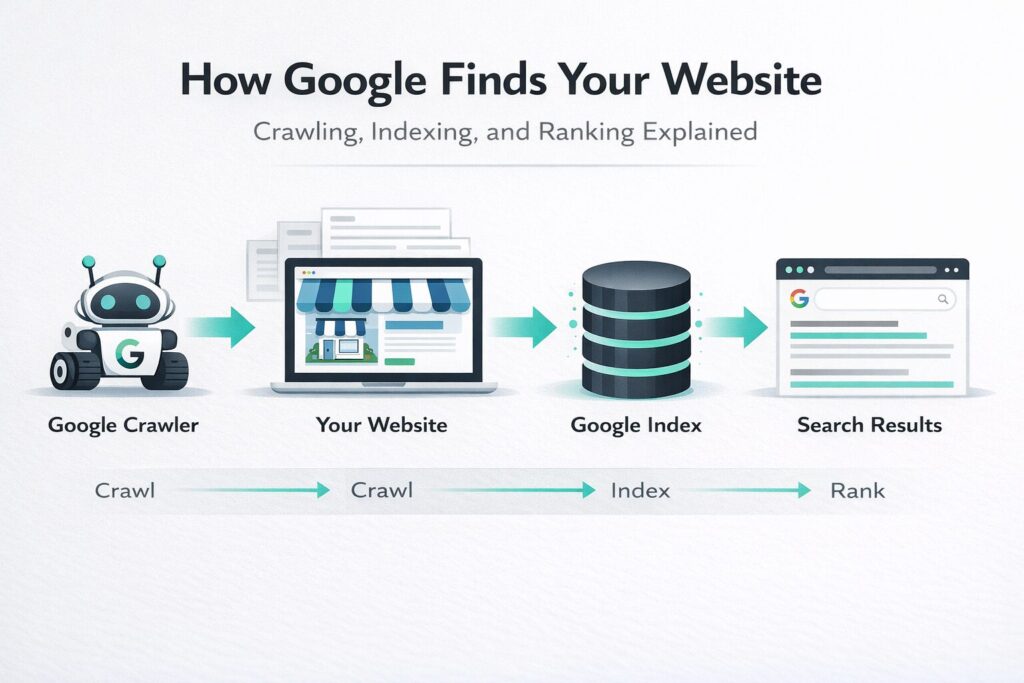
Google uses automated programs called crawlers (sometimes called “spiders”) that constantly move across the internet following links from page to page. When a crawler visits your site, it reads the content and adds your pages to Google’s massive index — essentially its database of websites.
This process is called indexing. Once a page is indexed, it can appear in search results. But being indexed is just the starting point.
Google then evaluates your pages against hundreds of signals — relevance, quality, authority, speed, mobile-friendliness, and more — to decide where your site ranks when someone searches for something related to your business.
Think of it this way: being indexed gets you into the library. Ranking well means people can actually find your book.
Indexed vs. Ranking: A Critical Difference
Many business owners assume that if their site is “on Google,” everything is fine. But there’s a big gap between being indexed and ranking on page one.
- Indexed = Google knows your site exists
- Ranking = Google shows your site to people searching for your services
A site can be indexed but buried on page 10 of search results — where almost no one looks. Strong rankings come from building a site Google trusts and understands, with content that genuinely serves what searchers are looking for.
Getting found on Google is part technical setup, part optimization, and part long-term SEO strategy. All three matter.
Step-by-Step: How to Get Your Small Business Website on Google
Step 1 — Set Up Google Search Console
Google Search Console (GSC) is a free tool from Google that lets you monitor how your site performs in search. It’s the single most important tool for understanding your site’s visibility.
To get started:
- Go to search.google.com/search-console
- Add your website as a property
- Verify ownership (Google will walk you through this — most platforms like WordPress, Wix, or Squarespace have a one-click option)
Once verified, GSC will start showing you which pages are indexed, what search terms bring people to your site, and any technical issues Google has flagged.
Step 2 — Submit Your Sitemap
A sitemap is a file that lists all the important pages on your website. Submitting it to Google Search Console tells Google exactly what you want indexed and makes it easier for crawlers to find everything.
Most website platforms generate a sitemap automatically. Your sitemap URL usually looks like: yourwebsite.com/sitemap.xml
In GSC, go to Sitemaps and paste in that URL. Google will confirm receipt and start crawling those pages.
Step 3 — Make Sure Your Site Is Crawlable and Indexable
This sounds technical, but it comes down to one thing: are there any settings accidentally blocking Google from reading your site?
Common culprits include:
- A “noindex” tag left on from when the site was in development
- A blocked robots.txt file that tells Google to stay out
- Password protection on pages that should be public
In Google Search Console, use the URL Inspection Tool to check any page. It will tell you whether Google can access and index it.
Step 4 — Optimize Your Core Pages
Once Google can read your site, you need to make sure it understands what each page is about. That starts with the basics:
- Page titles — each page should have a unique, descriptive title that includes your main keyword (e.g., “Plumbing Services in Halifax | Your Company Name”)
- Meta descriptions — a short summary (under 160 characters) that tells searchers what the page covers
- Headings — use H1 for the main topic of each page, H2 for subtopics
- Body content — write clearly about what you offer, who you serve, and where you’re located
Step 5 — Create Dedicated Service Pages
One of the most common mistakes small businesses make is putting all their services on a single page. Each core service deserves its own page.
If you’re a landscaping company, you’d want separate pages for lawn care, landscape design, snow removal, and so on. This gives Google more to index and helps you appear in more specific searches.
Step 6 — Build Internal Links
Internal links connect your pages together. They help Google understand how your site is structured and which pages matter most.
Link from your homepage to your service pages. Link from blog posts to related services. Keep the navigation logical and easy to follow.
Step 7 — Make Your Site Fast and Mobile-Friendly
Google prioritizes sites that load quickly and work well on phones. If your site takes more than three seconds to load or looks broken on a mobile screen, it will rank lower — and visitors will leave.
You can test your site speed at PageSpeed Insights and check mobile usability inside Google Search Console.
The Beginner’s Google Visibility Checklist
- [ ] Google Search Console set up and verified
- [ ] Sitemap submitted
- [ ] No accidental “noindex” tags blocking pages
- [ ] Unique page titles on every page
- [ ] Meta descriptions written for key pages
- [ ] Dedicated pages for each main service
- [ ] Google Business Profile created and verified
- [ ] Business name, address, and phone number consistent across the web
- [ ] Site loads in under 3 seconds
- [ ] Site passes Google’s mobile-friendly test
- [ ] Internal links connecting key pages
- [ ] Location mentioned naturally in service page content
Why Google Search Console Is Non-Negotiable
Many business owners skip Google Search Console entirely because they don’t know it exists or assume it’s only for developers. That’s a missed opportunity.
GSC gives you free, direct data from Google itself. You can see:
- Which of your pages are indexed (and which aren’t)
- What keywords people are using to find you
- Whether Google has encountered any errors on your site
- How many clicks and impressions your site receives
It’s one of the most actionable tools available to any small business, and it’s completely free. If you have a website and you’re not using GSC, set it up today.
Google Business Profile: Essential for Local Businesses
If your business serves customers in a specific city or region, your Google Business Profile (GBP) — formerly Google My Business — may be more important than your website for local visibility.
Your GBP is what powers the map results, the “local pack” (the three businesses shown at the top of local searches), and your business panel in Google search. When someone searches “plumber near me” or “best restaurant in Fredericton,” GBP results often appear before any website.
To optimize your Google Business Profile:
- Claim and verify your listing at business.google.com
- Fill in every field — name, address, phone, hours, website, category
- Add professional photos of your work, team, or location
- Collect and respond to customer reviews
- Post updates regularly to show the profile is active
Your website and your Google Business Profile work together. One reinforces the other.
Local SEO: Getting Found in Your City or Area
Local SEO is the practice of optimizing your online presence so you appear in searches tied to a specific location. This matters deeply for any business that serves a defined geographic area — contractors, lawyers, clinics, restaurants, salons, and more.
Key local SEO strategies include:
- NAP consistency — your business Name, Address, and Phone number should be identical everywhere it appears online (your website, GBP, directories, social media)
- Location pages — if you serve multiple cities, consider creating a dedicated page for each one
- Local keywords — naturally mention your city or service area in your page content (e.g., “roofing contractor serving Moncton and surrounding areas”)
- Local citations — get listed in relevant directories like Yelp, Yellow Pages, and industry-specific platforms
- Reviews — consistent, positive Google reviews are one of the strongest signals for local rankings
On-Page SEO Basics That Actually Matter
On-page SEO refers to everything you can control directly on your website. These are the fundamentals:
Page Titles (Title Tags)
Every page needs a unique title that describes the page clearly. Keep it under 60 characters and lead with the main keyword where it reads naturally.
Meta Descriptions
While meta descriptions don’t directly affect rankings, they influence whether someone clicks your result. Write them to be helpful and compelling, under 160 characters.
Header Tags (H1, H2, H3)
Use one H1 per page — your main topic. Use H2s for major sections. This helps both readers and Google understand the structure of your content.
Content Quality
Write content that actually answers what someone searching for your service would want to know. Thin, generic content ranks poorly. Useful, specific content earns trust.
Image Alt Text
Add descriptive alt text to your images. This helps Google understand what your images show and improves accessibility.
Technical SEO Basics That Affect Visibility
You don’t need to be a developer to understand these, but you do need to make sure they’re handled:
- HTTPS — your site should have an SSL certificate (the padlock in the browser bar). Google treats HTTPS as a ranking signal, and visitors trust it more
- No broken links — links that lead to error pages hurt both user experience and SEO
- Clean URL structure — URLs should be short and descriptive (e.g., /services/web-design/ not /page?id=234)
- No duplicate content — avoid publishing the same content on multiple pages, which confuses Google
- Structured data (schema markup) — optional but valuable; this is code that helps Google understand your business type, services, reviews, and more
Why Your Content and Service Pages Matter
Google’s job is to show the most relevant result for any given search. If your website has thin content — a homepage with a few sentences and a contact page — Google has very little to work with.
Every service you offer is a potential search someone might do. Every question a client asks before hiring you is something they might search on Google.
Your website’s content should reflect what you do, who you help, where you work, and why clients should trust you. Service pages with clear, specific, useful content will consistently outperform vague pages with minimal detail.
Think about it from a visitor’s perspective: if someone lands on your site and can’t quickly tell what you do, who you serve, and how to contact you, they’ll leave. That bounce signal matters to Google too.
How Long Does It Take for Google to Index and Rank Your Site?
This is one of the most common questions — and the honest answer is: it depends.
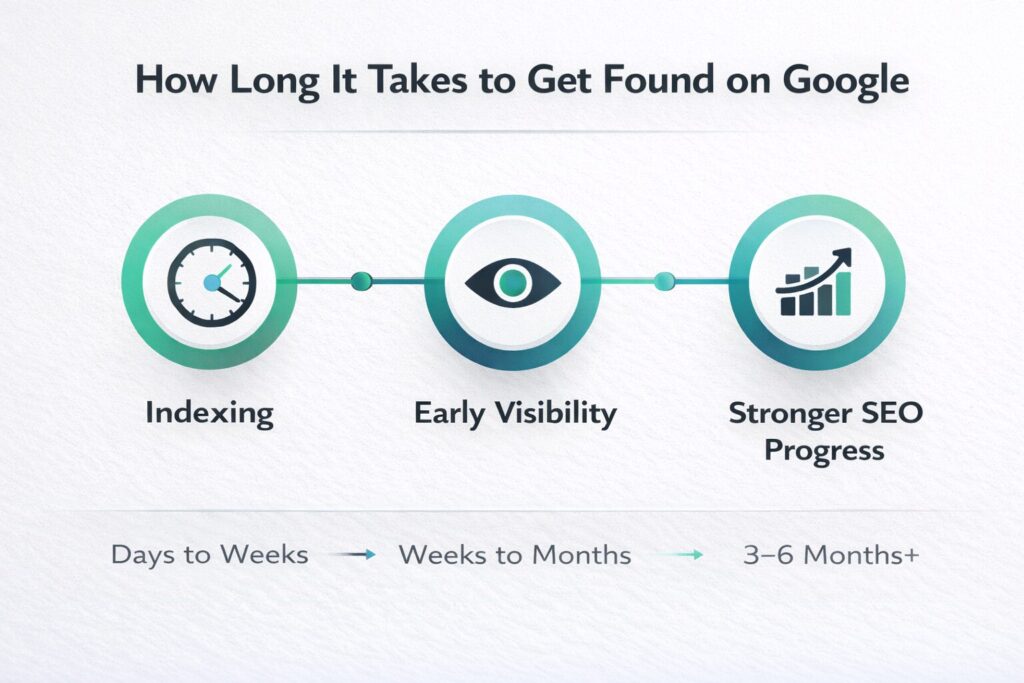
Indexing can happen within a few days of submitting your sitemap through Google Search Console, though sometimes it takes a few weeks for newer sites.
Ranking is a longer process. Most new websites don’t see significant search visibility in the first few months. With consistent SEO effort — optimizing pages, building content, earning links, and maintaining your Google Business Profile — meaningful progress typically shows up within three to six months.
Sites in competitive markets or without any backlinks (links from other websites pointing to yours) often take longer. SEO is a long game, but the results compound over time.
Common Reasons a Business Website Doesn’t Show Up on Google
If your site isn’t appearing in search results, here are the most likely reasons:
- The site is too new and hasn’t been indexed yet
- A “noindex” setting is accidentally blocking Google
- The sitemap was never submitted to Search Console
- Pages don’t have proper titles, headings, or enough content
- The site is slow or doesn’t work properly on mobile
- There’s no Google Business Profile, or it’s incomplete
- No other websites link to it, so Google hasn’t discovered it
- The business serves a competitive market without enough differentiation
Many of these are fixable. The first step is knowing what’s causing the problem.
Frequently Asked Questions
How do I know if my website is on Google?
Type site:yourwebsite.com into Google search (replacing “yourwebsite.com” with your actual domain). If pages show up, you’re indexed. If nothing appears, your site likely hasn’t been crawled yet or has an indexing issue.
Is Google Search Console free?
Yes, completely free. It’s one of the most valuable tools available to any website owner, and there’s no reason not to use it.
Do I need a website to show up on Google?
Not necessarily — your Google Business Profile can appear in local searches even without a website. But having a well-optimized website gives you far more opportunities to rank for specific services and keywords.
Why does my competitor show up on Google but I don’t?
They’ve likely done more SEO work — their site is properly structured, they have more content, they’ve built links, and their Google Business Profile is fully optimized. All of these things can be addressed over time.
Does social media help my website rank on Google?
Social media doesn’t directly affect Google rankings, but it can drive traffic to your site and help people discover your business, which can indirectly support your SEO efforts.
How often should I update my website for SEO?
Consistency matters more than frequency. Adding new content, keeping your service pages current, and regularly updating your Google Business Profile will all help your visibility over time.
Conclusion: Getting Found Takes More Than Just Going Live
If there’s one thing to take away from this guide, it’s this: launching a website is the beginning, not the end.
Getting your small business website on Google requires proper technical setup, clear and useful content, a complete Google Business Profile, and an ongoing SEO strategy that builds trust with Google over time. None of this is out of reach — but it does take intentional effort.
If you’ve read through all of this and you’re feeling overwhelmed, or if you’ve already done some of these steps and your site still isn’t showing up the way you’d like, that’s where professional help makes a real difference.
A good web design and SEO agency will handle the setup, fix what’s broken, and build a strategy that actually moves the needle for your business — so you can focus on running it.
Ready to get your website working for you? [Get in touch and let’s take a look at where your site stands.]
Suggested Links
- PageSpeed Insights — Mobile and speed section
- Google’s SEO Starter Guide — Further reading