
Most Small Business SEO Problems Are Basics Problems
Before anything else — the single most important thing to understand about improving your website’s SEO is this:
Most small business websites don’t have an advanced SEO problem. They have a fundamentals problem.
Missing title tags. No dedicated service pages. A Google Business Profile that hasn’t been touched since it was created. No Google Search Console. Pages that load slowly on mobile. These are the issues holding back the vast majority of local business websites — not a lack of advanced tactics, not insufficient link-building campaigns, not complex technical architecture.
Fix the fundamentals first. That’s the entire framework for this guide.
This post walks you through what SEO actually involves for a small business website, what to prioritize, what you can do yourself, and what typically needs professional help — in plain language, without the jargon.
The Four Types of SEO You Need to Understand
SEO is often talked about as a single thing, but it’s really four distinct disciplines that each affect your visibility in different ways:
Technical SEO — The foundation. Can Google actually crawl and index your website? Is it fast? Does it work on mobile? Is it structured correctly? Without a solid technical foundation, nothing else matters.
On-Page SEO — The content structure. Are your page titles and headings clear and keyword-relevant? Does each page have a clear topic? Is the content substantive enough for Google to understand what you do and who you help?
Local SEO — The geographic layer. Does Google know where you operate and who you serve locally? Is your Google Business Profile optimized and active? Is your NAP (name, address, phone) consistent across directories?
Content SEO — The long-term growth engine. Is your website regularly publishing useful content that answers the questions your prospective clients are searching? Are you building topical depth over time?
Most small businesses have problems across all four — but they’re not equal in urgency. Technical and on-page come first. Local and content build on top.
Where to Start: The SEO Foundations Roadmap
If you’re not sure where to begin, start here — in this order:
Step 1 — Set Up Google Search Console
Google Search Console is a free tool from Google that shows you exactly how your site is performing in search. It’s the single most important SEO tool available to any small business — and it costs nothing.
Once set up, it tells you:
- Which of your pages are indexed and which aren’t
- What search queries are triggering your site
- How many clicks and impressions your pages receive
- Any technical errors or coverage issues Google has found
If you don’t have Search Console set up, set it up before anything else. Without it, you’re making every SEO decision completely blind.
Step 2 — Submit Your Sitemap
A sitemap is a file that lists all the important pages on your website. Submitting it to Google Search Console tells Google exactly what you want indexed and accelerates the crawling process.
Your sitemap URL is typically yourwebsite.com/sitemap.xml. Submit it through the Sitemaps section of Search Console. Once submitted, Google confirms receipt and begins crawling the pages listed.
Step 3 — Check Your Indexing Status
In Search Console, go to the Coverage or Indexing report. Look at how many of your pages are indexed versus excluded. If key service pages are excluded — especially due to a “noindex” tag — that’s your first technical problem to fix.
You can also run a quick check outside Search Console by typing site:yourwebsite.com into Google. The number of results shown is a rough estimate of how many pages Google has indexed.
Step 4 — Fix Your Page Titles
Every page on your website has a title — the text that appears in the browser tab and in Google’s search results. For most small business websites, these titles are either generic (“Home,” “About,” “Services”) or simply the business name.
A well-written title tag tells Google and prospective clients exactly what the page is about:
Weak: Home — Ottawa Web Genius Strong: Web Design for Ottawa Small Businesses | Ottawa Web Genius
Weak: Services Strong: Web Design and SEO Services in Ottawa | Ottawa Web Genius
Every page should have a unique title under 60 characters that includes the primary topic and your location where relevant.
Step 5 — Fix Your Meta Descriptions
Your meta description is the short summary text that appears under your title in Google’s search results. It doesn’t directly affect rankings, but it affects click-through rate — whether someone clicks your result or a competitor’s.
Write a unique meta description for every important page, under 160 characters. Make it genuinely descriptive and include a natural call to action where appropriate.
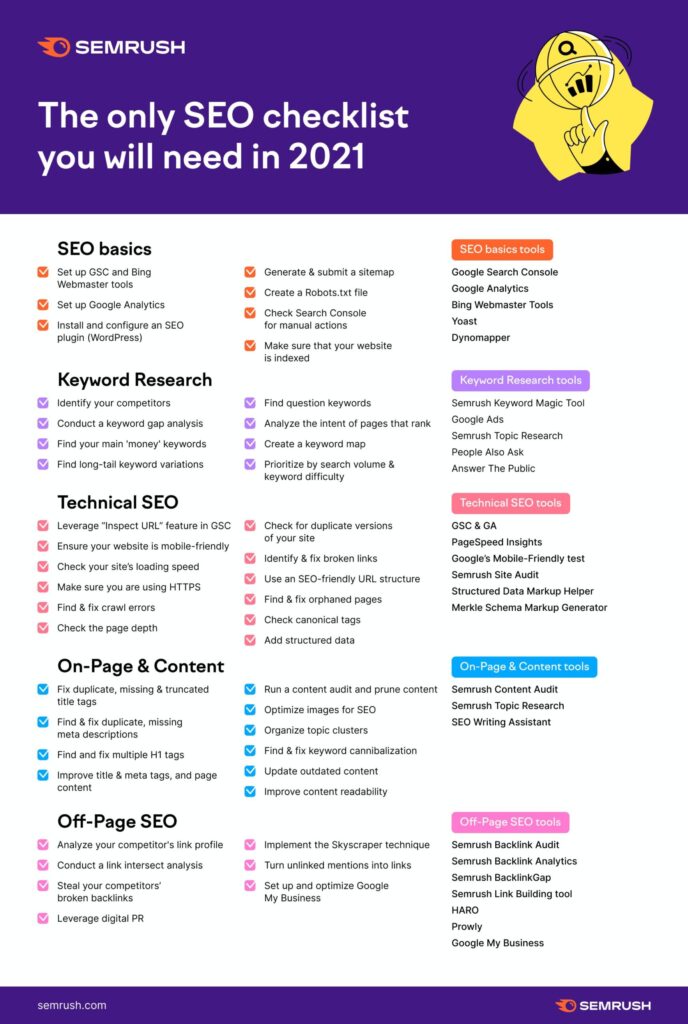
Improving your website’s SEO starts with the foundations — title tags, meta descriptions, page structure, and Google Search Console setup — before moving on to more advanced optimisation.
How to Improve On-Page SEO
On-page SEO is everything you can control directly on each page of your website.
Use Clear Heading Structure
Each page should have one H1 heading — the main topic of that page. Use H2 headings for major sections, H3 for sub-sections. This structure helps both Google and human readers understand what a page covers.
Your H1 should include your primary keyword for that page and describe the page’s purpose clearly. If you’re a contractor with a page about roof repairs in Ottawa, the H1 should say something like “Roof Repair Services in Ottawa” — not “Welcome to Our Services.”
Create Dedicated Service Pages
This is one of the highest-impact improvements most small business websites can make.
If all your services are listed in bullet points on a single page, Google has nothing specific to rank for specific searches. Each service you offer should have its own dedicated page with:
- A clear title tag naming the service and location
- An H1 that matches or supports the title
- 500–900 words of substantive content explaining the service, who it’s for, and what’s involved
- A relevant testimonial or trust signal where possible
- A clear call to action
A roofing company with separate pages for roof repair, roof replacement, flat roofing, and eavestrough cleaning can rank for four times as many searches as one with a single Services page.
For a detailed breakdown of how a well-structured service website should be organized, our guide on what a business website should include covers every essential element.
Strengthen Internal Linking
Internal links connect your pages together and help Google understand which pages are most important. Every service page should link to your contact page. Your homepage should link to each core service page. Blog posts should link to relevant service pages.
A minimum of two to three internal links per page is a reasonable baseline. The anchor text (the clickable words) should be descriptive — “our roof repair services” rather than “click here.”
Add and Improve Image Alt Text
Every image on your website should have alt text — a short written description of what the image shows. Alt text helps Google understand your images and improves accessibility for visitors using screen readers.
Keep alt text concise and descriptive: “Completed roofing project in Barrhaven Ottawa” rather than “image1.jpg” or leaving it blank.
How to Improve Technical SEO
Mobile Performance
Google now uses your website’s mobile performance as a primary ranking factor. A site that loads slowly or displays poorly on a phone ranks below a faster, mobile-friendly competitor for equivalent content.
Test your site at Google PageSpeed Insights. A mobile score above 70 is a reasonable target. The most common causes of poor mobile scores are uncompressed images, too many third-party scripts, and unoptimised hosting.
SSL Certificate
Your website URL should start with https:// not http://. An SSL certificate is now a baseline ranking signal and a trust indicator for visitors. Most hosting providers offer free SSL — if yours doesn’t have it enabled, contact your host.
Fix Broken Links
Links that lead to error pages create a poor user experience and can affect how efficiently Google crawls your site. Use a free tool like Screaming Frog (free for up to 500 URLs) or the Coverage report in Search Console to identify and fix broken links.
Clean URL Structure
Your page URLs should be short, descriptive, and readable. /services/roof-repair-ottawa/ is better than /page?id=234. Clean URLs help Google understand page topics and are more trustworthy to prospective visitors.
How to Improve Local SEO
Local SEO is the layer of optimization that makes your website visible to people searching for services in your specific city or area. For Ottawa small businesses, this is often the highest-return SEO work available.
Optimize Your Google Business Profile
Your GBP is what powers your map pack appearance — those three businesses shown at the top of local searches with a map. A poorly optimized or inactive GBP is one of the most common reasons Ottawa businesses don’t appear in local search results.
Our Google Business Profile optimization guide covers every element of a well-maintained profile, including the 2026 changes to how Google handles local business information.
Add Location Context to Service Pages
Your service pages should naturally mention Ottawa and the specific neighbourhoods you serve. “We provide roofing services across Ottawa, including Barrhaven, Kanata, and Orleans” is a simple addition that creates real local relevance signals.
If you serve multiple distinct areas, dedicated service area pages — one for each major neighbourhood you actively target — can significantly expand your local search footprint with relatively low competition.
Maintain NAP Consistency
Your business Name, Address, and Phone number should be identical across your website, your Google Business Profile, and every directory listing online. Even minor inconsistencies — different phone number formats, “Street” vs “St” — create conflicting signals that can suppress local rankings quietly.
For a full understanding of how local SEO works for Ottawa small businesses, our local SEO guide covers the complete strategy.
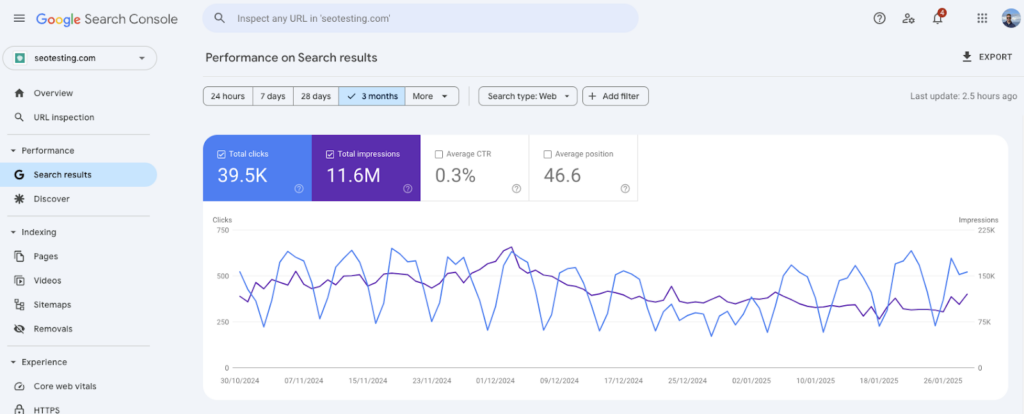
Google Search Console’s performance report shows you which pages are getting impressions and clicks — the essential data for understanding where your SEO is working and where it isn’t.
How Content Helps Your SEO
Every service you offer is a potential search someone might make. Every question a client asks before hiring you is something they might search on Google. Content — service pages, FAQ sections, blog posts — creates new entry points to your website that compound over time.
Content that works for small business SEO:
- Service pages targeting specific local searches (“emergency plumber Nepean,” “separation agreement lawyer Ottawa”)
- FAQ pages that answer real questions your clients ask before hiring you
- Blog posts addressing problems your audience searches for
- Neighbourhood or service area pages for businesses serving multiple Ottawa locations
Consistency matters more than volume. One genuinely useful piece of content published weekly for a year creates compounding visibility. Ten posts published in January and nothing for eleven months produces very little.
How to Measure Whether Your SEO Is Actually Improving
You can’t improve what you can’t measure. These are the metrics that matter:
Impressions (in Search Console) — How many times your pages appeared in Google results. Growing impressions indicate Google is indexing more of your content and showing it more frequently.
Clicks — How many people actually clicked through to your site from search results. Click-through rate (clicks divided by impressions) tells you whether your titles and meta descriptions are compelling enough.
Average position — Where your pages rank on average for the searches triggering them. Improving average position for your priority keywords is the core SEO goal.
Organic traffic — Total visitors coming from Google search. Growing month-over-month organic traffic, tracked in Google Analytics, is the most direct measure of SEO progress.
Leads and conversions — Ultimately, SEO’s job is to generate qualified inquiries. If traffic is growing but leads aren’t, the problem may be conversion rather than visibility.
Getting Traffic but Not Getting Leads?
Traffic and leads are different problems with different solutions. Many businesses assume an SEO problem when they actually have a conversion problem.
If your website is getting visitors but few of them contact you, the issue is likely one or more of:
- Weak or missing calls to action
- Unclear homepage messaging that doesn’t quickly confirm you solve the visitor’s problem
- Trust signals missing (no visible reviews, no photos, no credentials)
- A contact form with too many fields
- A poor mobile experience that loses visitors before they reach the CTA
Our post on how to get more clients from your website addresses the conversion side of this equation specifically.
The SEO Improvement Checklist
Search Console and indexing:
- Google Search Console set up and verified
- Sitemap submitted to Search Console
- Key pages confirmed indexed (Coverage report)
- No unintended noindex tags on important pages
- robots.txt reviewed — no accidental site-wide blocking
On-page SEO:
- Unique, keyword-relevant title tag on every page (under 60 characters)
- Unique meta description on every page (under 160 characters)
- One H1 per page, clearly describing the page topic
- Dedicated page for each core service
- Location (Ottawa / relevant neighbourhoods) mentioned naturally in service page content
- Internal links connecting service pages, homepage, and contact page
- Image alt text added to all images
Technical SEO:
- Mobile performance score above 70 (test at PageSpeed Insights)
- SSL certificate active (HTTPS URL)
- Broken links identified and fixed
- Clean, readable URL structure
Local SEO:
- Google Business Profile claimed, verified, and fully completed
- NAP identical across website, GBP, and all directories
- Recent reviews collected consistently
- All reviews responded to
- Regular Google Posts published
Content:
- FAQ section added to key service pages or a dedicated FAQ page
- Blog or resource section publishing consistently
- Content addresses real questions clients ask before hiring
Common SEO Mistakes Small Businesses Make
Assuming the site is fine because it looks good. Design and SEO are completely separate. A beautiful site with no title tags, no service pages, and a poor mobile score can be essentially invisible on Google.
Targeting keywords that are too broad. “Lawyer” or “plumber” are far too competitive. “Divorce lawyer Ottawa” or “emergency plumber Kanata” are specific, achievable, and more likely to convert because they match exactly what the searcher needs.
Publishing content and never updating it. Google weights freshness for many query types. Pages that were accurate in 2022 and haven’t been touched since are gradually deprioritised relative to freshly maintained competitors.
Ignoring Google Search Console. This is the free, direct line of communication from Google about how it sees your site. Not using it means missing technical problems, missed ranking opportunities, and no data to guide decisions.
Chasing shortcuts. Buying links, keyword-stuffing content, or trying to game Google’s algorithm has produced the same result consistently for twenty years: a temporary lift followed by a penalty. The long game — genuine, useful content and a properly maintained website — is the only approach that compounds rather than collapses.
What You Can Do Yourself vs. What Benefits from Expert Help
Can be done without technical expertise:
- Setting up Google Search Console and submitting a sitemap
- Rewriting page titles and meta descriptions in your CMS
- Adding location context to service page content
- Creating a FAQ page
- Managing your Google Business Profile
- Collecting and responding to reviews
- Publishing blog content
Benefits significantly from professional experience:
- Technical SEO audit (identifying hidden indexing, speed, and crawl issues)
- Service page architecture for sites with complex offerings
- Schema markup implementation
- Site speed optimisation beyond basic image compression
- Backlink strategy and building local authority
- Diagnosing why a site ranks well but doesn’t convert
Many Ottawa small business owners handle the on-page and content work themselves and bring in professional help for technical audits, architecture decisions, and ongoing performance management. Our SEO services for Ottawa businessesare built around exactly this kind of practical, prioritised approach.
How Long Does SEO Take to Show Results?
Honest answer: it depends on your starting point, your competition, and how consistently the work is done.
- Weeks 1–4: Technical fixes and Search Console setup take effect. Indexing improves. Some quick-win title tag improvements may produce early ranking movements.
- Months 2–3: Service page improvements begin gaining traction. Local pack visibility starts responding to GBP optimisation and review growth.
- Months 4–6: Meaningful organic ranking movement for competitive local keywords. Traffic growing noticeably.
- 6–12 months: Compounding returns. Content published months ago starts earning consistent traffic. Authority builds across the domain.
SEO is the only marketing investment that genuinely compounds — every improvement you make today continues generating returns indefinitely. Paid ads stop working the moment you stop paying. A well-optimised website keeps earning visibility around the clock. For a deeper look at what this process looks like from the very beginning, our guide on how to get your small business website on Google walks through the full journey.

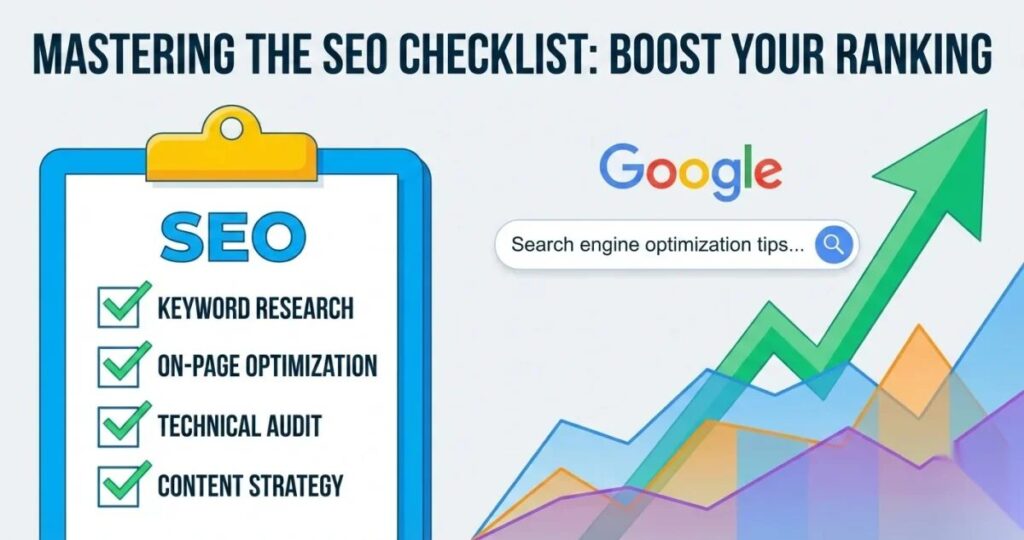
On-page SEO — title tags, meta descriptions, heading structure, and internal linking — is the layer most small business websites can improve significantly with focused, systematic effort.
Frequently Asked Questions
How long does it take to see SEO results for a small business website?
Most small business websites with no prior SEO investment begin seeing meaningful movement within three to six months of consistent work — assuming technical foundations are solid and content is being improved regularly. The fastest results typically come from fixing indexing problems and rewriting title tags, which can produce visible improvements within weeks. Competitive local keyword rankings typically take four to eight months. The compounding nature of SEO means the return per hour invested increases over time rather than staying flat.
What is the single most important SEO improvement I can make right now?
Set up Google Search Console if you haven’t already. This single action gives you the data you need to make every other SEO decision correctly — which pages are indexed, what searches trigger your site, where your rankings stand, and what technical issues exist. Without Search Console, every other SEO effort is essentially guesswork. You can set it up for free at search.google.com/search-console.
Can I do SEO myself or do I need to hire someone?
Many of the most impactful SEO improvements — fixing title tags, setting up Search Console, creating service pages, managing your GBP, collecting reviews — can be done by a business owner without technical expertise. Where professional help adds the most value is in technical auditing, site architecture decisions, schema markup implementation, and sustained content strategy. A practical approach for many small businesses is to handle the content and GBP work in-house while bringing in professional support for the technical layer.
Why does my competitor rank higher even though my website looks better?
Design and rankings are independent. Your competitor may rank higher because they’ve been investing in SEO longer, have more external links pointing to their site, have more and more recent Google reviews, have more substantive service page content, or have a faster, more technically sound website. None of these are visible from looking at the surface of a website. A proper SEO audit compares these underlying signals specifically.
How do I know if my SEO is actually improving?
Track four metrics in Google Search Console and Google Analytics monthly: total impressions (how often you appear in search), average position (where you rank), click-through rate (how often people click your result), and organic traffic sessions. Growing impressions with flat clicks indicates your titles and meta descriptions need improvement. Growing clicks with flat leads indicates a conversion problem on the site itself.
Should I focus on SEO or Google Business Profile first?
For most local Ottawa service businesses, the practical answer is: do both simultaneously since they serve different search surfaces. Your GBP drives map pack visibility and is relatively quick to improve — a well-optimised GBP can start producing better results within weeks. Website SEO drives organic rankings and takes longer to move. If you’re extremely time-constrained, start with GBP because the feedback loop is faster, then build on it with the website work. Our GBP optimization guide and this post together cover both sides of the equation.
Fix the Right Things in the Right Order
The most common SEO mistake isn’t a technical error or a missed keyword opportunity. It’s spending time on the wrong things — chasing tactics before the fundamentals are in place.
Start with Search Console. Fix your title tags and service pages. Get your GBP in order. Build content consistently. Measure what’s working and adjust. That sequence, applied consistently over six to twelve months, produces real visibility for most Ottawa small businesses — without requiring advanced technical knowledge or a significant agency budget.
If you’ve worked through these steps and still aren’t seeing the movement you’d expect — or if you’d rather have someone audit your site, identify the specific gaps, and handle the technical work — that’s exactly what we do at Ottawa Web Genius.
Explore our SEO services or view our pricing to understand what professional SEO support looks like — and whether it makes sense for your business right now.