
Imagine hiring a contractor to renovate your office, and when prospective clients come to visit, the front door sticks, the lights take five seconds to turn on, and every time someone walks in, the reception desk wobbles unpredictably. Nobody is going to feel confident about hiring you from that experience — regardless of how good the work is once they’re inside.
Core Web Vitals are Google’s way of measuring the equivalent experience on your website. How quickly does the main content appear? How stable is the page while it’s loading? How fast does it respond when someone taps or clicks something?
These are not technical metrics for developers. They are measurements of how a real visitor experiences your website — and they matter both for how people feel about your business and for how Google decides whether to recommend your site in search results.
This guide explains each one in plain English, with no assumed technical knowledge.
What Are Core Web Vitals?
Core Web Vitals are a set of three specific performance measurements that Google uses to evaluate the user experience of a webpage. They are part of a broader Google concept called Page Experience — which is Google’s assessment of whether a visit to your website is a good experience for a real person.
Google introduced Core Web Vitals because research consistently showed that how fast and stable a website feels has a direct impact on whether visitors stay, engage, and convert. Pages that load slowly, jump around unexpectedly, or feel sluggish to interact with lose visitors — and Google, whose job is to recommend the best results for any given search, takes that into account.
The three metrics are:
- Largest Contentful Paint (LCP) — measures loading speed
- Interaction to Next Paint (INP) — measures responsiveness
- Cumulative Layout Shift (CLS) — measures visual stability
Each one is explained in its own section below.
What to do next: Before reading the technical explanations, go to Google PageSpeed Insights, enter your website address, and run a test. The results will show you scores for each of these three metrics and tell you whether they are “Good,” “Needs Improvement,” or “Poor.” You don’t need to understand them fully yet — just run the test so you have a reference point as you read.
Why Did Google Create Core Web Vitals?
Google’s business depends on people trusting its search results. If Google sends someone to a website that loads slowly, jumps around while loading, or feels unresponsive, that person has a poor experience — and they start to lose trust in Google’s recommendations.
According to Google’s own research on page experience, users are significantly more likely to abandon a page that loads slowly, and that behaviour directly affects which results Google considers trustworthy.
Core Web Vitals are Google’s attempt to define “bad experience” in measurable, objective terms — so that websites can be assessed and ranked partly on whether they deliver a good experience, not just relevant content.
Important caveat: Google is explicit that Core Web Vitals are one ranking signal among many — and not the most important one. A slow website with genuinely excellent, relevant content will still outrank a fast website with thin content. According to Google Search Central, content quality and relevance remain the primary ranking factors. Core Web Vitals matter at the margin — they can be a tiebreaker between otherwise similar pages, and they directly affect whether visitors stay long enough to convert.
What to do next: Do not panic about Core Web Vitals if your content strategy and SEO foundations are not yet in place. Fix those first. Then address performance. For the full priority framework, our post on how to improve your website’s SEO covers the right order of operations.
The Three Core Web Vitals Explained
Largest Contentful Paint (LCP) — How Fast Does the Page Load?
What it measures: LCP measures how long it takes for the largest visible piece of content on the page — usually a hero image, a large heading, or a featured photo — to fully load and appear on screen. Google considers this the moment the page feels “loaded” to the visitor.
A plain-English analogy: Imagine walking into a restaurant and waiting for the menu to arrive. You sat down, you’re ready to order, but nothing happens for seven seconds. Then the menu appears. LCP is that wait — the time between arriving at a page and seeing the main content you came for.
A real Ottawa business example: A roofing contractor in Kanata has a homepage with a large before-and-after project photo as the hero image. If that image is unoptimised — saved at a very large file size — it takes five or six seconds to appear on a mobile connection. Visitors see a blank or partially loaded page and leave. The LCP is failing.
Why visitors care: If the main content doesn’t appear quickly, most people assume something is broken and leave. Google’s research indicates that pages loading in under 2.5 seconds retain significantly more visitors than those taking longer.
Why Google cares: A high bounce rate (people leaving immediately) signals to Google that the page is not satisfying visitor intent — which can suppress rankings over time.
What usually causes LCP problems:
- Large, uncompressed images (the most common cause)
- Slow web hosting (a cheap shared hosting plan that can’t serve files quickly)
- Images that aren’t set to load efficiently (no “lazy loading” — a technique that delays loading images until they’re needed)
- Too many large files loading at the same time when the page opens
Simple improvements:
- Compress all images and convert them to WebP format (a more efficient image type)
- Upgrade to faster hosting
- Make sure your hero image is the priority file that loads first, before everything else
What should you do next? Check your PageSpeed Insights report specifically for LCP. If it’s over 4 seconds on mobile, image optimisation and hosting quality are the most likely culprits.
Interaction to Next Paint (INP) — How Quickly Does the Page Respond?
What it measures: INP measures how quickly your website responds when a visitor does something — taps a button, clicks a link, types into a form. It measures the delay between the action and the page visually responding. Google replaced the previous metric (FID) with INP in 2024 because INP captures the full interaction experience throughout the visit, not just the first click.
A plain-English analogy: You’re at a coffee shop and you tap the touchscreen to order. Nothing happens for three seconds. Then it responds. That frustrating delay is what INP measures on a website — the gap between “I did something” and “the page acknowledged it.”
A real Ottawa business example: A family law firm in Ottawa has a contact form on their consultation page. When a prospective client taps the “Submit” button on their phone, there’s a two-second delay before anything visibly happens. Many visitors tap again, thinking it didn’t register. Some give up and leave. The INP is failing.
Why visitors care: Unresponsive interactions feel broken. If a button doesn’t respond immediately, most users assume it didn’t work — and either repeat the action or leave.
What usually causes INP problems:
- Too much JavaScript (code that runs in the background and slows response times)
- Third-party scripts loading on the page (chat widgets, analytics tools, advertising trackers, social media buttons) that compete for processing power
- Heavy animations that tie up the browser while the page is loading
Simple improvements:
- Remove third-party scripts you don’t actively need
- Ask your developer to defer JavaScript (delay code from running until after the main content loads)
- Audit which plugins or widgets are adding scripts to every page of the site
What should you do next? Check your INP score in PageSpeed Insights. Scores under 200 milliseconds are considered Good. If yours is Poor, the most common fix is removing unnecessary third-party scripts — this is a developer task but often produces fast results.
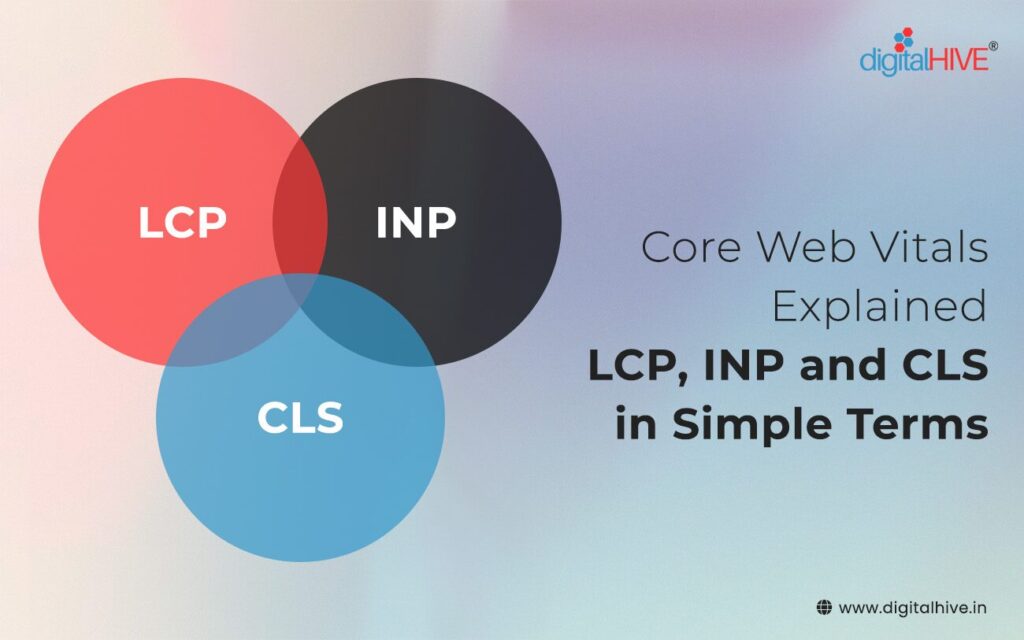
The three Core Web Vitals — LCP (loading speed), INP (responsiveness), and CLS (visual stability) — measure the most impactful aspects of how visitors actually experience your website.
Cumulative Layout Shift (CLS) — Does the Page Stay Stable While Loading?
What it measures: CLS measures how much the content on your page moves around while it’s loading. If an image loads and pushes text down, or if an ad appears and shifts a button you were about to click, CLS is capturing that instability. A higher CLS score means more unexpected movement.
A plain-English analogy: You’re reading a menu posted on a restaurant window and just as you find the dish you want, the whole menu shifts down six centimetres. You’ve lost your place. That is layout shift — the page moving unexpectedly while you’re trying to use it.
A real Ottawa business example: A restaurant in Westboro has a homepage with images that load slightly after the text. When the page first opens, the text appears at the top and the visitor starts reading. Then the images load and push everything down. The visitor loses their place and the “Reserve a Table” button they were about to tap has moved to a different position. This is a CLS failure.
Why visitors care: Unexpected movement is disorienting and often causes accidental taps — clicking something you didn’t intend to click because the button moved at the last moment.
What usually causes CLS problems:
- Images without defined dimensions in the code (the browser doesn’t know how much space to reserve until the image loads)
- Ads or banners that load after the rest of the page
- Fonts that load and replace placeholder text (causing text blocks to resize)
- Elements that appear dynamically after the initial page load
Simple improvements:
- Set explicit width and height attributes on all images in the code (so the browser reserves space before they load)
- Avoid inserting ads or banners into the middle of page content
- Use system fonts or preload web fonts to prevent text reflow
What should you do next? Check your CLS score in PageSpeed Insights. A Good score is under 0.1. If yours is Poor, ask your developer specifically about image dimensions and dynamic content insertion.
Core Web Vitals at a Glance
| Metric | What It Measures | Good Score | What Visitors Notice | Typical Causes | Simple Fix |
|---|---|---|---|---|---|
| LCP | Loading speed | Under 2.5 seconds | Waiting for main content to appear | Large uncompressed images, slow hosting | Compress images, upgrade hosting |
| INP | Responsiveness | Under 200ms | Tapping something and waiting for a response | Excess JavaScript, third-party scripts | Remove unused scripts |
| CLS | Visual stability | Under 0.1 | Page content jumping while loading | Images without defined dimensions, late-loading ads | Set image dimensions, avoid dynamic content injection |
Why Small Business Owners in Ottawa Should Care
Core Web Vitals are not just an abstract technical metric. For local service businesses, the practical impact is direct.
A law firm in Ottawa has prospective clients who arrive from a Google search, often in a stressful situation, wanting to quickly find a phone number or consultation form. A page that loads in five seconds and shifts around while loading communicates — before a single word is read — that the firm may not be operating with the same attention to quality as its competitors.
A contractor in Barrhaven whose project gallery takes seven seconds to load on a phone is losing the homeowner who was moments away from requesting a quote. Gallery pages are notoriously heavy with images — optimising them is one of the highest-impact changes a trades website can make.
A restaurant in Westboro whose menu page loads slowly and shifts unexpectedly on mobile is creating friction at exactly the moment a diner is deciding whether to make a reservation. The conversion from “looking at menu” to “booking a table” depends on that experience being smooth.
An HVAC company in Nepean that runs a bloated website with multiple chat widgets, advertising scripts, and large images on every page may find their mobile INP score failing — which means every tap on their contact form feels unresponsive. Customers in an urgent situation (no heat in February) will call whoever responds first — and if your website feels broken, they’re moving to the next result.
The pattern across all of these is the same: poor Core Web Vitals don’t just affect rankings — they affect how visitors feel about your business before they’ve read a word.
How Core Web Vitals Affect SEO
Google confirmed in 2021 that Core Web Vitals are a ranking signal as part of its Page Experience update. However, Google has also been consistently clear about the relative weight of this signal.
From Google’s documentation on page experience: Google states that “great page experience doesn’t override having great page content.” A website with excellent, relevant content will outrank a faster website with thin content.
Where Core Web Vitals have their clearest impact is in competitive situations — when two pages are roughly equivalent in content quality and relevance, the one with better performance signals tends to rank higher. This makes performance optimisation more important as your overall SEO strategy matures, because at that stage the marginal improvements are what separate page one positions from page two.
For businesses still working on content strategy and basic on-page SEO, those foundations should come first. For businesses that have the fundamentals in place and want to close the remaining gap with competitors, Core Web Vitals are a logical next focus.
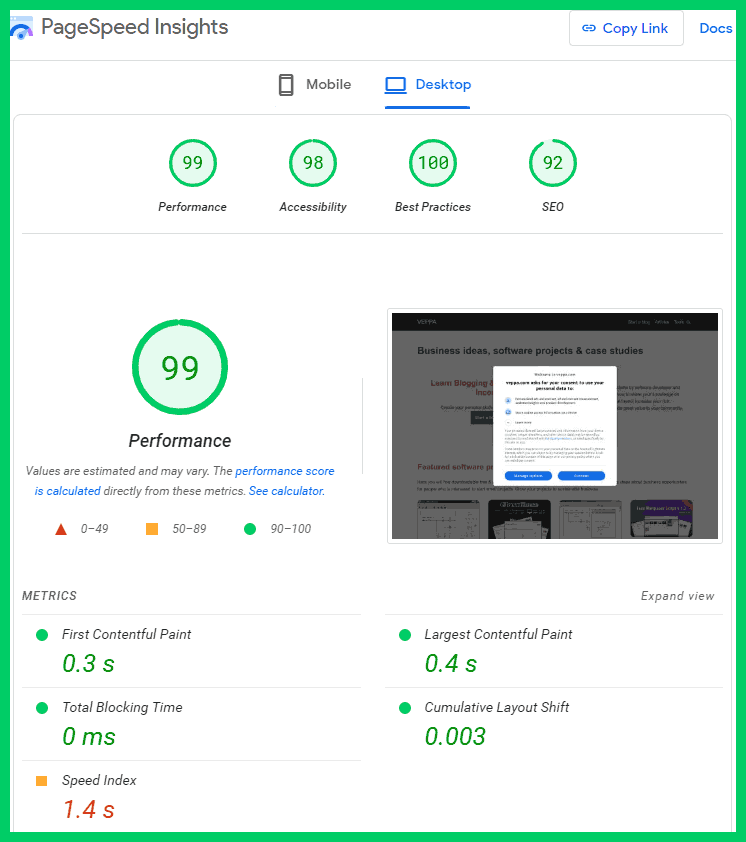
Google PageSpeed Insights is a free tool that shows your Core Web Vitals scores, identifies specific problems, and provides prioritised recommendations — all without requiring any technical knowledge to run.
Common Causes of Poor Core Web Vitals on Ottawa Business Websites
The same problems appear repeatedly across the local business websites we review:
Oversized images. A photo taken on a modern smartphone camera and uploaded directly to a website without any compression can be 4–8MB. On a mobile connection, that single image can delay the entire page. Compressed to an appropriate web size, the same image might be 80–150KB — fifty times smaller with no visible quality difference.
Cheap or shared hosting. Hosting is the server (a computer) that stores and delivers your website. Inexpensive shared hosting puts hundreds of websites on the same server. When that server is busy, your website is slow — regardless of how well everything else is optimised.
Too many plugins. On WordPress sites, each plugin (an add-on that adds functionality) often loads additional code on every page. Twenty plugins loading code on every page of your website is twenty potential sources of slowdown, even if no individual plugin is obviously problematic.
Third-party scripts. Chat widgets, social media share buttons, advertising networks, and marketing tracking tools all load external code on your page. Each one adds a request to an external server — and if that external server is slow, your page waits.
Large, unoptimised video. A video embedded directly on a page (as opposed to embedded from YouTube) can dramatically slow load times if it isn’t properly compressed and configured to load only when needed.
How to Test Your Website’s Core Web Vitals
Google PageSpeed Insights — The most accessible tool. Go to pagespeed.web.dev, enter your URL, and receive a report within 30 seconds. The report gives you a score out of 100 for mobile and desktop, flags specific problems, and provides recommendations in plain English. Start here.
Google Search Console — If your website has Search Console set up (it should), navigate to Experience → Core Web Vitals. This shows you real-world data from actual visitors to your site — not a simulated test. It also identifies which specific pages have problems and categorises them by severity.
Chrome DevTools — Built into the Chrome browser (press F12 to open). More technical, most useful for developers. Not necessary for business owners — PageSpeed Insights covers what you need.
For a guide on setting up and reading Search Console data effectively, our post on how to track your website performancecovers the full monitoring toolkit.
What Should You Fix First?
If your Core Web Vitals scores are Poor or Need Improvement, this is the priority order that produces the biggest results with the least effort:
1. Optimise images first. This is the single highest-impact change on most Ottawa business websites. Compress all images, convert to WebP format, and make sure large hero images are sized appropriately for web display. A developer can do this in a few hours; the impact on LCP is often dramatic.
2. Audit and remove unnecessary third-party scripts. Review every plugin, widget, and external tool loading on your pages. Remove anything you don’t actively use. This typically improves both INP and overall load time.
3. Upgrade hosting if necessary. If your website is on the cheapest shared hosting available, it will have a speed ceiling regardless of how well the site is optimised. Managed WordPress hosting typically produces measurably better performance.
4. Set image dimensions in code. If CLS is your primary problem, this is usually the fix. Defining explicit width and height attributes for images prevents layout shift during loading.
5. Defer or minimise JavaScript. For persistent INP problems after removing unnecessary scripts, a developer can configure the remaining scripts to load after the main content appears — which improves perceived responsiveness.
For a full picture of what responsive design and performance optimisation look like together, our post on what is responsive web design explains how performance and layout are connected in modern website builds.
Frequently Asked Questions
Do Core Web Vitals directly determine my Google ranking?
Not directly, and not as the primary factor. Google has confirmed that Core Web Vitals are a ranking signal — part of the Page Experience assessment — but that content quality and relevance remain the primary determinants of ranking. Think of Core Web Vitals as a tiebreaker: if two pages are equally relevant and well-optimised for SEO, the one with better performance scores will typically rank higher. For businesses still building their content and SEO foundations, those come first.
What is considered a Good score for each Core Web Vital?
Google defines the thresholds clearly: LCP should be under 2.5 seconds (Good) — between 2.5 and 4 seconds is Needs Improvement, over 4 seconds is Poor. INP should be under 200 milliseconds (Good) — between 200 and 500ms is Needs Improvement, over 500ms is Poor. CLS should be under 0.1 (Good) — between 0.1 and 0.25 is Needs Improvement, over 0.25 is Poor. These thresholds are documented at web.dev/explore/metrics.
My website looks fine on my computer — why would it have performance problems?
Because your computer and your internet connection are faster than the average visitor’s. PageSpeed Insights tests your website under simulated mobile conditions — a mid-range Android phone on a typical mobile data connection. This is deliberately representative of a real-world visitor, not an ideal scenario. Many websites look and feel fine in an office on a fast connection but perform poorly for someone on a phone with a standard mobile connection.
Should I try to fix Core Web Vitals myself or hire a developer?
Image optimisation and hosting upgrades are often manageable without a developer — many WordPress plugins can compress images automatically. JavaScript issues, image dimension attributes, and server-side caching typically require developer involvement. If your PageSpeed score is below 50 on mobile and you’re not sure where to start, the most efficient approach is a developer audit that prioritises the highest-impact fixes before addressing everything else.
How often should I check my Core Web Vitals?
Check PageSpeed Insights whenever you make significant changes to your website — adding a new page template, installing a plugin, changing your hosting, or updating your theme. Otherwise, a quarterly check in Google Search Console’s Core Web Vitals report is sufficient. The report highlights new problems as they appear, so you don’t need to monitor it daily.
Will improving Core Web Vitals alone improve my search rankings?
Improving Core Web Vitals alone is unlikely to produce dramatic ranking improvements if other SEO fundamentals are missing. A faster website with no dedicated service pages, no Google Business Profile, and no local SEO will not suddenly outrank competitors who have all of those things in place. Improve your Core Web Vitals as part of a broader SEO strategy — not as a standalone fix. Our guide on how to improve your website’s SEO covers where Core Web Vitals fit within the full optimisation priority order.
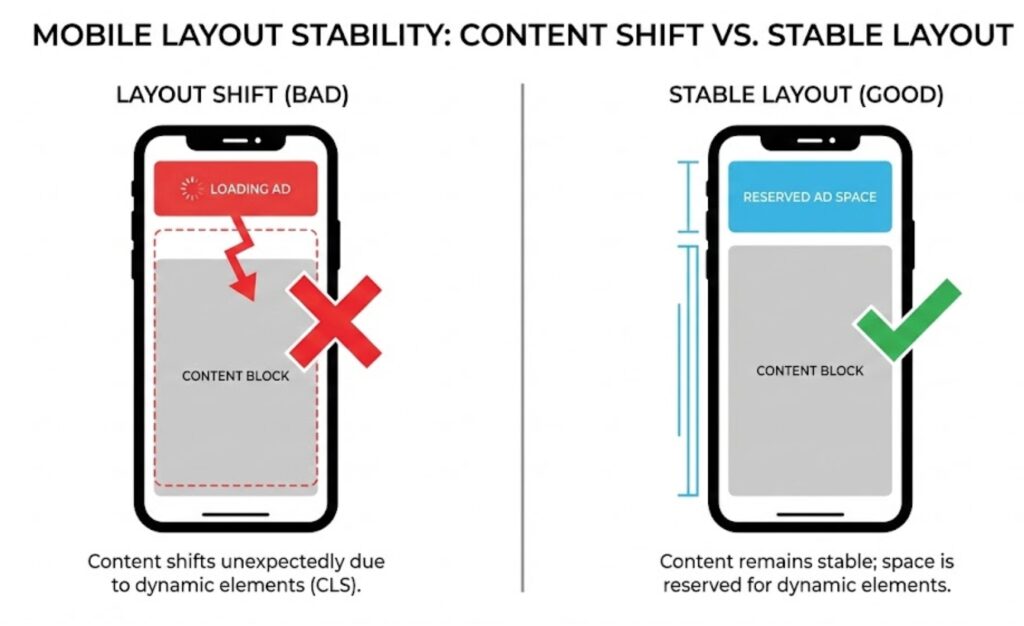
Cumulative Layout Shift — content jumping while a page loads — is one of the most frustrating experiences for mobile visitors, often causing accidental taps and abandoned pages.
Conclusion: You Don’t Need to Become a Technical Expert
Core Web Vitals measure three things that visitors care about even when they don’t know the names for them: whether your website loads quickly, whether it responds when they tap something, and whether it stays stable while loading.
You don’t need to understand the technical implementation to know whether your website is passing or failing these measurements. Run your URL through Google PageSpeed Insights and the report will tell you plainly whether each metric is Good, Needs Improvement, or Poor — and what the likely causes are.
If you’re passing all three, your website’s performance is working in your favour. If one or more are failing, the fixes are usually practical and well-defined — compressed images and a hosting upgrade resolve the majority of LCP problems; script audits address most INP issues; image dimensions fix most CLS failures.
At Ottawa Web Genius, every website we build is tested against Core Web Vitals standards before launch. If you’re curious how your current website performs, or you’d like to understand the results of your own PageSpeed report without wading through technical language, explore our web design services or reach out directly — we’re happy to walk through what the numbers mean for your business specifically.
What Does an SEO-Friendly Website Actually Mean?
September 15, 2026[…] Core Web Vitals specifically and how they affect Ottawa small business websites, our guide on what Core Web Vitals are and why small business owners should care covers each metric in practical […]