Setting Up Your Profile Is Not the Same as Optimizing It
Most small business owners in Ottawa have heard that they need a Google Business Profile. Many have set one up. But there’s a significant gap between having a profile and having one that actually works — one that shows up consistently in local search, earns clicks over competitors, and turns map views into phone calls.
That gap is optimization.
A Google Business Profile that is simply “claimed and filled in” will do the bare minimum. A profile that is actively managed — with accurate details, real photos, consistent reviews, and regular updates — is one of the most powerful free tools available to any local business.
This guide walks you through exactly what to do, step by step, in plain language designed for business owners rather than SEO specialists.
What Is a Google Business Profile?
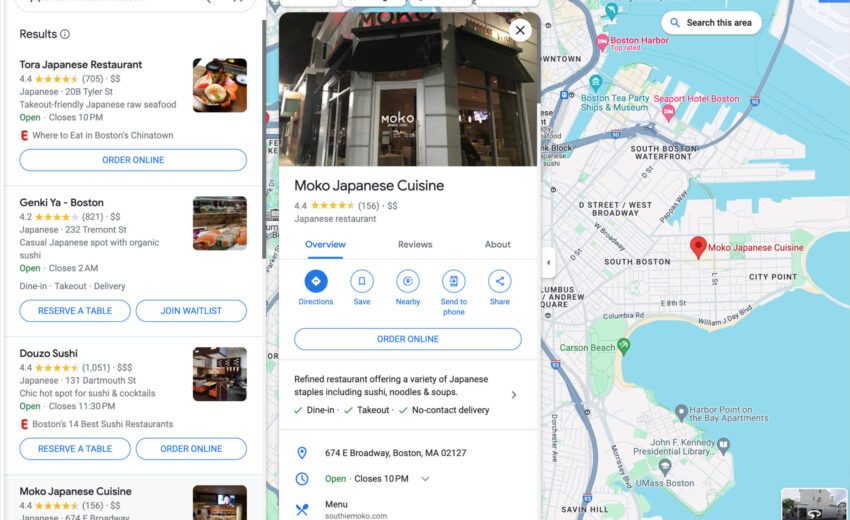
A Google Business Profile (formerly Google My Business) is a free listing that controls how your business appears in Google Search and Google Maps. It’s the panel that shows up on the right side of Google when someone searches your business name — and it’s what powers the “local pack,” the three businesses shown at the top of local search results with a map above them.
When someone in Ottawa searches “electrician near me,” “family lawyer Kanata,” or “best brunch Westboro,” the businesses that appear in those top three positions are there in large part because their Google Business Profiles are well-optimized.
Your profile can display your business name, address, phone number, website link, hours, photos, reviews, services, and more. It gives potential clients a complete picture of your business before they ever visit your website — and in many cases, it’s the only thing they look at before deciding whether to call.
Why Google Business Profile Matters for Local SEO in Ottawa
For any Ottawa business that depends on local customers, your GBP is arguably more important than your website for generating first contact.
Here’s why it sits at the centre of local SEO:
- Map pack visibility. The three businesses in the local pack receive the majority of clicks for local searches. GBP optimization is the primary factor in whether you appear there.
- “Near me” and mobile searches. Most local searches happen on phones. Google’s mobile results heavily prioritize local pack listings — and your GBP drives those listings.
- Calls and direction requests without a website visit. Many prospective clients call directly from your GBP listing, never visiting your website at all. Your profile needs to convert, not just inform.
- Trust signals before the first click. Star ratings, review counts, photos, and response activity are all visible before a visitor clicks anything. These signals influence whether they contact you or your competitor.
- Google uses your GBP to understand your business. The categories, services, description, and NAP details you provide help Google match your profile to relevant searches.
For a broader view of how GBP fits into your full local visibility strategy, our local SEO guide for Ottawa small businesses covers the complete picture.
The local pack — the three businesses shown at the top of local search results — is largely determined by how well each business’s Google Business Profile is optimized.
What Types of Businesses Benefit Most from GBP Optimization?
Any business that serves local customers benefits from an optimized GBP. But it has the highest impact for:
- Service-area businesses — plumbers, electricians, landscapers, contractors, cleaners who go to the client
- Brick-and-mortar businesses — restaurants, salons, retail shops, clinics, dental offices
- Professional services — law firms, accountants, financial advisors, consultants
- Healthcare providers — physiotherapy, optometry, mental health practices, massage therapy
- Local trades — HVAC, roofing, painting, renovation companies
If someone in Ottawa could plausibly search for your type of service and choose between multiple providers, GBP optimization is how you show up first and earn the call over the competition.
Setup vs. Optimization: Understanding the Difference
Claiming your profile and filling in the basics is setup. Optimization is what happens after — and it never fully stops.
Setup includes:
- Claiming or creating the listing
- Verifying the business
- Adding your name, address, phone, website, and hours
Optimization includes everything that makes it perform:
- Selecting the most accurate primary and secondary categories
- Writing a compelling, keyword-aware business description
- Adding every service with descriptions and pricing where relevant
- Uploading high-quality, regularly refreshed photos
- Actively collecting and responding to reviews
- Publishing Google Posts consistently
- Monitoring and answering the Q&A section
- Reviewing GBP Insights monthly and adjusting accordingly
The businesses appearing consistently at the top of Ottawa local search results are not there because they claimed a profile and forgot about it. They’re there because they treat their GBP as an active, ongoing asset.
Step-by-Step: How to Optimize Your Google Business Profile
Step 1 — Claim and Verify Your Profile
If you haven’t already, go to Google Business Profile and claim your listing. Google will walk you through verification, typically by postcard, phone, or video verification depending on your business type. Until your profile is verified, it has very limited visibility.
If your profile was auto-generated by Google, claim it rather than creating a duplicate — duplicate listings confuse Google and can harm your rankings.
Step 2 — Choose Your Primary Category Carefully
Your primary category is one of the most important ranking signals in your entire profile. It tells Google what type of business you are and determines which searches you’re eligible to appear for.
Choose the most accurate, specific category available. “Electrician” not “Contractor.” “Family Law Attorney” not “Lawyer.” “Italian Restaurant” not “Restaurant.”
You can also add secondary categories — use these for additional services your business genuinely offers, but don’t pad them with irrelevant options. Google can detect and penalise over-categorisation.
Step 3 — Complete Every Important Field
Google rewards completeness. A fully completed profile ranks higher and converts better than a partially filled one. Fields to complete:
- Business name (exactly as it appears on your storefront and website — no keyword stuffing in the name)
- Address or service area
- Phone number (local Ottawa number, not a call-tracking number as primary)
- Website URL (link directly to the most relevant page, not always the homepage)
- Business hours, including special hours for holidays
- Business description (more on this below)
- Opening date
- Attributes (wheelchair accessible, woman-owned, appointment required, etc.)
Step 4 — Write a Strong Business Description
Your business description appears in your profile and gives Google additional context about what you do. You have 750 characters — use them well.
A strong description:
- Clearly states what you do and who you help
- Mentions your key services and Ottawa service area naturally
- Includes a few relevant keywords without stuffing
- Explains what makes your business different
- Does not include links, HTML, or promotional language like “best” or “number one”
Example opening for a web design agency: “Ottawa Web Genius helps small businesses across Ottawa — including Kanata, Barrhaven, and Orleans — build professional websites and improve their Google rankings. We specialize in web design, local SEO, and Google Business Profile management for service-based businesses, law firms, and contractors.”
Step 5 — Add Your Services and Products
Under the Services section, list every core service you offer with a name, description, and price range where relevant. This is indexed by Google and helps match your profile to more specific searches.
Don’t just list service names. Add a one-to-two sentence description for each one. “Custom Website Design — We build professional, mobile-friendly websites for Ottawa small businesses that are optimized for Google from day one.”
Step 6 — Upload High-Quality, Real Photos
Photos are one of the most visible and high-impact elements of your GBP. Profiles with photos receive significantly more direction requests and website clicks than those without, according to Google’s own data.
What to upload:
- Your logo (used as your profile icon)
- A cover photo (first image visitors see — make it representative)
- Photos of your team at work
- Before-and-after project photos (especially effective for trades and contractors)
- Photos of your physical space if you have one
- Photos of your actual work, not stock imagery
Refresh your photos regularly. A profile with photos added only once at setup looks inactive compared to one updated monthly.
An active, well-maintained Google Business Profile dashboard — with current photos, recent posts, and review responses — signals to Google that your business is legitimate and engaged.
Step 7 — Collect Reviews Consistently
Reviews are one of the three core local ranking factors Google uses (alongside relevance and distance). The quantity, recency, and rating of your reviews directly affect your map pack visibility.
The most important things to know:
- Ask every satisfied client for a review — don’t rely on unsolicited reviews alone
- Make it easy: generate a direct review link from your GBP dashboard and share it by text or email
- Never incentivise reviews with discounts or gifts — this violates Google’s review policies
- Recency matters: ten reviews from last month outperform fifty from three years ago
For a full guide on building a consistent review strategy, our post on how to get more Google reviews for your Ottawa small business walks through scripts, timing, and strategy in detail.
Step 8 — Respond to Every Review
Responding to reviews — both positive and negative — signals to Google that your business is active and engaged. It also signals to prospective clients that you care about your customers.
For positive reviews: Respond personally, reference the specific work or service, and thank them genuinely. Vary your responses — identical templates look automated.
For negative reviews: Stay calm, acknowledge the concern, and offer to resolve it offline. A professional response to a negative review often builds more trust than five positive reviews on their own.
Step 9 — Publish Google Posts Regularly
Google Posts are short updates — like a social media post directly on your GBP — that appear on your profile in search results. They can include text, a photo, and a call to action (call, book, learn more, etc.).
Use them to share:
- Current promotions or seasonal offers
- New services or service area expansions
- Recent project highlights
- Business updates (new hours, new team members, etc.)
- Links to relevant blog posts or resources
Posts expire after seven days, so consistency matters. Aim for at least one post every two weeks — monthly at minimum to show the profile is active.
Step 10 — Monitor and Manage the Q&A Section
The Questions & Answers section of your GBP allows anyone — including people who’ve never used your business — to ask and answer questions publicly. Answers from other users can appear on your profile and may be inaccurate.
Check your Q&A section regularly:
- Answer every open question promptly and accurately
- Proactively add your own questions and answers covering common queries (“Do you offer free consultations?” “Do you serve the Orleans area?”)
- Flag and report any answers that are misleading or inaccurate
Step 11 — Keep Everything Accurate and Updated
Outdated information — wrong hours, old phone number, changed address — is one of the fastest ways to erode trust and hurt rankings. Google factors NAP (Name, Address, Phone) consistency across the web into local rankings.
Update your GBP any time your business details change. Set a calendar reminder to review it quarterly even if nothing has changed — confirming accuracy counts as engagement.
Step 12 — Review GBP Insights Monthly
Google provides free performance data inside your profile dashboard. Check it monthly and look at:
- How many people searched for your business directly (branded) vs. found you through a category search (discovery)
- How many people called, requested directions, or clicked your website
- Which photos are getting the most views
- What search queries triggered your profile to appear
This data tells you whether your optimization is working and where to focus next.
The Google Business Profile Optimization Checklist
Profile setup:
- [ ] Profile claimed and verified
- [ ] Correct primary category selected
- [ ] Relevant secondary categories added
- [ ] Business name matches website and physical signage exactly
- [ ] Local Ottawa phone number added
- [ ] Website URL links to correct landing page
- [ ] Address or service area confirmed accurate
- [ ] Business hours complete including holidays
- [ ] Business description written (750 characters, keyword-aware, no links)
- [ ] All attributes completed (accessibility, payment types, etc.)
Content and media:
- [ ] Logo uploaded as profile photo
- [ ] Cover photo uploaded and relevant
- [ ] 10+ real photos of work, team, or space uploaded
- [ ] Services listed with descriptions
- [ ] Products added if applicable
Ongoing activity:
- [ ] Review collection process in place
- [ ] All reviews responded to (positive and negative)
- [ ] Google Post published in the past two weeks
- [ ] Q&A section reviewed and answered
- [ ] GBP Insights reviewed this month
- [ ] Profile information confirmed accurate
Common Google Business Profile Mistakes to Avoid
Keyword stuffing the business name. Adding keywords like “Ottawa Best Plumber — Fast Service” to your business name field is against Google’s guidelines and can get your profile suspended. Use your real business name only.
Choosing an inaccurate primary category. Choosing “General Contractor” when you’re a roofer, or “Lawyer” when you practice family law specifically, limits the searches your profile can rank for.
Setting hours and never updating them. Incorrect hours are a top reason prospective clients lose trust before contacting you — especially if someone arrives at your business when you’re supposed to be open and you’re not.
Ignoring the Q&A section. Questions left unanswered or answered inaccurately by other users create real misinformation on your profile.
Uploading stock photos. Generic imagery signals an unengaged profile. Real photos of your team, work, and space convert dramatically better.
Never responding to reviews. Especially negative ones. Silence suggests the business doesn’t care.
Creating duplicate listings. Multiple GBP listings for the same business confuse Google, split your review equity, and can result in profile suspension.
Does Google Business Profile Work Without a Website?
Your GBP can generate calls and direction requests on its own — and for very small or very local businesses, it sometimes does the majority of the heavy lifting. But there’s a clear ceiling.
Without a website:
- Google has limited content to evaluate when deciding how to rank your profile for specific service searches
- Prospective clients have nowhere to learn more before contacting you — which lowers conversion for higher-value services
- You can’t rank in organic (non-map) search results for service keywords
- You have no SEO asset that builds authority over time
A well-optimized GBP and a well-optimized website work together. The GBP drives map pack visibility and direct contact. The website deepens trust, supports organic rankings, and captures searchers who want more information before calling.
How Long Does It Take to See Results?
Optimizing or updating your GBP is not an instant ranking fix. Here’s a realistic timeline:
- Immediate to 1 week: Profile changes (hours, description, photos) take effect immediately and may show visible improvements in profile completeness quickly
- 2–6 weeks: Improvements in map pack visibility often begin appearing after consistent optimization across several factors — especially if the profile was sparse before
- 2–4 months: Meaningful movement in competitive local keywords typically develops over consistent months of review collection, posting activity, and profile engagement
- Ongoing: Local pack rankings are not static. Competitors are also optimizing. Maintaining your position requires continuing the activity that earned it
For a realistic picture of local SEO timelines more broadly, our local SEO guide explains what to expect at each stage.
How GBP Works with Your Website and Full Local SEO Strategy
Your Google Business Profile is the most visible local SEO asset you have — but it performs best when it’s supported by a strong website.
Google’s local ranking algorithm uses three core factors: relevance (does your business match the search?), distance (how close are you to the searcher?), and prominence (how well-known and trusted are you?). Your GBP addresses all three — but your website, reviews, local citations, and backlinks all contribute to prominence.
A business with a fully optimized GBP and a well-structured, fast, mobile-friendly website with dedicated service pages will consistently outrank a business with only a strong GBP and no website — or a great website and a neglected GBP.
The full local SEO picture includes:
- Google Business Profile (map pack visibility, direct contact)
- Website with dedicated service pages (organic rankings, trust-building)
- Reviews (ranking signal and conversion signal)
- NAP consistency across directories (verification signal)
- Local citations (authority signal)
If your website isn’t set up to support your GBP, our web design and SEO services are built to address exactly this — making your full local presence work as a coordinated system rather than isolated parts.
Frequently Asked Questions
Is Google Business Profile free to use?
Yes, completely free. Google Business Profile is a free tool provided by Google. There is no charge to claim, verify, or optimize your listing. The only costs associated with your GBP are the time involved in managing it, or the fees you might pay an agency to manage it on your behalf. Google’s Business Profile help centre has full documentation if you want to explore features in more detail.
How do I know if my Google Business Profile is working?
Log into your GBP dashboard and check the Insights (or Performance) section. It shows how many people viewed your profile, how many called, requested directions, or clicked your website, and which search queries triggered your listing. If those numbers are low relative to your local competition, your profile likely needs more optimization — particularly in reviews, photos, and category accuracy.
Can I have a Google Business Profile without a physical address?
Yes. If you’re a service-area business — a contractor, consultant, or mobile service that goes to clients rather than receiving them at a fixed location — you can set up your GBP as a service-area business. You’ll define the cities or regions you serve instead of displaying a physical address. This is the correct setup for trades businesses, cleaners, mobile services, and similar businesses in Ottawa.
Why is my Google Business Profile not showing up in the local pack?
The most common reasons are an incomplete or unverified profile, incorrect or missing categories, few or no recent reviews, a profile with no photo activity, NAP inconsistency across the web, or strong competition in a specific keyword area. Google’s guidance on improving your local ranking outlines the factors they consider. If your profile is complete and you’re still not appearing, the issue may be on the website side — thin content, poor local relevance signals, or technical SEO problems.
Should I hire someone to manage my Google Business Profile?
It depends on how competitive your local market is and how much time you can realistically dedicate to it. The basics — completing the profile, uploading photos, responding to reviews — can be handled by most business owners in an hour or two per month. Active management in competitive markets (ongoing posts, review strategy, performance monitoring, citation building) is more involved and is something many Ottawa businesses outsource to a local SEO specialist. If you’re curious about what that looks like in practice, our services page and pricing page give a clear breakdown.
How many reviews do I need to rank well locally in Ottawa?
There’s no fixed number — it depends entirely on your competitors. Search your main service plus Ottawa (or your neighbourhood) on Google and look at the review counts of the top three businesses in the local pack. That’s your target to match and eventually exceed. In most Ottawa local markets, 30–60 recent reviews with a rating above 4.5 puts a business in a strong position. Recency matters as much as total count — ten reviews from the last month carry more weight than sixty from three years ago.
Conclusion: Optimization Is What Separates Visible Businesses from Invisible Ones
A Google Business Profile that was set up once and never touched again is not an asset — it’s just a listing. The businesses that consistently appear at the top of Ottawa local search results, that get the calls, the direction requests, and the new clients, have made their GBP an active, ongoing part of how they show up online.
The good news is that the steps required to get there are completely manageable. Claim your profile, choose the right category, write a real description, add photos, collect reviews, respond to them, post updates occasionally, and check your insights. Done consistently, this alone will move most Ottawa small businesses ahead of the majority of their local competitors.
But your GBP is one piece of the full local visibility picture. Your website, your reviews, your citation consistency, and your local SEO strategy all reinforce each other. At Ottawa Web Genius, we help Ottawa small businesses manage all of these as a coordinated system — not as isolated tasks.
Explore our local SEO and web design services or view our pricing to understand what working with us looks like — and how we can help your business become more visible in the places Ottawa customers are actually searching.
Web Design for Dental Offices in Ottawa
August 21, 2026[…] that can suppress local rankings. For a complete walkthrough of how GBP optimization works, our Google Business Profile guide covers every […]
Web Design for Accountants Ottawa
August 28, 2026[…] firm’s services, correct address, hours, and a consistent review collection process. Our Google Business Profile optimization guide covers every element of a well-maintained […]
Local SEO for HVAC Companies Ottawa: 2026 Guide
September 3, 2026[…] the full step-by-step GBP optimisation process, our Google Business Profile guide for Ottawa businesses covers every element including the 2026 changes to how Google handles local business […]
How to Write a Google Business Profile Desc
September 9, 2026[…] the comprehensive view of what a well-optimised GBP looks like in 2026, our Google Business Profile optimisation guide for Ottawa businesses covers every element including the most recent platform changes. And if your profile has been […]