A Live Website Is Not the Same as a Visible One
You built a website. It looks good. You can see it when you type in your web address. But when you search for your business or your services on Google, your site doesn’t appear — or it appears so far down the results that nobody would ever find it.
This is one of the most common frustrations for small business owners, and it almost always comes down to one of two separate problems:
Problem 1: Google hasn’t indexed your site yet — meaning it doesn’t know your website exists and can’t show it to anyone.
Problem 2: Google has indexed your site but isn’t ranking it well — meaning it knows your site exists but doesn’t consider it relevant or authoritative enough to show for the searches you care about.
These are different problems with different fixes. This guide explains how to tell which one you have, what’s causing it, and exactly what to do about it.
Not Indexed vs. Not Ranking: Understanding the Difference
This distinction is the most important starting point — because confusing the two leads to applying the wrong fix.
Not indexed means Google’s crawler has not added your pages to its database. Your website might as well not exist from Google’s perspective. This is a technical problem.
Indexed but not ranking means Google knows your site exists but doesn’t consider it relevant, authoritative, or useful enough to show for the searches you’re targeting. This is an SEO and content problem.
You can have both simultaneously — a partially indexed site with weak content — which is why a full diagnostic is worth doing before jumping to solutions.
Step 1: Check Whether Google Has Indexed Your Site
Before anything else, run this simple test.
Open Google and type: site:yourwebsite.com
Replace “yourwebsite.com” with your actual domain. If pages appear in the results, Google has indexed at least some of your site. If nothing appears at all — no results, just a message that there are no results matching your search — Google has not indexed your site.
If nothing appears: You have an indexing problem. Jump to the technical section below.
If pages appear but your site doesn’t show up for your target searches: You have a ranking problem. Your site is indexed but not performing for the keywords that matter to your business.
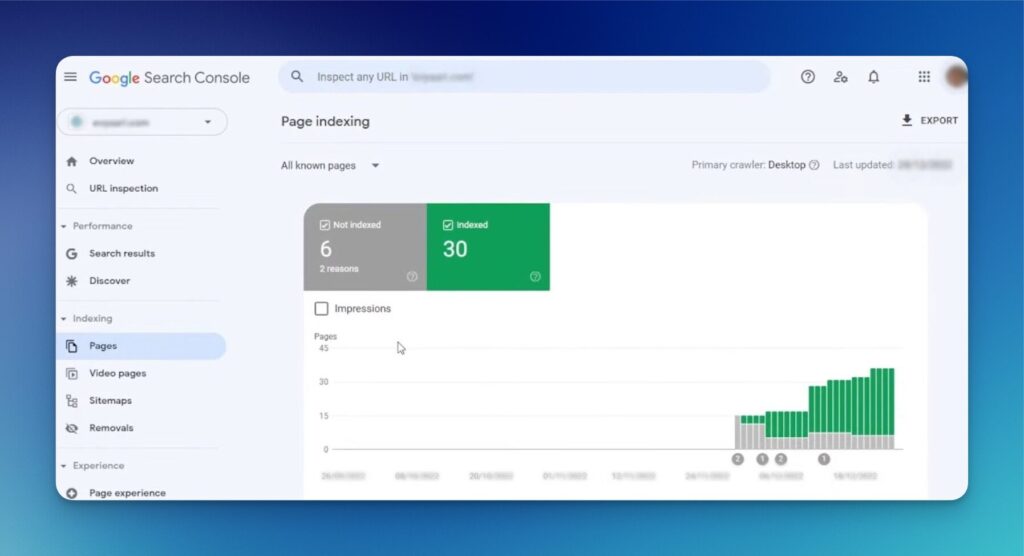
Google Search Console is the most important free tool for understanding why your website isn’t appearing — it shows exactly which pages are indexed, which aren’t, and what errors are preventing visibility.
The Most Common Reasons a Website Doesn’t Show Up on Google
1. The Site Was Never Submitted to Google
Google finds websites by following links from other sites. A brand new website with no external links pointing to it may not be discovered automatically — particularly if it was built recently and hasn’t been shared or listed anywhere.
The fix: Submit your sitemap through Google Search Console. This tells Google exactly which pages you want indexed and gives its crawler a direct path to find them.
2. A Noindex Tag Is Blocking Google
This is one of the most common and easily overlooked technical problems. A “noindex” tag is a piece of code that tells Google explicitly not to index a page. It’s often added during website development — to prevent a work-in-progress site from appearing in search — and then accidentally left in place after launch.
One noindex tag on the homepage will prevent your most important page from ever appearing in Google search results, regardless of how good everything else is.
Check your page’s source code (right-click → “View Page Source” in most browsers) and search for the word “noindex.” If you find it, it needs to be removed from any page you want Google to index.
3. The Robots.txt File Is Blocking Crawlers
Your robots.txt file tells Google which parts of your website it’s allowed to crawl. If it’s misconfigured — particularly if it contains Disallow: / — it can block Google from accessing your entire site.
Check your robots.txt by typing yourwebsite.com/robots.txt into your browser. If you see “Disallow: /” at the top, that’s likely the cause of your invisibility problem.
4. The Website Is Too New
Google doesn’t index new websites instantly. For a brand new site with no external links, no established authority, and no prior crawl history, it can take several weeks to several months for pages to be indexed and begin appearing in search results.
If your site was launched recently, some patience is required — but you can accelerate the process by submitting your sitemap, building a few external links (from directories, social profiles, and partner sites), and ensuring your GBP links to your website.
5. Google Search Console Has Never Been Set Up
Many business owners build a website without ever connecting it to Google Search Console. Without it, you’re flying blind — you have no data on whether Google can access your site, which pages are indexed, what errors exist, or what searches are triggering your content.
Setting up Google Search Console is free, takes about twenty minutes, and is the single most important step you can take to understand and improve your Google visibility.
6. No Sitemap Has Been Submitted
A sitemap is a file that lists all the important pages on your website. Submitting it to Google Search Console significantly speeds up the indexing process and ensures Google knows about every page you want indexed.
Most website platforms generate a sitemap automatically. Your sitemap URL typically looks like yourwebsite.com/sitemap.xml. Submit it through the Sitemaps section of Google Search Console.
Technical Issues That Can Block Google Visibility
Beyond the basics above, these technical problems can prevent a site from appearing or ranking properly:
Slow page speed on mobile. Google uses mobile performance as a ranking signal. A site that loads slowly on a phone — more than three seconds — will rank below faster competitors for equivalent content. Test your site at Google PageSpeed Insights and address any major issues.
Not mobile-friendly. A site that doesn’t display cleanly on a phone is penalised in mobile search results, which is where the majority of local searches happen.
No SSL certificate. If your website URL starts with “http” rather than “https,” Google treats it as less trustworthy. Most hosting providers now offer free SSL certificates — this should be addressed immediately if it hasn’t been already.
Broken or orphaned pages. Pages with no internal links pointing to them are difficult for Google to discover and crawl consistently. Every important page should be reachable from your navigation or from at least one other linked page on your site.
Duplicate content. If the same content appears on multiple pages of your site, Google may not know which version to index and rank. This is particularly common with e-commerce sites but also affects service businesses with similar text across multiple location pages.
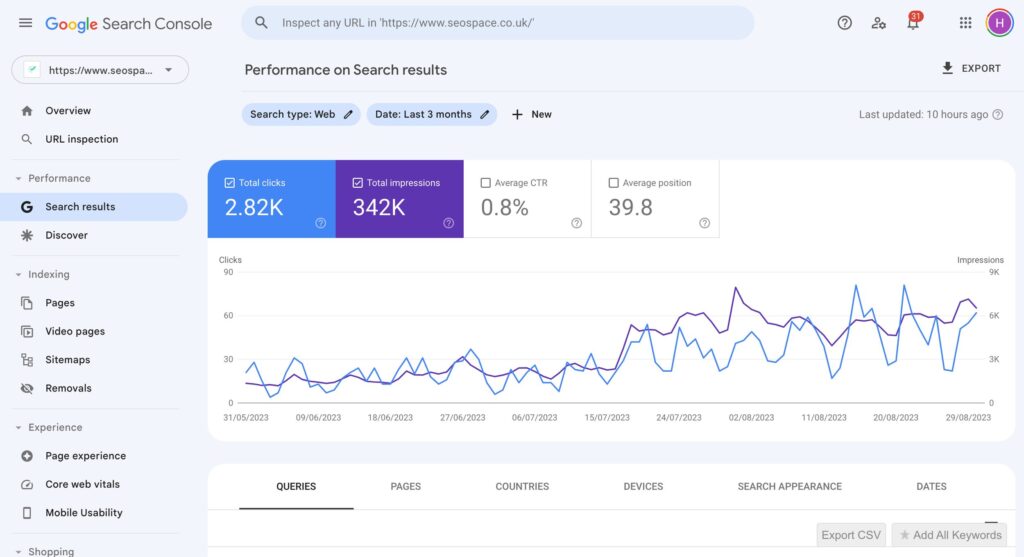
Most website visibility problems fall into one of two categories: a technical issue preventing Google from indexing the site, or a content and SEO issue preventing it from ranking for the right searches.
Weak Content and On-Page SEO Issues
Even a perfectly healthy technical website can fail to appear for relevant searches if the content doesn’t give Google enough to work with.
Thin or vague page content. A homepage with a few sentences and a contact page with just a form isn’t giving Google enough information to understand what you do, who you help, or where you operate. Every important page should have enough substantive, specific content that a prospective client could clearly answer those three questions just by reading it.
Missing or weak title tags. Your page title (the text in the browser tab and in Google’s search results) is one of the strongest on-page ranking signals. If your homepage title is just your business name — or “Home” — you’re missing the opportunity to tell Google and searchers exactly what you do.
Each page should have a unique title tag that clearly names the service or topic and includes your location where relevant: “Web Design for Ottawa Small Businesses | Ottawa Web Genius” rather than just “Ottawa Web Genius.”
No dedicated service pages. If all your services are listed in bullet points on a single page, Google has nothing specific to rank for specific searches. “Emergency plumber Ottawa” requires a page specifically about emergency plumbing. “Family lawyer separation agreement Ottawa” requires a page about that specific service. Each service you offer should have its own dedicated page.
No location relevance. If your website doesn’t mention Ottawa, the specific neighbourhoods you serve, or any geographic context, Google has no basis to show your site to local searchers. Location context should appear naturally in your page content, title tags, and meta descriptions.
For a comprehensive look at everything a properly structured small business website should include, our guide on what a business website should include covers the full structure in detail.
Local SEO and Google Business Profile Factors
For local businesses, the website is only part of the picture. Your Google Business Profile and the consistency of your business information across the web both affect whether you appear in local searches.
An unclaimed or incomplete Google Business Profile. Your GBP powers your appearance in the local map pack — the three businesses shown at the top of local searches. If your profile is unclaimed, incomplete, or inactive, you’re invisible in map results regardless of how good your website is.
NAP inconsistency. If your business name, address, and phone number appear differently across your website, GBP, and online directories — different formats, different abbreviations, slightly different wording — Google sees conflicting signals and may suppress your local rankings accordingly.
No reviews. Review quantity and recency are local ranking factors. A business with zero reviews is at a structural disadvantage in local search compared to competitors with an active review history, even if everything else is equal.
Our Google Business Profile optimization guide walks through every element of a well-optimized local listing.
Is a Google Business Profile Alone Enough?
A common question: Can I just use my GBP without a proper website and still show up on Google?
Your GBP can generate calls and direction requests directly, without a website visit — and for very simple, very local searches it can sometimes appear prominently. But there’s a clear ceiling.
Without a website:
- Google has limited content to evaluate when ranking you for specific service searches
- You can’t rank in organic (non-map) results for any keyword
- Prospective clients have nowhere to learn more before contacting you — which lowers conversion for higher-value services
- Every GBP ranking signal Google can give you is already being given, with no way to expand it
A well-optimized GBP and a properly structured website work as a system. The GBP handles map visibility. The website handles organic rankings and deeper trust-building. Neither fully compensates for the absence of the other.
How Long Does It Take for a Website to Show Up on Google?
For a brand new website with no external links and no prior history:
- Initial indexing typically happens within 2–8 weeks of submitting a sitemap through Google Search Console
- First organic rankings for less competitive searches may appear within 4–12 weeks
- Meaningful rankings for competitive local keywords typically develop over 3–6 months of consistent SEO work
These timelines assume the technical foundations are solid, the content is substantive, and the site is actively being maintained. A site with technical problems, thin content, or no external signals will take significantly longer — or may not rank at all without intervention.
For a detailed guide on this full process from indexing through to ranking, our post on how to get your small business website on Google walks through every step with specific actions.
The Website Visibility Troubleshooting Checklist
Work through these steps in order — starting with the quickest diagnostic tests and moving to the more involved fixes:
Diagnostic steps:
- [ ] Run
site:yourwebsite.comin Google — note how many pages appear - [ ] Set up Google Search Console if not already active
- [ ] Submit your sitemap (
yourwebsite.com/sitemap.xml) through Search Console - [ ] Check for noindex tags in page source code on key pages
- [ ] Review
yourwebsite.com/robots.txtfor anyDisallow: /entries - [ ] Use the URL Inspection tool in Search Console to check indexing status for specific pages
Content and on-page fixes:
- [ ] Add a unique, keyword-relevant title tag to every page
- [ ] Add a unique meta description to every important page
- [ ] Ensure each service has its own dedicated page
- [ ] Add location (Ottawa and relevant neighbourhoods) naturally to key pages
- [ ] Expand thin pages with substantive, specific content
- [ ] Add internal links between related pages
Technical fixes:
- [ ] Test mobile performance at Google PageSpeed Insights — address scores below 50
- [ ] Confirm site is HTTPS (SSL active)
- [ ] Check for and fix broken links
- [ ] Ensure all important pages are reachable from navigation or internal links
Local visibility:
- [ ] Claim and verify Google Business Profile
- [ ] Confirm NAP is identical across website, GBP, and all directories
- [ ] Ensure GBP links to correct website URL
When the Issue Is Technical vs. When It’s SEO and Content
It’s likely a technical problem if:
- Your
site:search shows zero or very few results - Google Search Console shows “noindex” or crawl errors for key pages
- Your site was recently launched or migrated to a new domain
- Your robots.txt or noindex settings were recently changed
It’s likely an SEO and content problem if:
- Your
site:search shows your pages are indexed - You appear for searches of your exact business name but not your services
- You rank on page 5 or beyond for your target keywords
- Your service pages have little written content
- Your title tags are missing or generic
It’s probably both if:
- Only some pages are indexed but rankings are also weak where indexed pages exist
- Your site is technically sound but has thin, poorly structured content across most pages
For the full picture of what strong on-page SEO looks like, our guide on how to improve your website’s SEO covers every element in detail.
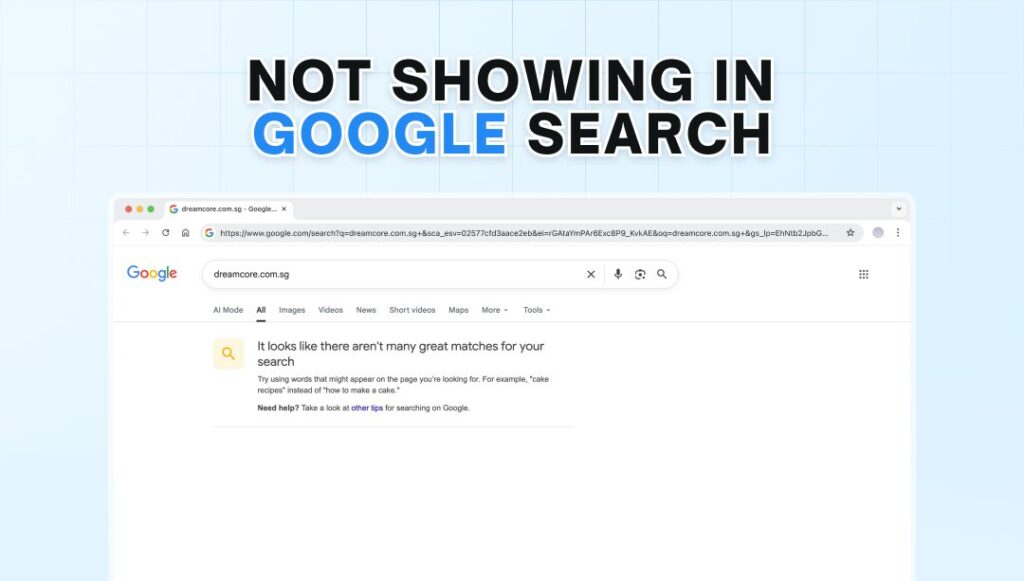
Whether your website isn’t showing up on Google due to a technical indexing issue or a content and SEO problem determines the fix — diagnosing correctly first saves significant time and money.
Frequently Asked Questions
How do I check if my website is on Google?
Type site:yourwebsite.com into Google Search (replacing the domain with your actual website address). If pages appear, Google has indexed your site. If you get zero results, Google hasn’t indexed it yet or is being blocked from doing so. You can also check specific pages using the URL Inspection tool inside Google Search Console, which gives you more detailed information about indexing status and any issues Google has encountered.
Why does my website show up when I search my exact business name but not for my services?
This is very common and indicates your site is indexed but not ranking for competitive service keywords. When you search your business name, Google can match it directly to your site regardless of SEO quality. When you search a service keyword (“plumber Ottawa,” “family lawyer Nepean”), you’re competing with every other site targeting that term — and your site’s content, structure, authority, and relevance all determine where you appear. The fix is improving your service pages, title tags, and overall SEO foundations.
How long does it take for a new website to appear on Google?
For a new website that has submitted a sitemap through Google Search Console, initial indexing typically happens within two to eight weeks. Appearing for competitive local searches usually takes three to six months of consistent optimization work. There’s no shortcut to this timeline — Google evaluates trust and relevance over time, and a site that was launched last week is inherently less established than a competitor whose site has been actively maintained for two years.
Can a noindex tag really make my entire website invisible?
Yes. A single noindex directive on your homepage prevents Google from indexing and showing that page in search results. If the noindex applies site-wide — which can happen through a WordPress setting that was never disabled after development, for example — it prevents Google from indexing any page. This is one of the first things to check for any website that is confirmed to not appear in Google search results. The fix is simply removing the noindex tag or disabling the setting in your CMS.
Is Google Business Profile a substitute for website SEO?
No — they serve different functions and neither fully replaces the other. Your GBP controls your map pack appearance and direct contact actions (calls, direction requests). Website SEO controls your organic search rankings for specific service and location keywords. A strong GBP without website SEO means you miss every organic result below the map. Strong website SEO without an optimized GBP means you miss the map pack entirely. Both need to be in place for full local visibility.
What if I’ve done everything on this checklist and my site still doesn’t rank well?
If your site is properly indexed, technically sound, and has good content — but still doesn’t rank where it should — the issue is usually authority. Authority is built over time through external links (other websites linking to yours), consistent content, review volume on your GBP, and local citations. These take longer to develop than technical fixes. If you’ve been waiting six months or more with no meaningful movement, it may be worth a professional SEO audit to identify the specific gaps. Our web design and SEO services include exactly this kind of diagnostic work.
Conclusion: The Problem Is Almost Always Fixable
If your website is live and not showing up on Google the way you expected, the cause is almost certainly one of the issues covered in this guide — and most of them are entirely fixable without starting over.
The diagnostic process starts with one simple search: site:yourwebsite.com. What you see there tells you whether you have an indexing problem, a ranking problem, or both — and points you toward the right category of fix.
At Ottawa Web Genius, we’ve diagnosed and fixed website visibility problems for local businesses across Ottawa — from simple indexing issues that take an afternoon to resolve, to deeper SEO and content problems that require a more structured approach. Whatever the cause, identifying it clearly is the first step.
Explore our SEO and web design services or reach out directly if you’d like us to take a look at what might be holding your site back.