Google Is Now Answering Questions About Your Business — With or Without You
If you’ve logged into your Google Business Profile recently and noticed that the Q&A section looks different — or has disappeared entirely — you’re not imagining things.
Google officially discontinued the Q&A feature on November 3, 2025. The manual system where customers could ask questions and business owners could reply has been replaced by something fundamentally different: Google’s AI, powered by Gemini, is now generating conversational answers about your business automatically.
That means Google is answering questions about your hours, services, location, process, and offerings — whether you’ve prepared for it or not. If the information Google can find about your business is thin, outdated, or scattered, the answers it generates may be incomplete, inaccurate, or simply unhelpful to the prospective client who just asked.
This isn’t a reason to panic. But it is a reason to act. Here’s what changed, why it matters, and exactly what Ottawa small businesses should do right now.
What Changed: The End of Manual Q&A on Google Business Profile
The original Google Business Profile Q&A feature allowed anyone — customers, prospective clients, or random users — to post questions directly on a business’s Google listing. Business owners could then respond publicly. It was essentially a mini-forum attached to each listing.
This feature has now been retired. The Q&A API was officially discontinued on November 3, 2025, and the feature is now disappearing gradually from listings. Some older listings may still show legacy Q&A content temporarily, but Google’s long-term plan is to phase it out completely.
What’s replacing it is significantly more consequential for small businesses.
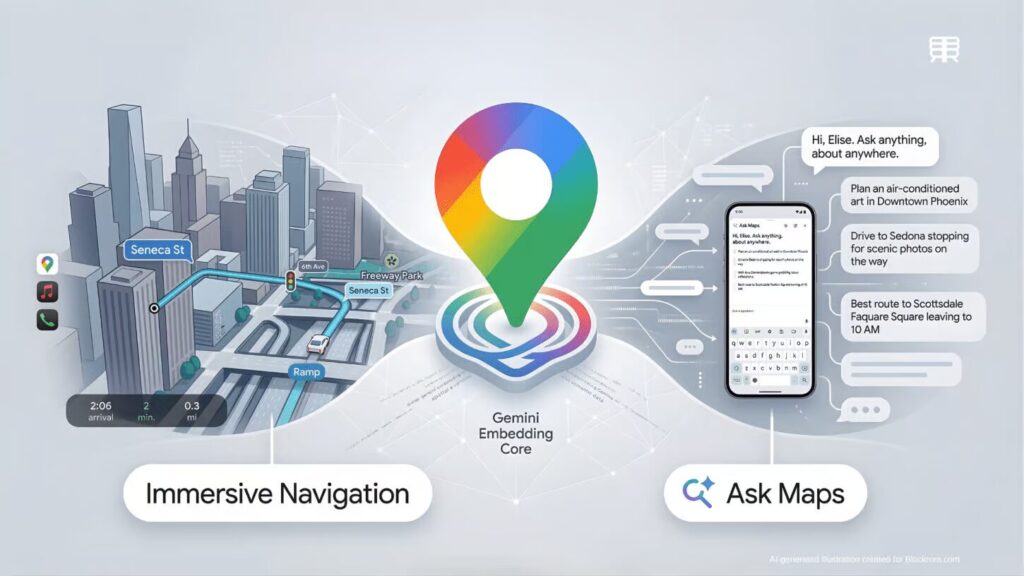
Google’s Ask Maps feature — powered by Gemini AI — now answers conversational questions about local businesses directly in Google Maps, drawing from profile information, reviews, and website content.
What Is Ask Maps?
Ask Maps is Google’s new AI-powered conversational feature built into Google Maps, powered by Gemini. Instead of the old manual Q&A system where a human had to respond, Gemini now scans your profile, website, and reviews to generate an instant, conversational answer.
In practical terms: if someone opens Google Maps and asks “Does this plumber offer same-day service?” or “Is this law firm taking new clients?” — Gemini generates an answer based on what it can find across your Google Business Profile, your website, your reviews, and any other publicly available information about your business.
If a user asks “Does this place have outdoor seating and fast Wi-Fi?” the AI won’t wait for you — it will formulate an answer based on the data it finds in your recent reviews and service attributes.
This is a fundamental shift in how Google handles local business information. The business owner is no longer in the conversation. The AI is responding on your behalf.
How Gemini Generates Answers About Your Business
Understanding how Gemini sources its answers is important — because it tells you exactly what to fix.
Based on what Google has disclosed and what SEO practitioners have observed, Gemini draws from several sources when generating answers about a local business:
- Your Google Business Profile — business description, services, attributes, hours, categories, and photos
- Your website — service pages, about page, FAQ pages, and any structured data (schema markup) you’ve implemented
- Your Google reviews — patterns in what customers say about your business, including specific mentions of services, qualities, or experiences
- Google Posts — updates and offers you’ve published on your profile
- Third-party directories and citations — information about your business that appears elsewhere online
AI summaries pull from reviews, posts, and web content. Thin or outdated profiles get less favourable summaries regardless of review score.
The critical insight here is this: Gemini doesn’t know what you haven’t told it. If your website has one paragraph about your services and your GBP description is vague, the AI has little to work with. It may generate a technically accurate but unhelpfully vague answer — or worse, piece together something misleading from your reviews.
Why This Matters for Ottawa Small Businesses
For most Ottawa small businesses, the Q&A section was either ignored entirely or used occasionally. That made the retirement feel minor. It isn’t.
The replacement — AI-generated answers — affects every business with a Google listing, regardless of whether they ever engaged with Q&A. And unlike the old Q&A where you could simply write a correct answer, the new system means the quality of Gemini’s responses is determined by the quality of your existing online presence.
Consider these scenarios:
A prospective client asks Google: “Does this Ottawa physiotherapy clinic accept new patients?” If your website says “contact us to book” without specifying whether you’re accepting new patients, and your profile doesn’t address it, and your recent reviews don’t mention it — Gemini has no reliable answer. It either says it doesn’t know, or it infers something from incomplete data.
A prospective client asks: “Does this contractor serve the Barrhaven area?” If your website mentions Ottawa but doesn’t list specific neighbourhoods, and your GBP service area is set broadly, Gemini may not confirm Barrhaven specifically — potentially sending that lead to a competitor whose site is clearer.
A law firm prospective client asks: “Does this firm offer free consultations?” If your website mentions consultations but doesn’t specify whether they’re free, Gemini may give an ambiguous answer at exactly the moment a prospective client is deciding whether to reach out.
Google’s Search Generative Experience often displays GBP data directly as the primary answer to voice and text queries, making your profile the definitive source of truth for AI agents. If that source of truth is incomplete, the consequences are real.
Why FAQ Pages on Your Website Now Matter More Than Ever
Before this change, a FAQ page on your website was a useful but optional SEO tool. After this change, it is one of the most practical ways to give Gemini accurate, structured information to draw from when answering questions about your business.
Google’s long-term plan is to replace the manual Q&A completely with AI-generated answers. Forward-thinking agencies are already building optimised FAQ pages that teach Google’s AI the correct answers about a business.
A well-built FAQ page does several things simultaneously:
- It answers the questions prospective clients are actually asking, in a format Google can clearly read
- It gives Gemini reliable, authoritative source material to draw from
- It improves your website’s SEO for long-tail question-based searches
- It reduces friction for prospective clients who want answers before contacting you
What belongs on a small business FAQ page:
Think about the five to ten questions your clients ask most often — before hiring you, during the intake process, or in initial consultations. Those are the questions to answer.
Examples by business type:
- Contractor: “Do you offer free quotes?” “Do you serve Kanata and surrounding areas?” “Are you licensed and insured in Ontario?” “How long does a typical roof repair take?”
- Law firm: “Do you offer free consultations?” “What areas of family law do you handle?” “How long does a separation agreement take?” “Do you serve clients in Nepean and Barrhaven?”
- Consultant: “What does a first session look like?” “Do you work with clients outside Ottawa?” “What’s included in your initial assessment?”
Answer each one clearly, specifically, and in plain language. Avoid vague answers like “contact us to find out” — those give Gemini nothing useful.
FAQ schema markup tells Google exactly which content on your website is a question and which is the answer — helping Gemini accurately source information when generating AI responses about your business.
What Is FAQ Schema Markup and Why Does It Help?
Schema markup is code added to your website that helps Google understand what different pieces of content mean — not just what they say. FAQ schema specifically tells Google: “this is a question, and this is the answer to that question.”
When your FAQ page has proper schema markup, Google can read it in a structured way. Adding FAQ and Q&A schema markup makes your website the authoritative source when Gemini generates responses. Without it, Google has to interpret your content and may not distinguish your FAQ answers from general page text.
How to add FAQ schema markup without a developer:
If your website is built on WordPress, plugins like Yoast SEO, RankMath, or Schema Pro can add FAQ schema markup without touching any code. You fill in the question and answer fields, and the plugin handles the technical implementation.
If you’re on a platform like Squarespace or Wix, options are more limited — but you can manually add a JSON-LD script to the page header if you’re comfortable doing so, or ask your web designer to implement it.
To verify your schema is working correctly, use Google’s Rich Results Test — a free tool that shows you whether Google can read your structured data.
How to Audit What Google Is Currently Saying About Your Business
Before fixing anything, it helps to understand what Gemini is currently working with. Here’s how to check:
1. Search your business on Google Maps. Open Google Maps on your phone or browser and search your business name. Look at how your profile appears and what information is visible. Check whether your description, services, hours, and photos are accurate and current.
2. Try asking Google questions about your business. In Google Maps or Google Search, type questions a prospective client might ask: “Does [your business name] offer [specific service]?” or “Is [your business name] open on Saturdays?” See what Google surfaces.
3. Read your recent reviews for patterns. Reviews are one of Gemini’s key sources. If clients frequently mention a service in positive terms, that signal helps. If reviews mention confusion about your hours or services, that confusion may feed into AI answers as well.
4. Check your GBP services and description. Log into Google Business Profile and review every field. Your description should clearly state what you do, who you serve, and where you operate. Services should be listed individually with brief descriptions.
What to Update Right Now — The Action Checklist
An active, complete, and accurate Google Business Profile — with current hours, real photos, detailed services, and recent reviews — gives Gemini the best possible source material to generate accurate answers about your business.
Google Business Profile:
- [ ] Verify and update your business hours — including any seasonal variations
- [ ] Rewrite your business description to clearly state your services and Ottawa service area
- [ ] Add or update every service with a name and brief description
- [ ] Upload recent, real photos of your team, work, or space
- [ ] Confirm your NAP (name, address, phone) is accurate and matches your website exactly
- [ ] Respond to any unanswered reviews — recent activity signals an active profile
Website:
- [ ] Create or improve a dedicated FAQ page answering your most common client questions
- [ ] Add FAQ schema markup to your FAQ page
- [ ] Review each service page — does it clearly state what you offer, who it’s for, and where you operate?
- [ ] Ensure your contact page states your service area, hours, and what happens after someone reaches out
- [ ] Add neighbourhood or service area references to key pages where relevant
Ongoing monitoring:
- [ ] Set up Google Search Console if you haven’t already — it shows how Google sees and indexes your site
- [ ] Check your GBP Insights monthly for changes in profile views, calls, and clicks
- [ ] Periodically test what Google says about your business by searching for it in Maps
Common Mistakes to Avoid
Assuming your information is “out there” somewhere. Having accurate information scattered across your website, your profile, and a few directory listings is not the same as having clear, structured, accessible information Google can easily read. Structured clarity outperforms scattered completeness every time.
Writing vague FAQ answers. “Contact us for more information” is not an FAQ answer — it’s a deflection. If Gemini pulls from your FAQ page and finds deflections, it has nothing useful to generate from. Be specific.
Ignoring schema markup. A well-written FAQ page without schema markup is better than nothing. A FAQ page with proper schema markup is significantly more likely to feed Gemini accurate, clearly attributed answers. The implementation is relatively simple and worth doing.
Setting up a GBP and not maintaining it. A big shift in 2026 is how quickly an inactive profile starts to look stale. Multiple local SEO guides are now calling out meaningful visibility drops when a profile goes 30+ days without new photos or updates. Activity is now a more significant ranking signal than before.
Panicking about AI errors without investigating first. Before assuming Gemini is saying something wrong about your business, actually test it. You may find the answers are reasonable — or you may find a specific gap in your profile or website that’s easy to fix.
What to Do If Google Is Giving Incomplete or Inaccurate Answers
If you test Ask Maps or Google Search and find that the information being surfaced about your business is inaccurate or misleading:
Start with your GBP. Correct any factual errors in your profile immediately — wrong hours, wrong address, wrong categories. These are direct inputs Gemini uses.
Improve your website content. If the inaccurate answer seems to come from a vague or outdated service page, rewrite that page with clearer, more specific language.
Add or improve your FAQ page. Directly address the question that’s being answered poorly. Write a clear, accurate answer and mark it up with FAQ schema.
Build review volume. If Gemini is drawing from thin review content, more recent reviews — especially those that naturally mention your specific services or service area — provide better source material over time.
You cannot control every AI-generated answer. But you can significantly influence the quality of what Gemini has to work with, which in turn improves the accuracy and usefulness of the answers it generates.
For a comprehensive foundation, our Google Business Profile optimization guide covers every element of a well-maintained profile — updated for the current GBP landscape.
Frequently Asked Questions
Is the Google Business Profile Q&A feature completely gone?
Yes. The Q&A API was officially discontinued on November 3, 2025. Some legacy Q&A content may still be visible on older profiles temporarily, but the feature is being phased out entirely. The replacement is Gemini-powered AI responses through Ask Maps. Business owners can no longer manually post or respond to questions through the Q&A interface.
Can I control what Gemini says about my business?
Not directly — you cannot write a script that Gemini reads verbatim. But you can significantly influence the quality of its answers by improving the source material it draws from: your GBP profile accuracy, your website’s service pages and FAQ content, your review volume and recency, and your schema markup implementation. The better and clearer the information you provide, the more accurate and useful the AI-generated answers tend to be.
Do I need to hire a developer to add FAQ schema markup?
Not necessarily. If your site is on WordPress, plugins like RankMath or Yoast SEO allow you to add FAQ schema through a simple interface without writing code. On other platforms, a small amount of JSON-LD code can be added to a page manually — or your web designer can implement it as a quick task. For a fuller picture of what strong on-page SEO looks like alongside schema, our post on how to improve your website’s SEO covers the technical foundations clearly.
How do I test what Google is currently saying about my business?
Open Google Maps, search your business name, and try asking questions the way a customer might — “Does [business name] offer free quotes?” or “Is [business name] open on weekends?” You can also search your business name in Google Search and look at the AI Overview or knowledge panel for what information is being surfaced. Note any answers that are vague, missing, or inaccurate — those are the gaps your FAQ page and GBP updates should address.
Does this change affect how I rank on Google Maps?
Indirectly, yes. The factors that feed Gemini better answers — an active, complete GBP profile, a well-structured website, recent reviews, clear service descriptions — are largely the same factors that support local map pack rankings. Businesses that actively engage users with fresh visuals, frequent updates, and helpful responses will naturally rise in rankings. Improving your content quality for AI accuracy and improving it for local SEO rankings are essentially the same work.
Should I update my existing Google Business Profile guide or FAQ content in light of this change?
Yes — and promptly. Any FAQ content on your website that references the old Q&A feature should be updated. More importantly, if your FAQ page was written generically or hasn’t been reviewed recently, this is the right moment to expand it with specific, schema-marked answers to real customer questions. Your local SEO strategy as a whole benefits from treating your website as the authoritative source of truth that feeds Google’s AI — not just a brochure that exists alongside it.
Conclusion: Give Google Better Information Before It Fills in the Gaps Itself
The retirement of Google Business Profile Q&A is not a crisis — but it is a signal. Google is moving toward a world where AI generates the first impression of your business for prospective clients. What that impression looks like depends almost entirely on the quality of the information you’ve given Google to work with.
Businesses that have a complete, active Google Business Profile, a website with clear service pages and a genuine FAQ section, and a consistent stream of recent reviews are well-positioned. Google has what it needs to represent them accurately.
Businesses with thin websites, sparse profiles, and few recent reviews are at risk of being represented vaguely — or inaccurately — at exactly the moment a prospective client is deciding whether to reach out.
The fix is practical, not complicated. Improve your FAQ page. Add schema markup. Update your GBP. Keep your profile active. Give Google the clearest possible picture of your business.
At Ottawa Web Genius, we help Ottawa small businesses stay ahead of exactly these kinds of changes — updating website content, implementing schema markup, and maintaining GBP profiles so our clients are represented accurately as Google’s systems evolve.
Explore our web design and SEO services or reach out to discuss what your business’s Google presence needs in light of these changes.