Suspension Is Stressful — But Usually Fixable
Finding that your Google Business Profile has been suspended is one of the more alarming things that can happen to a local business online. Your listing disappears from Google Maps, your phone stops ringing from Google, and the profile you’ve spent time building simply isn’t there anymore.
Before doing anything else, take a breath. A suspended Google Business Profile is not necessarily permanent, and in many cases it is the result of a policy mismatch, a documentation gap, or a guideline issue rather than anything intentionally wrong.
What matters most right now is not acting quickly — it is acting correctly. The wrong moves immediately after a suspension can make reinstatement harder or slower. This guide walks you through exactly what happened, what to do first, how to prepare a proper appeal, and how to reduce the risk of this happening again.
What a GBP Suspension Actually Means
When Google suspends a Google Business Profile, it means the listing has been reviewed — either by an automated system or a human reviewer — and found to violate one or more of Google’s guidelines for representing businesses.
A suspended profile is no longer visible in Google Search or Google Maps. Depending on the type of suspension, you may still be able to access your profile manager but be unable to publish or edit it.
Suspended vs. Disabled — what is the difference?
These two terms are sometimes used interchangeably, but they are technically different:
- Suspended profile — The specific business listing has been suspended. This is the more common situation and is tied to the profile itself, not your Google account. An appeal can be submitted to request reinstatement.
- Disabled account — The entire Google account used to manage profiles has been disabled. This is a more serious situation that affects all profiles managed by that account and typically involves a pattern of repeated guideline violations.
Most small business suspensions are profile-level, not account-level. If you can still log into your Google account and access the Business Profile manager, you are dealing with a profile suspension — and the reinstatement process outlined below applies.
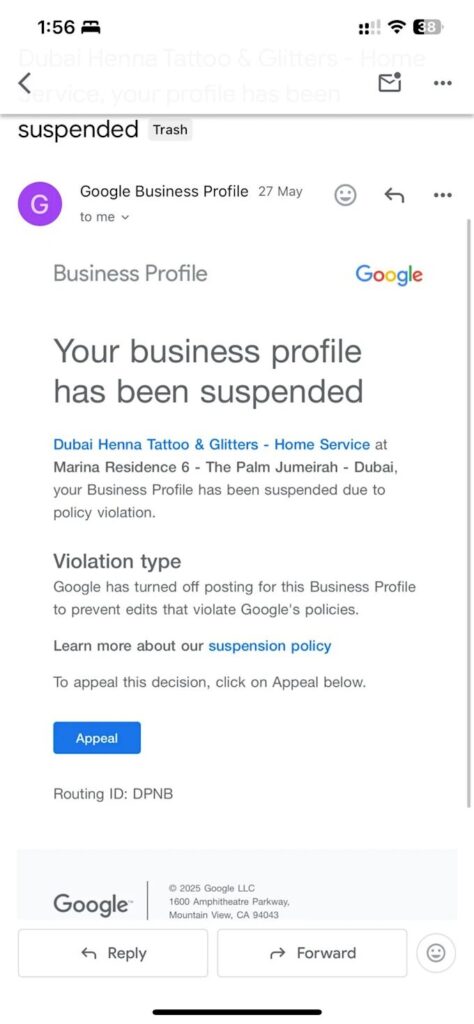
A suspended Google Business Profile is removed from Google Search and Maps until the issue is resolved — but most suspensions can be addressed through the appeal process if the right documentation is provided.
The Most Common Reasons Google Suspends a Profile
Understanding why your profile was suspended is the most important step before submitting an appeal — because submitting an appeal without addressing the underlying issue almost always results in a denial.
Google’s guidelines for representing your business on Google are the authoritative source for what is and isn’t permitted. The most common violations that trigger suspensions include:
Business name issues. The most frequent cause of suspension is a business name that does not match the real-world name of the business. Adding keywords, neighbourhood names, or marketing phrases to the business name field (“Best Ottawa Plumber — Fast Service”) violates Google’s guidelines. Your GBP name should match your signage, your business registration, and your website exactly.
Address or service area problems. Using a virtual office, a PO box, a co-working address, or a residential address for a business that does not actually operate or receive clients there. Service-area businesses that hide their address but set it inaccurately, or that list a physical address when they are not physically based there, are also at risk.
Duplicate listings. Multiple profiles for the same business at the same location — even if created accidentally — can trigger a suspension of one or both profiles. If you have more than one profile for the same business, this is likely the issue.
Category misuse. Selecting categories that don’t accurately describe the business, or adding excessive categories to capture more searches, can trigger a violation.
Spam and fake reviews. A profile that has recently had a significant influx of reviews that Google’s systems consider inauthentic may be flagged, which can affect the profile’s standing.
Unsupported edits. Certain profile changes — particularly changes to the business name or address — can trigger a verification or review process. If those edits were made based on inaccurate information, suspension can follow.
Ineligible business type. Some business types do not qualify for a GBP listing under Google’s guidelines, including home-based businesses that do not serve clients at or from the home.
What to Do Immediately After a Suspension
The most important rule after discovering a suspension is: do not start making rapid changes to the profile and do not create a new profile for the same business.
Creating a duplicate listing while an appeal is under review is explicitly against Google’s guidelines and can result in both profiles being permanently removed. Random edits made in a panic can complicate the appeal by creating inconsistencies in your profile history.
The correct immediate steps:
1. Log into your Business Profile manager and check whether the suspension status is visible. Look for any notification messages that explain the reason — in some cases, Google now shows which policy was violated.
2. Do not create a new profile. If your original profile was verified, creating a duplicate will not give you a shortcut — it will give Google another profile to suspend.
3. Review Google’s guidelines immediately. Before appealing, read Google’s guidelines for representing your business on Google carefully. Identify any areas where your profile may not have been fully compliant. An appeal submitted without addressing the underlying issue is almost always denied.
4. Identify the most likely cause. Cross-reference your profile details — business name, address, category, service area — against the guidelines. Is your business name identical to your signage? Does your address accurately reflect where the business actually operates?
5. Gather your business documentation. Before submitting an appeal, collect the documents that confirm your business’s real-world existence at the address listed.
What Documents to Gather Before Appealing
A strong reinstatement appeal is a documented one. Google typically asks for evidence that confirms your business is real, operates at the address listed (or the service area described), and is the business the profile represents.
Documents that are commonly useful for reinstatement appeals:
- Business registration or incorporation documents — matching your business name exactly as it appears in your profile
- Business licence — issued by the City of Ottawa or relevant municipality, matching your business name and address
- GST/HST registration documents — matching name and address
- Utility bills — in the business name, at the registered business address (not residential)
- Bank statements or credit card statements — in the business name, at the registered address
- Lease or rental agreement — for the business premises if you have a physical location
- Insurance certificates — in the business name, referencing the business address
All documents should match the business name and address exactly as listed on the Google Business Profile. Any discrepancy between documents and profile details — even minor ones like “St” vs “Street” — can weaken the appeal.
For service-area businesses that don’t have a physical customer-facing location, the documentation still needs to confirm the business’s real existence: business registration, tax documents, insurance, and banking documentation are typically most useful.
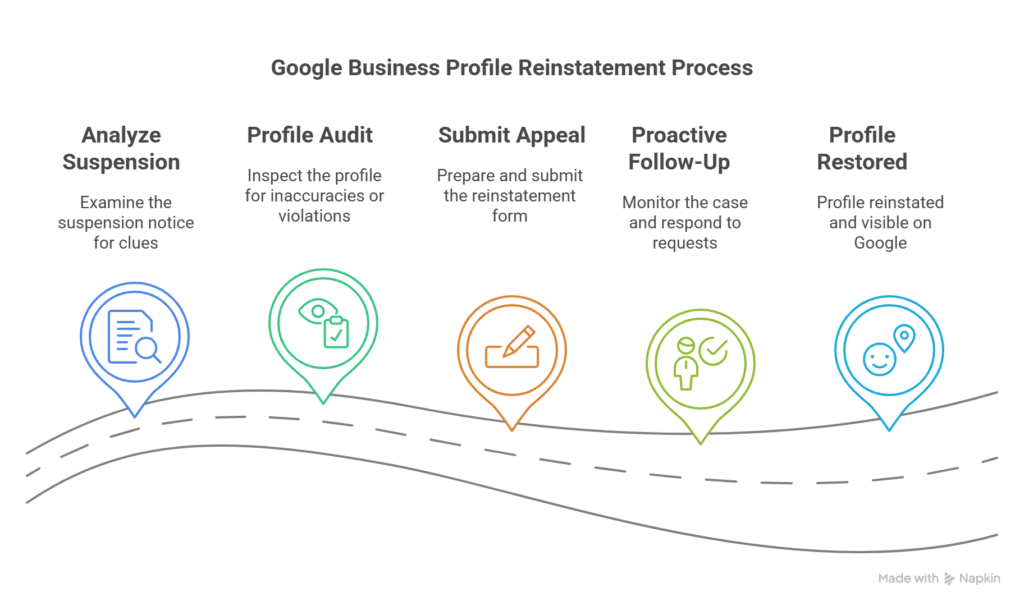
The reinstatement appeal process requires clear, matching documentation that confirms your business is real and operates as represented on the profile — the stronger and more consistent the evidence, the better the outcome.
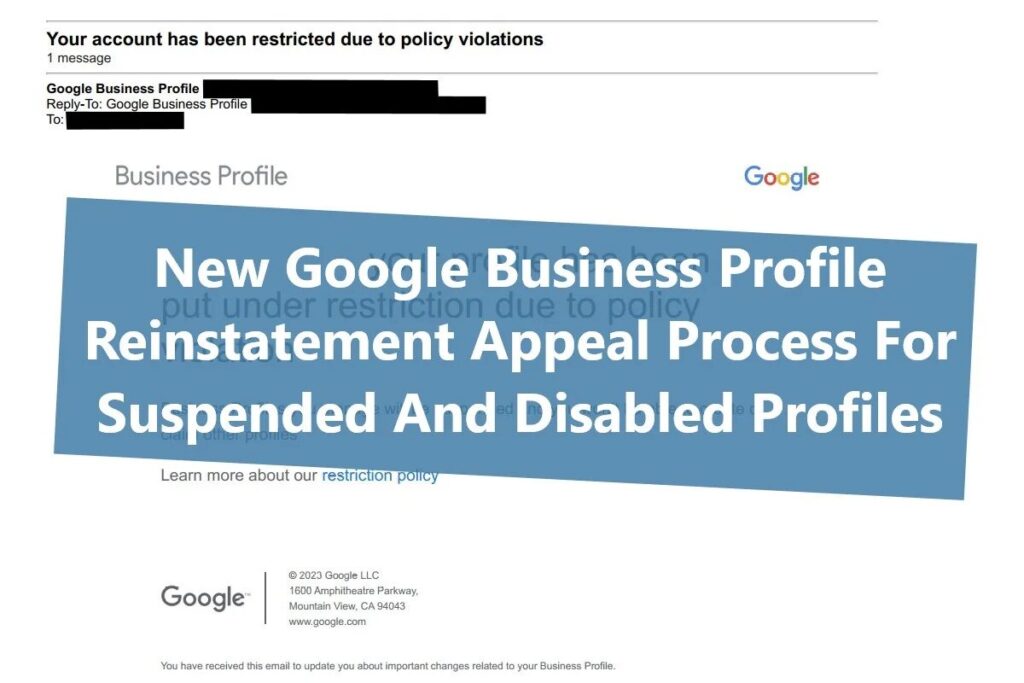
How to Submit the Appeal
Once you have reviewed the guidelines, identified the likely issue, corrected any profile inaccuracies you can address before the appeal, and gathered your documentation:
1. Access the Google Business Profile appeals tool. Google provides a dedicated appeals tool for suspended profiles. This is the correct channel — not a general Google support form.
2. Select the correct business. If you manage multiple profiles, confirm you are submitting the appeal for the correct suspended listing.
3. Describe the situation clearly. Explain your business honestly and specifically. Note what you believe caused the suspension, any corrections you have made, and why your business is eligible for a GBP listing. Keep the tone factual and professional.
4. Upload your supporting documentation. Submit the strongest, most directly relevant documents you have gathered. Ensure file names are neutral and professional — not screenshots taken on a phone at an angle.
5. Track the appeal status. Google provides status updates through the appeals tool. Processing times vary — from a few days to several weeks depending on the volume of appeals being reviewed.
Common Mistakes That Make the Situation Worse
Submitting multiple appeals rapidly. Submitting the same appeal repeatedly without adding new evidence or addressing the underlying issue signals to reviewers that you have not actually resolved the problem. Submit once, wait for a response, and if denied, prepare a stronger second submission.
Creating a new profile while the appeal is under review. As noted above, this is explicitly against Google’s guidelines and can result in both profiles being permanently removed.
Making major profile edits while the appeal is pending. Changes made while an appeal is under review can create inconsistencies that complicate the reviewer’s ability to verify your information.
Providing documentation that doesn’t match the profile. If your business registration is in a different name than your profile, or your address is formatted differently across documents, the appeal is likely to be denied. Consistency is the most important quality of a strong appeal.
Contacting Google support through multiple channels simultaneously. This does not accelerate the process and can create conflicting records in your case.
Adding or changing the business name to add keywords. Some business owners, after a suspension, try to “start fresh” by creating a profile with keywords in the name. This will almost certainly trigger another suspension.
The GBP Reinstatement Checklist
Before appealing:
- Stop making edits to the suspended profile
- Do not create a duplicate listing
- Read Google’s business representation guidelines in full
- Identify the most likely cause of the suspension
- Confirm your business name matches your signage, website, and registration exactly
- Confirm your address or service area is accurate and supported
- Confirm your primary category accurately represents your core business
- Gather business registration, licence, and matching address documents
During the appeal:
- Use the official Google Business Profile appeals tool
- Describe your business and situation clearly and specifically
- Upload clean, consistent documentation
- Submit once and wait — do not resubmit immediately
- Track the appeal status through the tool
After the appeal:
- If approved, review all profile details carefully before making any changes
- If denied, review the reason, prepare additional evidence, and submit one more time
- Set up alerts or regular profile checks to catch future issues early
What to Do If the Appeal Is Denied
A denial is not necessarily final. Google allows for an additional review in many cases if additional supporting evidence is provided.
If your first appeal is denied:
- Read any reason provided carefully — even a brief denial explanation can indicate what evidence was missing or what guideline concern was not adequately addressed
- Gather stronger or more directly relevant documentation — for example, switching from a utility bill to an official business licence or government registration document
- Correct any remaining profile issues you identified that were not addressed in the first appeal
- Submit a second appeal through the same tool with the additional evidence
- Keep the tone professional and factual
If repeated appeals are denied and you believe the suspension was applied in error, Google has an escalation path through the Business Profile support team. The path to escalation typically runs through the appeals tool itself, with options for further review appearing after an initial denial in some cases.
How to Reduce the Risk of Future Suspensions
Once your profile is reinstated — or if your profile is currently active and you want to protect it — these are the most important risk-reduction steps:
Keep your profile information accurate and consistent. Your business name, address, phone, and category should be identical across your profile, your website, and all directory listings. NAP inconsistency is both a local SEO problem and a suspension risk.
Only make changes when they reflect real-world changes. Do not update your address unless you have actually moved. Do not change your business name unless it has legally changed. Do not add categories to capture more search traffic — only add categories that accurately describe your business.
Monitor your profile regularly. Google allows anyone to suggest edits to a business’s profile. Third-party edits that are automatically or inadvertently accepted can introduce inaccuracies that create suspension risk. Check your profile at least monthly.
Build strong, consistent documentation. A business that has clear, matching registration documents, a proper website, and consistent directory listings is much easier to reinstate — and less likely to be flagged — than one with mismatched information across multiple sources.
Understand the guidelines before making major changes. Before editing your business name, address, or categories, review Google’s current guidelines. Many suspensions come from well-intentioned edits that inadvertently violate policy.
For a full understanding of how to maintain an optimized, compliant Google Business Profile — including the 2026 changes that affect how Google handles profile information — our Google Business Profile guide covers every element in detail. And for the broader context of how your GBP fits into your local SEO strategy, our local SEO guide explains how all the pieces work together.
When to Get Help Rather Than Handle It Alone
Most straightforward suspensions — caused by a business name issue, an address problem, or a duplicate listing — can be resolved by a business owner who carefully follows the process above.
Consider getting professional help if:
- Your appeal has been denied once or more with no clear explanation
- You are unsure which part of your profile caused the suspension
- Your business has a complex situation — multiple locations, a shared address, a home-based service business with special requirements
- Your entire Google account has been disabled rather than just the profile
- You do not have the time to research, document, and prepare a proper appeal carefully
- Your business’s revenue is significantly affected by the loss of GBP visibility
A professional handling your GBP can identify the specific guideline issue, prepare a well-documented appeal, and — if needed — navigate the escalation process more effectively than a rushed submission made under pressure. Our web design and local SEO services include Google Business Profile management and support, including situations like this where the profile needs careful attention.
Frequently Asked Questions
How long does a Google Business Profile reinstatement take?
Processing times vary significantly depending on Google’s current appeal volume. Simple cases can be resolved in a few business days. More complex situations — particularly those involving disputed information or multiple previous appeals — can take several weeks. The appeals tool provides a status tracker so you can monitor progress without submitting additional requests that might delay the review.
Will I lose my reviews if my GBP is reinstated?
In most cases, your reviews are retained after reinstatement. The reviews are associated with the business listing, not the suspension status. However, if the profile is permanently removed rather than reinstated, reviews associated with that listing may not be recoverable. This is another reason why proper appeals — rather than creating a new profile — is the correct path.
Can I create a new Google Business Profile while appealing?
No. Google explicitly states in its guidelines that creating a new profile for the same business while an appeal is under review can result in both profiles being permanently removed. Wait for the appeal to be processed before taking any action that would create a duplicate listing.
What if I don’t know why my profile was suspended?
Start by reading Google’s guidelines for representing your business on Google in full and comparing every aspect of your profile against what is permitted. Pay particular attention to your business name (no keywords or descriptors), your address (must be a real, accurate business location), your categories (must accurately represent your primary business), and your service area settings. In many cases, reviewing the guidelines carefully reveals the issue that wasn’t immediately obvious. If the suspension notification in your profile manager includes a specific policy reference, start your investigation there.
Should I respond to negative reviews before or after resolving a suspension?
During an active appeal, focus on the appeal itself. Making other profile changes during this period can complicate the review. Once the profile is reinstated, return to regular profile maintenance — including responding to reviews. If negative reviews played a role in the suspension (for example, reviews suggesting the business is not what it claims to be), that context may be relevant to mention in your appeal explanation, but responding to the reviews themselves should wait until after reinstatement.
Does having a suspended GBP affect my website’s SEO rankings?
A GBP suspension directly affects your local map pack visibility, which is separate from your organic website rankings. Your website can continue to appear in organic search results below the map pack even while your profile is suspended. However, the loss of map pack presence significantly reduces your local visibility and the number of direct calls and contacts your business receives from Google — which is why resolving the suspension promptly and correctly is important. For guidance on maintaining your website’s visibility during this period, our post on how to get more customers from Google for free covers the website-side visibility channels.
Conclusion: Act Correctly, Not Just Quickly
A suspended Google Business Profile is a significant disruption — but it is a solvable problem in most cases. The businesses that recover fastest and most successfully are not necessarily the ones that act most quickly. They are the ones that take the time to understand the underlying issue, prepare the right documentation, and submit a clear, consistent, properly evidenced appeal.
Do not create a duplicate. Do not make random edits. Do not submit the same appeal repeatedly without new evidence. Read the guidelines, identify the issue, gather your documentation, and submit once — thoroughly.
At Ottawa Web Genius, we help Ottawa small businesses manage their Google Business Profiles properly — including the situations where something has gone wrong and needs to be fixed carefully. Whether you need guidance preparing a reinstatement appeal or help making sure your profile is set up to avoid future issues, we can help.
Explore our local SEO and GBP services or reach out directly if your profile has been suspended and you’re not sure what to do next.