What do I need for my Small Business Website?
If you’re planning a new website or updating an existing one, it’s easy to feel overwhelmed. Sliders, chatbots, video backgrounds, social feeds, booking calendars — there’s no shortage of things you could add. But what do you actually need?
The answer is simpler than most people expect.
A great small business website doesn’t need to be complicated. It needs to do three things well: build trust, explain what you do, and make it easy for the right people to take action. Everything else is secondary.
In this guide, we’ll walk through the essential features every small business website should have, the pages that matter most, what you can skip, and how to think about features based on your specific business goals.
What Does a Small Business Website Actually Need to Do?
Before we talk about features, it helps to get clear on the job your website needs to perform.
Most small business websites exist to do one or more of the following:
- Generate phone calls or form submissions from potential clients
- Build credibility so people feel confident reaching out
- Explain your services clearly to people who are already looking for what you offer
- Support local visibility through Google Search and Google Maps
- Convert visitors who found you through referrals or social media
Your website is not a brochure. It’s a sales and trust tool that works for you around the clock. The features you need are the ones that help it do that job — and nothing more.
The Essential Features Every Small Business Website Should Have
These are the non-negotiables. If your website is missing any of these, it’s likely costing you leads or credibility.
Clear, Simple Navigation
Visitors should immediately understand how to find what they need. A cluttered or confusing menu creates friction. Keep your navigation to five or six items at most, and use plain language — “Services,” “About,” “Contact” — rather than clever labels that confuse people.
Mobile-Friendly Design
More than half of all web traffic happens on phones. If your website doesn’t look and work great on a mobile device, you’re losing visitors before they even read your first sentence. A responsive, mobile-first design is not optional.
Fast Loading Speed
People leave slow websites. A page that takes more than three seconds to load will lose a significant portion of its visitors. Speed also affects your Google rankings. Optimized images, clean code, and good hosting all contribute to a fast site.
Clear Calls to Action
Every page on your website should guide visitors toward a next step — whether that’s calling you, filling out a form, requesting a quote, or booking a consultation. Calls to action should be visible, specific, and repeated throughout the page, not hidden at the bottom.
Contact Form and Contact Information
Make it effortless for people to reach you. Your phone number, email address, and a simple contact form should be easy to find — ideally in the header, footer, and on a dedicated Contact page. If you serve a local area, include your address.
SSL Certificate and Basic Security
Your website needs an SSL certificate (indicated by the padlock and “https” in the browser). This protects visitors’ information and is a trust signal both to users and to Google. Most reputable web hosts include this, but it’s worth confirming.
Strong Branding and Clear Messaging
Your website should communicate who you are, who you help, and why someone should choose you — ideally within the first few seconds of landing on your homepage. Clear, consistent branding builds recognition and confidence.
Basic On-Page SEO Setup
This includes proper page titles, meta descriptions, header tags, and image alt text. You don’t need to obsess over SEO on day one, but basic setup ensures your site can be found by the right people when they search for your services.
A Content Management System (CMS)
You should be able to update your own website without calling a developer every time. A good CMS — whether that’s WordPress, Webflow, Squarespace, or another platform — gives you control over your content without requiring technical skills.
The Most Important Pages a Small Business Website Should Include
Features live on pages. Here are the pages that belong on nearly every small business website.
Homepage
Your homepage is your first impression. It should clearly state what you do, who you serve, and what makes you different — followed by a strong call to action. Include a brief overview of your services, a few trust signals (reviews, credentials, years in business), and a direct path to contact.
Services or Products Page
People need to understand exactly what you offer before they’ll reach out. A dedicated services page — or individual pages for each service — lets you go into detail, address common questions, and use the keywords your ideal clients are actually searching for.
About Page
People do business with people they trust. Your About page is where you explain your background, your values, and what drives your work. It doesn’t need to be long — but it should feel genuine and help visitors feel confident about choosing you.
Contact Page
A simple, functional contact page with a form, your phone number, email, and (if applicable) your physical address or service area. If you want calls, make your phone number prominent. If you prefer email or form submissions, design accordingly.
Testimonials or Reviews
Social proof is one of the most powerful trust-builders on any website. A page dedicated to client reviews, or testimonials woven throughout your service and homepage, significantly increases the likelihood that visitors will reach out.
FAQ Page (Where Appropriate)
If your clients consistently ask the same questions, an FAQ page does double duty: it saves you time and it helps your website rank for specific search queries. It also shows that you understand your clients’ concerns.
Trust-Building Features That Make a Real Difference
Trust is earned, not assumed. These features help visitors feel confident before they ever speak to you.
- Client testimonials and reviews — ideally with names and photos when possible
- Professional photography — real photos of you, your team, or your work
- Credentials, certifications, or awards — relevant to your industry
- Logos of clients or media mentions — if you have them
- Google Maps embed — for local businesses, this confirms your physical presence
- Clear privacy policy and terms — signals that you’re a legitimate, established business
- Years in business or project count — specific numbers build credibility
Conversion-Focused Features That Turn Visitors into Leads
Conversion is about removing friction and creating confidence. These features help.
- A phone number in the header — especially for service businesses that want calls
- Multiple contact options — some people want to call, others want to email or fill out a form
- A strong above-the-fold CTA — the first thing visitors should see is a reason to act
- A lead magnet or free consultation offer — something low-risk that gets people in the door
- Live chat or chatbot — useful if your team can respond quickly; avoid it if you can’t
- Booking integration — valuable for appointment-based businesses like consultants, therapists, and beauty professionals
Mobile, Speed, and SEO Essentials
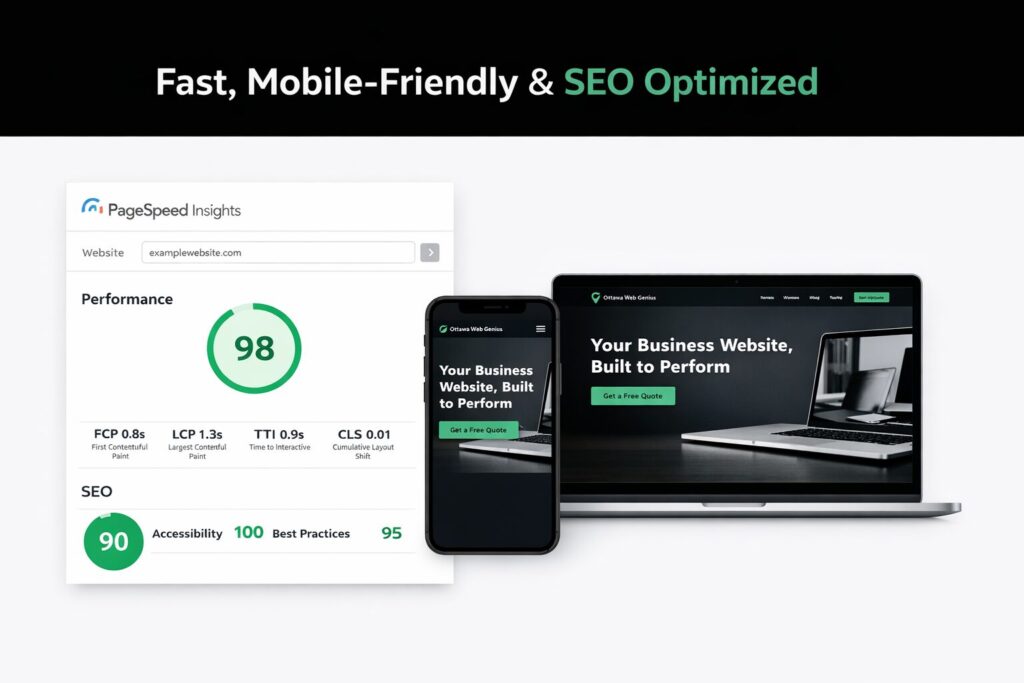
These three areas are often treated as afterthoughts. They shouldn’t be.
Mobile: Your website should be tested on multiple devices and screen sizes. Buttons need to be tappable. Text needs to be readable without zooming. Forms need to work smoothly on a phone.
Speed: Compress your images. Use a reliable host. Avoid loading unnecessary scripts and plugins. Tools like Google PageSpeed Insights can show you where your site is slowing down.
SEO basics: Each page should have a unique title and meta description. Use your target keywords naturally in headings and body copy. Set up Google Search Console to monitor your site’s performance in search results.
Features Small Businesses Think They Need (But Often Don’t)
Here’s where we save you some money and headaches.
| Feature | The Reality |
| Animated sliders / hero carousels | Rarely improve conversions; often hurt speed and clarity |
| Social media feed on the homepage | Pulls visitors away from your site; usually looks cluttered |
| Complex membership portals | Almost never needed at the early stage |
| Custom chatbots | Only useful if someone will actually respond promptly |
| Blog with 50 posts on day one | Two or three well-written posts beat a rushed, thin archive |
| E-commerce | Only if you’re actually selling products online — not just because it sounds good |
| Parallax scrolling effects | Trendy, but can hurt mobile usability and load speed |
| Live counters, popups, and auto-play video | Distracting and often annoying to visitors |
The pattern here: many features that look impressive often make websites less effective for small businesses. A site with clear messaging, fast loading, and simple navigation will outperform a flashy, bloated site almost every time.
How the Right Features Depend on Your Business Type
Not every business needs the same website. Here’s how priorities shift depending on what you do.
Local service businesses (contractors, landscapers, plumbers, electricians) Focus on: Clear service area, phone number in the header, Google Maps, reviews, and a simple quote request form. Speed and local SEO matter most.
Law firms and professional services Focus on: Credibility signals (credentials, bar association membership, case results where appropriate), practice area pages, attorney bios, and a consultation request form. Trust is everything.
Consultants and coaches Focus on: A strong About page, testimonials, a clear explanation of your process or methodology, and a low-friction way to book a discovery call. Your website should reflect your personal brand.
Restaurants and retail Focus on: Hours, location, menu or product photos, online ordering if applicable, and reservation or contact options. Mobile experience is critical.
E-commerce businesses Focus on: Product pages, clear pricing, easy checkout, return policy, customer reviews, and fast load times. Security and trust signals are especially important.
Must-Have vs. Nice-to-Have: A Quick Reference
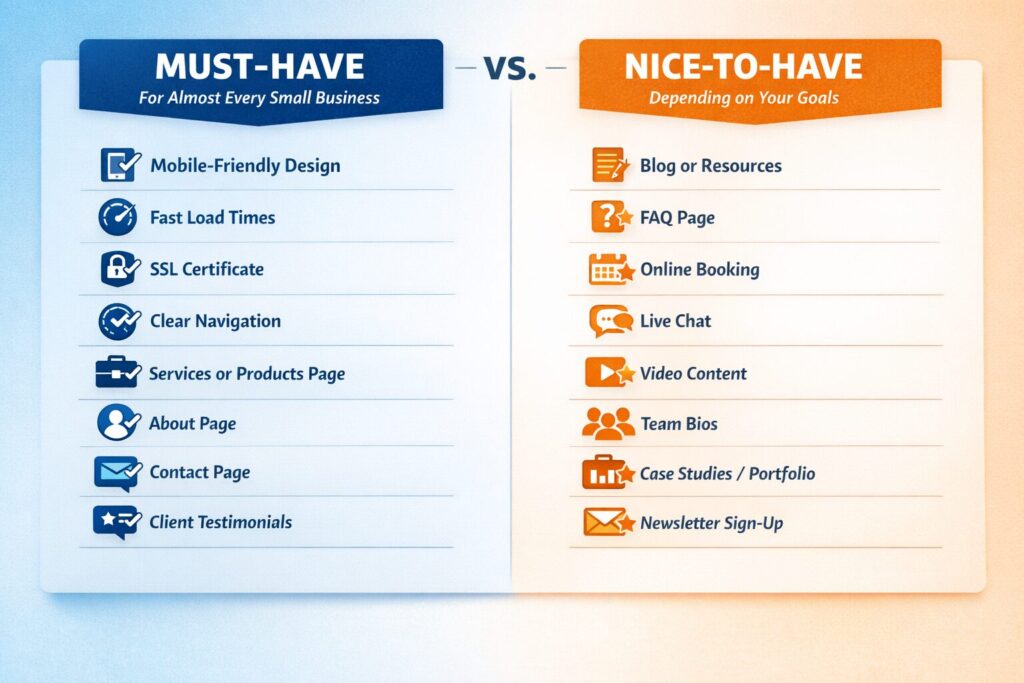
Must-have for almost every small business website:
- Mobile-friendly, responsive design
- Fast load times
- SSL certificate
- Clear navigation
- Homepage with a strong call to action
- Services or products page
- About page
- Contact page with form and phone number
- Client testimonials or reviews
- Basic SEO setup (titles, meta descriptions, headings)
- Consistent branding and messaging
Nice-to-have, depending on your goals:
- Blog or resources section
- FAQ page
- Online booking or scheduling integration
- Live chat
- Video content
- Team bios
- Case studies or portfolio
- Newsletter sign-up
Probably don’t need (at least not yet):
- Hero image carousel/slider
- Social media feed on your homepage
- Complex animations or parallax effects
- Membership portal
- Custom chatbot
- Pop-up promotions
Frequently Asked Questions
How many pages does a small business website need? Most small businesses can do very well with five to eight pages: Home, About, Services (or individual service pages), Contact, and a Testimonials or FAQ page. You don’t need a large site to make a strong impression — you need a focused one.
Do I need a blog on my small business website? Not necessarily right away. A blog can help with SEO over time, but only if you’re genuinely going to publish useful, well-written content regularly. A neglected blog with outdated posts can actually hurt your credibility. Start with a solid core site and add a blog when you’re ready to commit to it.
What is the most important feature on a small business website? Clarity. If visitors can’t quickly understand what you do, who you serve, and how to contact you, no other feature will save the site. Strong messaging and a clear call to action outperform any design gimmick.
Do I need an e-commerce store on my small business website? Only if you’re selling products directly online. Many service businesses make the mistake of adding e-commerce features they don’t use, which adds complexity and cost without any benefit.
How important is SEO for a small business website? Very important — but basic SEO doesn’t have to be complicated. Proper page titles, meta descriptions, local business information, and well-written service pages will take you a long way. You don’t need to hire an SEO specialist on day one, but your website should be built with search visibility in mind from the start.
How much does it cost to build a small business website with the right features? Costs vary widely depending on the platform, the designer, and the complexity of your site. A focused, professionally designed website with the essential features covered in this guide typically costs between $2,500 and $10,000. The more important question is: what is a new client worth to your business? A well-built website often pays for itself with a single new customer.
The Bottom Line: Simple, Clear, and Built Around Your Goals
The best small business website isn’t the most feature-rich one — it’s the one that works hardest for your specific goals.
If your goal is phone calls, make your phone number impossible to miss. If your goal is form submissions, build a clear, simple intake form. If your goal is bookings, make the booking process frictionless. Every feature on your site should earn its place by supporting one of those goals.
A good web design partner will help you figure out exactly what your website needs — and talk you out of what it doesn’t. That kind of strategic thinking at the start of a project saves time, money, and a lot of future frustration.
Ready to build a website that actually works for your business?
We help small businesses across [your region] build focused, professional websites that generate real leads — without the unnecessary complexity.
Get in touch to start the conversation →
Looking for more guidance? You might also enjoy: