UX stands for user experience. User experience is simply what it feels like for someone to use your website and how easily they can accomplish what they came there to do.
So, does a small business website need UX design? Yes – but that does not mean every small business needs to hire a dedicated UX designer.
Every decision about your navigation, pages, buttons, forms, content, and mobile layout affects the experience your visitors have. Imagine walking into a store where the products look great, but there are no signs, nobody can tell you where anything is, and the checkout counter is hidden. The store may be beautiful. The experience is still poor.
Your website already has a user experience. The question is whether it’s a good one.
What Is UX Design?
UX design is the process of making a website easier and more useful for the people who actually use it. Rather than starting with questions like “What colour should this section be?”, UX starts with questions about why someone is visiting, what they are trying to accomplish, what information they need first, where they should go next, what could confuse them, and what might prevent them from contacting the business.
That is why UX design is much broader than making a website attractive.
Imagine someone in Ottawa discovers a leaking pipe at 9 p.m. They pull out their phone and search for an emergency plumber. They are probably not interested in an elaborate homepage animation. They want four answers: Do you provide emergency plumbing? Do you serve my area? Can you help me now? How do I call you?
If the website answers those questions immediately and gives them a prominent tap-to-call button, that is good UX. If they have to open three pages, scroll through a company history, close a popup, and eventually hunt for a phone number in the footer, that is poor UX.
| What should you do next? Open your homepage and pretend you know absolutely nothing about your company. Ask what your most common customer wants to accomplish and whether the website makes that obvious within seconds. |
What Does UX Look Like on a Small Business Website?
UX is not normally one big feature. It is dozens of relatively small decisions working together.
- A visible phone number is UX because a visitor should not have to hunt for a way to call you.
- Clear navigation is UX because visitors need to understand where each menu item will take them.
- Readable text is UX because information is not useful if it is uncomfortable to read.
- A short contact form is UX because every unnecessary field creates another step between interest and inquiry.
- Clear calls-to-action are UX. A call-to-action (CTA) is a button, link, or message asking someone to take a specific next step, such as “Request a Quote” or “Book a Consultation.”
- Fast-loading pages, useful error messages, accessible layouts, directions, business hours, service areas and understandable pricing information are UX decisions too.
One thing I’ve noticed when reviewing small business websites is that the biggest UX problems are rarely spectacular technical failures. They are usually ordinary things: confusing wording, buried contact information, an awkward mobile menu, or a page that never makes clear what the visitor should do next.
Related Ottawa Web Genius resource: What Features Do I Really Need on My Small Business Website?
What should you do next? Identify the three things visitors most commonly come to your website to do. Try completing each one yourself on desktop and then on your phone.
UX Design vs. UI Design: What’s the Difference?
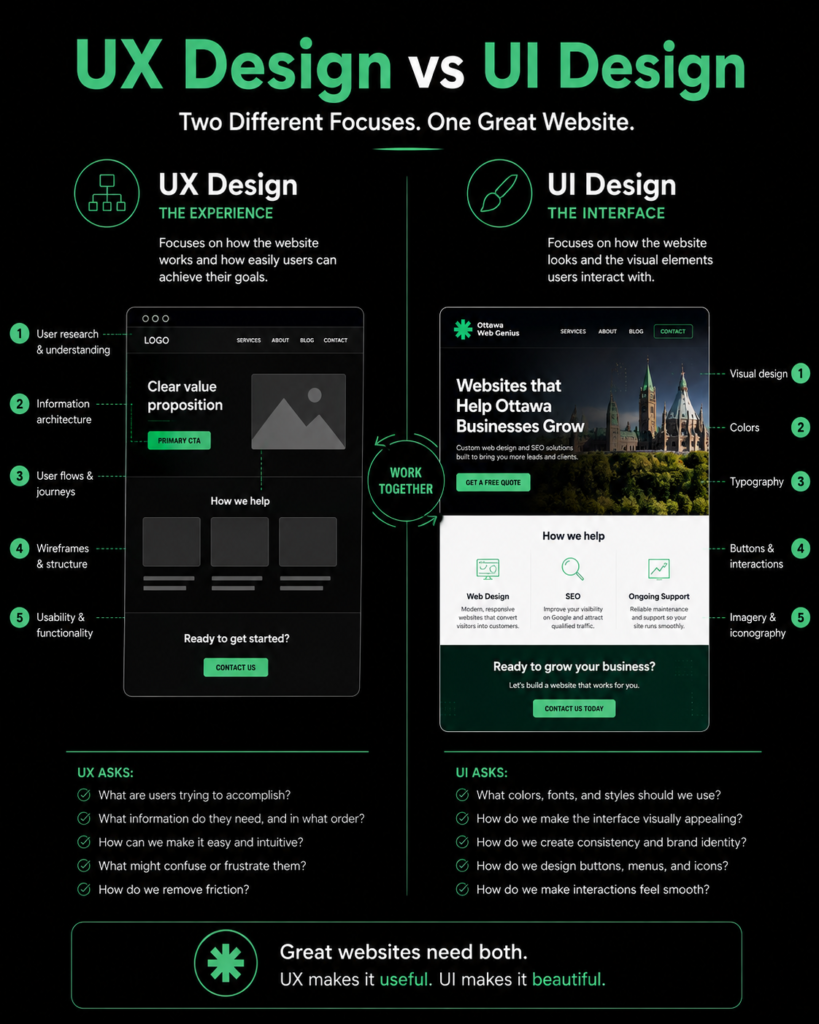
UI stands for User Interface. It refers to the visual and interactive elements someone sees and uses, including colours, typography, buttons, menus, icons, and forms. UX and UI overlap, but they are not interchangeable.
| UX Design | UI Design |
| Focuses on how something works | Focuses on how it looks and feels |
| Customer journey | Visual presentation |
| Navigation structure | Colours |
| Information hierarchy | Typography |
| Form experience | Button appearance |
| Usability | Visual consistency |
Think of a car dashboard. UX determines whether the driver can easily find the speedometer, turn on the headlights, adjust the temperature, and understand warning messages. UI influences what those controls look like: their colours, shapes, typography, icons, and styling.
A beautifully styled button does not help much if nobody understands what happens when they press it. Likewise, a perfectly positioned button can still undermine trust if the whole website looks careless and outdated. Good websites need both.
Why UX Design Matters for Small Business Websites
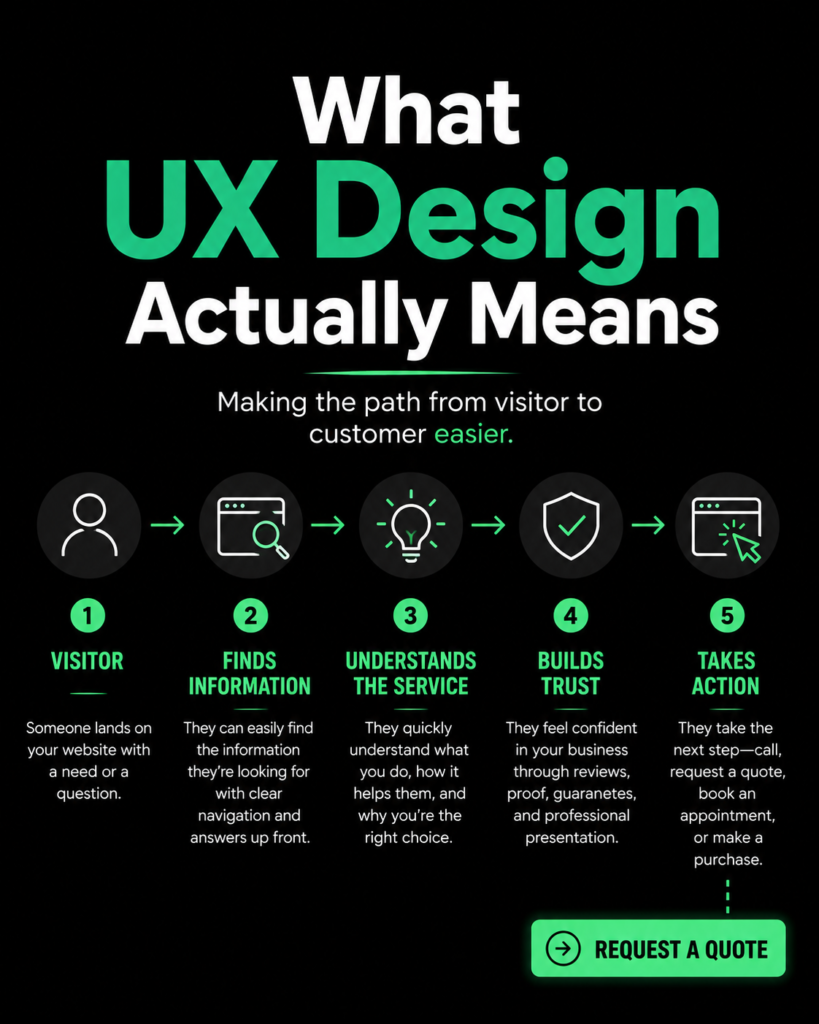
For a small business, website UX eventually becomes a business issue. A homeowner wants an estimate. A prospective legal client wants to book a consultation. A patient wants an appointment. A restaurant customer wants to see the menu. A consultant’s prospect wants to understand the service before scheduling a call.
The website’s job is to help each person move from “I need something” to “This business can help me” to “Here is what I do next.”
When I’m planning a website, one of the first questions I ask isn’t what colours the client likes. It’s what the visitor needs to do.
That question affects navigation, page structure, content, buttons, forms, mobile design and ultimately how effectively the website supports the business.
How Bad UX Quietly Loses Customers
Ottawa Contractor
A homeowner in Barrhaven wants an estimate. They reach the contractor’s website but cannot determine whether the company serves Barrhaven, and the Contact button is buried inside the mobile menu. They return to Google.
Law Firm
Someone has a legal problem but does not know the proper legal terminology. The firm’s website organizes everything around technical practice-area terminology without explaining what kinds of problems each lawyer handles. The visitor cannot tell whether they found the right firm.
Restaurant
Someone in Westboro wants to see tonight’s menu. The website requires them to download a large PDF that is difficult to read on their phone. They check another restaurant.
Clinic
A patient wants to make an appointment but cannot determine whether they should call, complete the form, create an account, or wait for a referral. They postpone it.
Home Service Business
A homeowner finds the company through Google Maps. The website loads on mobile, but the phone number is only visible at the bottom of the Contact page. They tap Back and call the next company.
These visitors rarely tell the business, “Your website’s UX was confusing.” They simply leave.
That makes UX problems particularly difficult to detect. A business can lose opportunities without receiving any direct feedback explaining why.
Good Design Doesn’t Automatically Mean Good UX
A website can be beautiful, modern, heavily animated and award-winning and still be frustrating to use. A visually simple website can also provide exceptional UX.
Animations, unconventional layouts, large photography, video and creative typography are not inherently bad. The problem starts when presentation interferes with the visitor’s goal. If a full-screen animation delays access to the phone number an emergency customer needs, the design is working against the experience.
The best websites do not choose between UX and visual design. The visual design supports the experience.
UX and Website Conversions
A conversion happens when a website visitor completes an action the business wants, such as calling, requesting an estimate, booking an appointment or making a purchase.
UX can influence conversions by reducing friction. Friction means anything that makes completing an action unnecessarily difficult.
Consider a quote form asking for a name, phone number, email, address, budget, referral source, project date, preferred contact method, detailed project description and several other fields. The business may need some of that information eventually, but it may not need all of it before someone can simply ask for an estimate.
Other UX decisions affecting conversions include CTA placement, whether button wording explains what happens next, whether trust signals appear before someone is asked to commit, whether navigation makes the right service easy to find, and whether mobile users can comfortably complete forms.
Related Ottawa Web Genius resource: How to Get More Clients From Your Website Without Spending More on Ads
| What should you do next? Complete your own primary conversion action from your phone. Count how many decisions, taps and fields stand between arriving on the site and completing it. |
UX and SEO: Are They Connected?
Yes, but the relationship is frequently oversimplified. Good UX does not automatically make a website rank higher.
Google’s guidance explains that its ranking systems consider many signals and recommends a holistic approach to page experience rather than treating one metric as a guarantee of rankings. Core Web Vitals are Google’s measurements of real-world loading performance, responsiveness and visual stability.
UX and SEO nevertheless overlap in areas such as page performance, mobile usability, understandable content structure, navigation, internal linking, accessibility and making the main content easy to access.
Google sources: Core Web Vitals and Google Search results | Understanding page experience in Google Search results
Related Ottawa Web Genius resource: What Are Core Web Vitals and Why Should Small Business Owners Care?
| What should you do next? Do not redesign your website solely because you think Google wants a prettier site. Prioritize your customers first, then make sure technical performance and search accessibility support that experience. |
Mobile UX Matters Even More for Local Businesses
Consider searches such as “electrician near me,” “family lawyer Ottawa,” “restaurant Westboro,” or “dentist Barrhaven.” These visitors may be standing outside, sitting in a car, dealing with an urgent problem, or trying to make a decision quickly.
They usually need practical information quickly: call, directions, hours, services, booking, pricing or menu information.
Navigation should remain understandable. Text should be readable without zooming. Forms should not require precise tapping. Phone numbers should be callable. Important buttons need enough room around them.
A tap target is the clickable area of an element such as a button or link. W3C’s Web Content Accessibility Guidelines include guidance on minimum target sizing or spacing so people are less likely to activate neighbouring controls accidentally.
Accessibility source: W3C – Target Size (Minimum)
Mobile UX is not simply shrinking your desktop website until it fits. It means considering how someone’s needs and behaviour change when the screen becomes smaller.
What Does the UX Design Process Actually Look Like?
User Research
Learning what actual or likely customers need, expect and struggle with. For a small contractor, this may be as simple as reviewing common customer questions, speaking with the owner and examining search behaviour.
User Journey
The sequence of steps someone takes from arriving on the website to accomplishing a goal. Example: Google search → roofing service page → reviews → project gallery → estimate form.
Information Architecture
How pages and information are organized so visitors can find and understand them. This includes deciding what belongs in the main navigation and how services should be grouped.
Wireframe
A simple structural blueprint of a webpage created before detailed visual styling. It focuses on what goes where rather than colours and photography.
Prototype
An interactive representation that lets designers or users try how part of the website may work before the final site is developed.
Usability Testing
Observing people attempting realistic tasks so you can see where they become confused, hesitate or fail.
A five-page Ottawa contractor website does not require the same research program as an online banking platform. UX work should be proportional to the complexity and consequences of the project.
Do Small Businesses Need a UX Designer?
Usually, no.
A typical Ottawa service business probably does not need a dedicated full-time UX specialist or months of formal research. It does need whoever is planning and designing the website to understand UX.
Dedicated UX expertise becomes increasingly valuable for complex software applications, SaaS products, large e-commerce stores, complicated booking systems, customer portals, websites serving several very different audiences, and products involving complicated workflows.
For a typical contractor, law firm, consultant or local service business, the process can be leaner: understand the customer, plan the pages, establish clear journeys, design sensible navigation, make actions obvious, build for mobile, and test the result. That is UX too.
UX for a $1,500 Website vs. a $15,000 Website
UX is not an on/off switch. The appropriate process depends on complexity, budget and risk. These prices are examples, not universal market rates.
| Smaller Website Project | Larger / Complex Project |
| Customer discovery | Formal user research |
| Page planning | Customer interviews |
| Navigation planning | Personas |
| CTA strategy | Detailed journey mapping |
| Mobile planning | Interactive prototypes |
| Form optimization | Formal usability testing |
| Basic testing | Multiple validation rounds |
A small-business website does not become “non-UX” because it does not include formal personas and weeks of testing. The objective is the same: understand the user well enough to make good design decisions.
Common UX Mistakes on Small Business Websites
- Unclear navigation or too many menu options.
- Vague buttons such as “Learn More” when a more specific action would be clearer.
- Buried contact information.
- Long forms that ask for information the business does not need yet.
- Pop-ups that cover most of a mobile screen.
- Autoplay video that distracts from the visitor’s task.
- Poor text contrast that makes content difficult to read.
- Confusing service names built around internal company terminology.
- No clear next step after a visitor reads a page.
- Designing the website around the business instead of the customer’s problem.
A Simple UX Test Any Business Owner Can Do
Find someone who is not familiar with your business. Open your website and give them about ten seconds. Then ask:
- What does this business do?
- Who does it serve?
- Where does it operate?
- What do you think you are supposed to do next?
Next, give them realistic tasks: find a service, find the phone number, request a quote, find pricing if you publish it, or book an appointment if your website supports bookings.
Do not tell them where anything is. Watch what they do.
If they pause at a menu, scroll past the button you expected them to click, or misunderstand a service name, note it. Where people hesitate is useful UX information.
UX Design Comparison: Poor UX vs. Better UX
These are examples rather than universal rules. The right choice depends on the business, audience and task.
| Poor UX | Better UX |
| “Learn More” with no context | “Request a Free Estimate” |
| 12 navigation items | 5–7 clear categories |
| 15-field contact form | Only necessary fields |
| Phone number buried in footer | Click-to-call in header |
| Generic homepage messaging | Clear service + location |
| Desktop-only thinking | Mobile-first experience |
Mobile-first means considering the small-screen experience as a primary design requirement rather than treating it as a reduced version of the desktop site.
What Should a Small Business Do About UX?
- Understand why people visit. Identify the two or three primary reasons customers come to the website.
- Identify their important questions. Do not make visitors search for information required to make a decision.
- Make primary actions obvious. Calling, booking or requesting a quote should not require detective work.
- Simplify navigation. Organize the website using language customers understand.
- Test mobile. Check menus, buttons, forms, text and page speed on real devices.
- Remove unnecessary friction. Question every extra field, popup, click and decision.
- Watch real people use the site. A few observations can expose problems you have stopped noticing yourself.
- Use analytics to identify problems. Traffic and behaviour data can help identify pages that deserve closer investigation.
The goal is not to make every visitor stay longer. The goal is to help the right visitor accomplish what they came to do.
Frequently Asked Questions
What does UX mean in web design?
UX means user experience. In web design, it describes how easy, clear and useful the website feels to someone trying to accomplish something. Navigation, page structure, content, forms, buttons and mobile behaviour all contribute to UX.
What’s the difference between UX and UI design?
UX focuses primarily on how the website works for the visitor and how easily they can accomplish their goals. UI, or User Interface design, focuses more on visual and interactive presentation, including colours, typography, buttons and other interface elements. Strong websites use both together.
Does a small business need a UX designer?
Usually not a dedicated one. Most small business websites are not complex enough to require a full UX research team. However, whoever plans and designs the website should understand UX principles and apply them throughout the project.
How much does UX design cost?
There is no useful universal price because UX can range from basic planning within a small web-design project to extensive research, prototyping and usability testing for complex digital products. The appropriate investment should reflect the website’s complexity, risk and importance to the business.
Can UX design improve website conversions?
It can help. Better UX can remove obstacles that prevent visitors from calling, submitting forms, booking appointments or making purchases. That does not guarantee a particular conversion rate, but it gives qualified visitors fewer reasons to abandon the process.
How do I know if my website has bad UX?
Watch someone unfamiliar with your business use it. Ask them to identify what you do, find a service and contact you without giving instructions. Confusion, hesitation, missed buttons and misunderstood wording can reveal UX problems that are difficult to notice when you already know the website.
Does Your Small Business Website Need UX Design?
A small business may not need a dedicated UX designer. But it absolutely needs to think about user experience.
For most Ottawa businesses, that means something practical rather than elaborate: understand what customers need, organize information around those needs, make navigation obvious, make contacting the business easy, design properly for mobile and test whether real people can use the website without explanation.
UX is not an expensive feature that gets added after the website is finished. It is already there.
Your website already has a user experience. UX design is simply the process of making sure that experience helps customers instead of getting in their way.
| Not sure what customers experience on your website?Ottawa Web Genius can review your website from a customer’s perspective and identify the highest-priority opportunities without turning the conversation into an unnecessary sales pitch.Explore Ottawa Web Genius Web Design Services |
What Is a CMS and Which One Should a Small Business Use?
August 26, 2026[…] behind the website matters, but so does what visitors experience on the front end. Our guide to [UX design for small business websites] explains how navigation, forms, page structure, and other decisions affect how easily customers […]