CMS stands for Content Management System. A CMS is software that lets you create, organize, edit, and publish website content without manually coding every page.
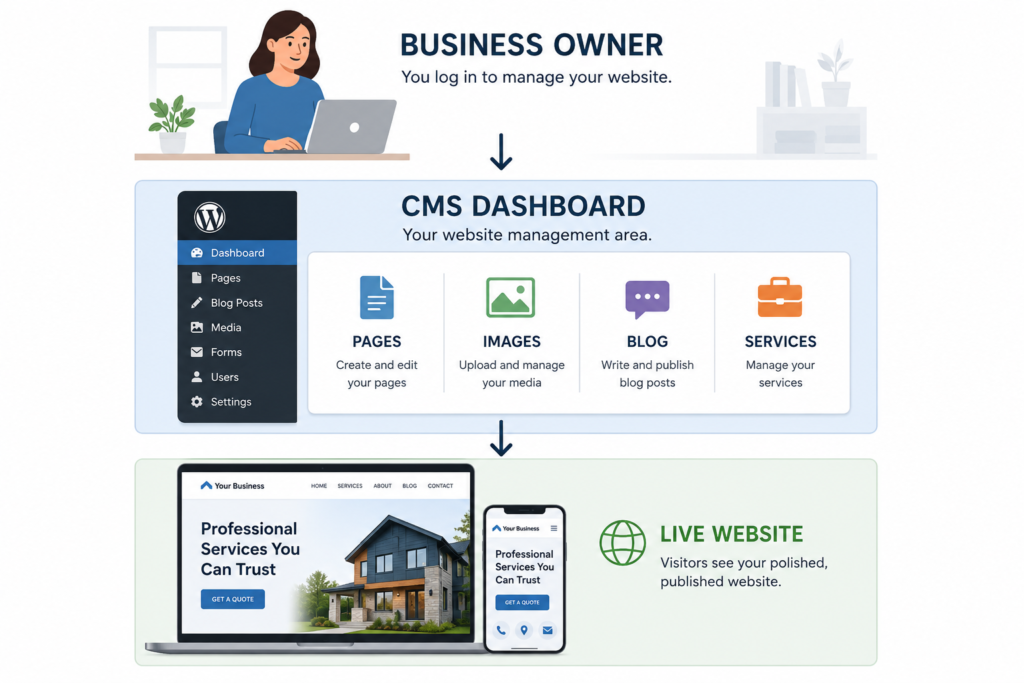
Think of your website as a storefront. Your customers see the finished store, while the CMS is the workspace behind the counter where you update prices, add products, change signs, and organize what customers see.
So, which CMS should a small business use?
For many service-based small businesses, WordPress is a strong choice because of its flexibility, large ecosystem, and ability to grow with a website. Wix and Squarespace can be excellent choices when simplicity and managed infrastructure matter more. Shopify is usually the more natural option when selling products online is the main purpose of the website.
There is no universal winner.
The best CMS for a small business is the one that fits what the website actually needs to do.
What Is a CMS?
A Content Management System gives you an administrative area where you can manage your website without having to edit its underlying code every time something changes.
Depending on the CMS, you may be able to manage:
- Website pages
- Blog posts
- Images and videos
- Navigation menus
- Users
- Forms
- Products
- SEO settings
- Website templates
- Other content
Imagine an Ottawa renovation company decides to introduce basement finishing as a new service.
With a CMS, the company or its web designer can create a new service page, add project photos, write the content, optimize the page for search, and publish it without rebuilding the entire website.
That flexibility is one of the main reasons Content Management Systems have become so useful for small businesses.
What should you do next?
Before comparing platforms, write down what you expect to update on your website after it launches. That will immediately tell you a lot about how important your CMS choice is. The CMS is only one part of how a website is built. If you’re unclear about where the CMS fits into the overall process, our guide to [What Is the Difference Between Web Design and Web Development?] explains the difference between designing the experience and developing the technology behind it.
What Does a CMS Actually Do?
A CMS usually brings several website components together.
Content is the text, images, video, and other information visitors see.
A template is a reusable page structure. For example, all of your service pages might use the same general layout.
A theme controls much of a website’s visual presentation and, depending on the platform, may also affect certain functionality.
A plugin or extension is an additional piece of software that adds functionality. WordPress plugins, for example, can add contact forms, SEO controls, booking functionality, e-commerce, and thousands of other features. WordPress describes plugins as a way to extend the functionality already available in WordPress. (WordPress.org)
A database is an organized system where information such as page content, settings, and user information can be stored.
A media library gives you a central place to manage images and files.
You may also be able to create different user permissions, meaning one employee can edit content while another has permission to change more sensitive website settings.
What should you do next?
Think about who will actually manage your website. A platform that feels simple to a developer may not feel simple to the employee responsible for updating it every week.
CMS vs Website Builder: What’s the Difference?
This gets confusing because the categories overlap.
A traditional CMS such as self-hosted WordPress gives you software that can be installed with a hosting provider of your choice.
Platforms such as Wix and Squarespace combine the website builder, CMS, hosting, security infrastructure, and other tools into a managed service.
This is sometimes described as SaaS, or Software as a Service. That simply means the provider hosts and manages the software while you access it as a customer.
WordPress itself can also be confusing because WordPress.org and WordPress.com use the same core WordPress software. The key difference is hosting. WordPress.com includes managed hosting, while using WordPress from WordPress.org generally means arranging hosting separately. (WordPress.com)
What should you do next?
When somebody recommends a platform, ask whether hosting, updates, backups, security, and support are included. Comparing CMS names alone does not tell you who is responsible for running the website.
CMS vs Domain vs Hosting
These are three different things.
Domain: The address of your website, such as yourbusiness.ca.
Hosting: The infrastructure that stores and serves the website so people can access it online.
CMS: The software you use to manage the website.
If WordPress powers yourbusiness.ca, WordPress is the CMS. The domain is the address, and the hosting provider supplies the infrastructure that keeps the site online.
Why Your CMS Choice Matters
A CMS can affect much more than how you edit text.
Your choice can influence:
- How easily you can update the site
- How much SEO control you have
- How flexible the design can become
- What integrations you can add
- How maintenance is handled
- What happens when the business grows
- What developers can work on the site
- How difficult a future migration may be
- The total long-term cost
Scalability simply means how well your website can accommodate future growth, such as more services, more pages, more traffic, more products, or more complex functionality.
An Ottawa consultant with five pages does not need to evaluate scalability the same way as a retailer planning to manage thousands of products. The technology behind the website matters, but so does what visitors experience on the front end. Our guide to [UX design for small business websites] explains how navigation, forms, page structure, and other decisions affect how easily customers can actually use the site.
What should you do next?
Do not choose based only on what your website needs today. Think about what you could reasonably need two or three years from now.
Best CMS for Small Business: The Main Options
WordPress
WordPress is an open-source publishing platform. Open source means its source code is available under an open licence that allows people to use, modify, and extend the software.
WordPress supports themes, blocks, and a large plugin ecosystem. Its official documentation also covers maintenance, security, publishing, media management, and extensive customization. (WordPress.org)
Where WordPress is strong:
- Flexible website architecture
- Large plugin and developer ecosystem
- Strong content management
- Extensive customization
- Good fit for content-heavy websites
- Strong technical SEO flexibility when properly configured
- Choice of hosting provider when self-hosted
Where WordPress requires more consideration:
- Updates and maintenance need to be managed
- Hosting quality matters
- Plugins need to be selected carefully
- A poorly configured WordPress site can become unnecessarily complicated
Often a good fit for: service businesses, contractors, law firms, content-driven sites, local SEO campaigns, and businesses expecting their site to expand.
Wix
Wix is a hosted website platform that bundles editing tools with managed infrastructure.
One thing I would not repeat in 2026 is the old claim that Wix is inherently bad for SEO.
Wix currently supports customizable title tags, meta descriptions, canonical tags, robots directives, structured data, XML sitemaps, URL customization, redirects, server-side rendering, Search Console integration, CDN caching, and other technical SEO functionality. (wix.com)
Where Wix is strong:
- Relatively approachable editing
- Managed hosting
- Built-in business tools
- Lower technical maintenance burden
- Useful SEO controls
- Fast path to launching simpler websites
Potential trade-offs:
- Less infrastructure control than self-hosted platforms
- Custom requirements may eventually exceed the platform’s ideal use case
- Moving a complex website to a completely different platform can require rebuilding parts of it
Often a good fit for: consultants, smaller businesses, portfolios, and owners who prioritize straightforward management.
Squarespace
Squarespace is another managed website platform that combines hosting, design tools, and content management.
It also includes built-in SEO functionality, and Squarespace states that its sites are designed for clean indexing while still emphasizing that website content and structure play a major role in search performance. (Squarespace Help)
Where Squarespace is strong:
- Strong visual consistency
- Managed infrastructure
- Straightforward content management
- Good fit for relatively simple marketing sites
- Integrated commerce and business functionality
Potential trade-offs:
- Less flexibility for highly custom requirements
- Some platform-dependent functionality is difficult to move elsewhere
- Export functionality does not transfer everything
Squarespace currently lets users export certain content, but elements including some page types, products, videos, styling, headers, footers, and other platform-specific features may not export in the same way. (Squarespace Help)
Often a good fit for: creative businesses, consultants, portfolios, restaurants, and relatively straightforward service websites.
Shopify
Shopify is primarily an e-commerce platform. E-commerce means selling products or services directly online.
Shopify provides tools for products, inventory, orders, payments, themes, apps, and other online-store functionality. (Shopify Help Center)
Where Shopify is strong:
- Online selling
- Inventory management
- Checkout
- Payment processing
- E-commerce apps
- Managed infrastructure
- Businesses with substantial product catalogues
Potential trade-offs:
- Often unnecessary for businesses that do not actually sell online
- Apps can increase ongoing costs
- Payment processing and certain transaction-related fees depend on plan and payment setup
Shopify’s current fee structure is more nuanced than simply saying “Shopify charges transaction fees.” For example, Shopify says stores using Shopify Payments generally do not pay its additional third-party transaction fee for eligible transactions, although payment-processing and other costs still apply. (Shopify Help Center)
Often a good fit for: retailers and product businesses where e-commerce is central to the website.
Webflow
Webflow combines visual website building with CMS capabilities and substantial design control.
It can be an attractive option when a project puts significant emphasis on custom visual design and structured content.
Potential trade-offs include:
- A steeper learning curve for many business owners
- More platform-specific workflows
- Migration and long-term management should be considered before committing
Often a good fit for: design-driven marketing sites, agencies, startups, and businesses that value detailed visual control.
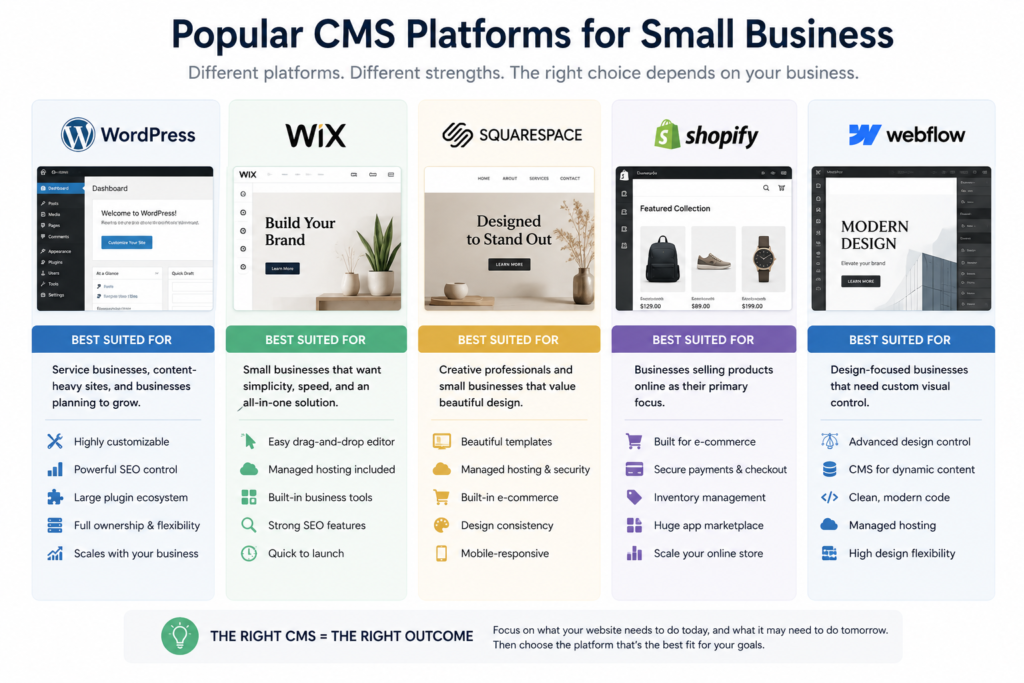
Best CMS for Small Business Comparison
| Factor | WordPress | Wix | Squarespace | Shopify | Webflow |
| Often best for | Service/content sites | Simpler business sites | Design-led sites | Online stores | Design-led custom sites |
| Ease for owner | Moderate | High | High | Moderate | Moderate |
| Design flexibility | High | Moderate to high | Moderate | Moderate | High |
| SEO controls | High | Strong | Strong | Strong | Strong |
| E-commerce | Strong with WooCommerce | Available | Available | Core strength | Available |
| Hosting | Flexible/self-hosted or managed | Managed | Managed | Managed | Managed |
| Maintenance | Depends on setup | Mostly managed | Mostly managed | Mostly managed | Mostly managed |
| Customization | Very high | Moderate to high | Moderate | High within commerce | High |
| Content-heavy sites | Strong | Capable | Capable | Secondary use case | Strong |
| Platform migration | Generally flexible, but depends on build | May require rebuilding | Partial export available | Requires planning | Requires planning |
The point of this table is not to declare a winner.
The right platform depends on the job.
WordPress vs Wix for Small Business
If your business needs a large number of service pages, extensive content, custom integrations, deeper hosting control, or significant long-term expansion, WordPress can be a very strong choice.
If you want a simpler managed environment where much of the infrastructure is handled for you, Wix can be entirely reasonable.
For example, an Ottawa contractor planning to build dozens of service and location-focused pages over several years might value WordPress’s flexibility.
A solo consultant in Kanata who needs a five-page website and wants to handle basic updates personally might prefer Wix.
Neither decision is inherently more professional.
WordPress vs Squarespace for Small Business
A creative consultant with a relatively simple portfolio may appreciate Squarespace’s managed environment and visual consistency.
An Ottawa law firm planning extensive practice-area content, supporting articles, integrations, and a long-term SEO strategy may decide that WordPress provides the kind of extensibility it wants.
Again, that is a project decision, not a ranking rule.
WordPress vs Shopify for Small Business
This comparison becomes much easier once you ask one question:
Is selling online the primary job of the website?
For an Ottawa roofing company, probably not.
For an Ottawa specialty retailer managing hundreds of products, inventory, payments, shipping, and orders, Shopify may be a much more natural starting point.
WordPress can also support online selling through WooCommerce, an e-commerce system built for WordPress, but Shopify and WooCommerce approach store management differently.
Which CMS Is Best for SEO?
There is no CMS that Google automatically prefers.
A WordPress site does not rank simply because it uses WordPress. A Wix site does not rank poorly simply because it uses Wix.
Search visibility depends on factors such as:
- Useful and relevant content
- Website architecture
- Internal links
- Crawlability, meaning whether search engines can access your pages
- Indexability, meaning whether your pages are eligible to be stored in Google’s search index
- Page performance
- Mobile experience
- Backlinks
- Structured data
- Search intent
- Technical implementation
The CMS determines how much control you have over some of those things, but it does not replace good SEO.
What should you do next?
Ask what SEO controls your specific project requires rather than asking, “Which CMS ranks best?”
Does Your CMS Affect Website Speed?
Yes, but it is only one part of the equation.
Performance can also depend on:
- Hosting
- Images
- Themes
- Plugins
- Third-party scripts
- Custom code
- Fonts
- Caching
- Content
Caching means temporarily storing information so that it can be delivered more quickly when someone requests it again.
A poorly optimized website can be slow on almost any platform. A well-built website can perform well on many different platforms.
What About Website Security?
Responsibility changes depending on the platform.
With a managed platform such as Wix, Squarespace, Shopify, or Webflow, the provider manages more of the underlying infrastructure.
With self-hosted WordPress, whoever manages the site generally has more responsibility for areas such as:
- WordPress updates
- Plugin updates
- Theme updates
- Hosting
- Backups
- Security configuration
That flexibility is useful, but it creates responsibility too. This is also why choosing a CMS should include a conversation about what happens after launch. Our guide to [website maintenance for small businesses] explains updates, backups, security, performance, forms, and the other ongoing work required to keep a website reliable.
What About Website Ownership?
This is one of the questions I think businesses should ask more often.
Instead of simply asking, “Do I own my website?” ask:
- Who owns my domain?
- Who controls the account?
- Can another developer access the website?
- Can I export my content?
- Can I change hosting providers?
- What happens if I leave my current agency?
- Which parts of the site depend on proprietary platform technology?
Platform portability varies.
For example, Squarespace allows certain content to be exported, but not every element of a Squarespace website transfers automatically. (Squarespace Help)
Ownership and portability should be discussed before the website is built, not when a business is already trying to leave.
Which CMS Is Best for Different Ottawa Businesses?
Contractor or Home Service Business
Likely priorities:
- Service pages
- Local SEO
- Quote forms
- Project galleries
- Google Ads landing pages
- Future expansion
WordPress may be a strong candidate, especially when content and SEO growth are major priorities.
Ottawa Law Firm
Likely priorities:
- Practice-area pages
- Lawyer profiles
- Educational content
- Strong site architecture
- SEO
- Long-term content expansion
A flexible content-focused CMS may make sense.
Restaurant
Likely priorities:
- Menu
- Hours
- Reservations
- Location
- Photos
- Easy updates
- Strong mobile experience
A managed platform can be completely reasonable if it supports the restaurant’s ordering and reservation systems.
Consultant
A consultant may only need five to ten pages, a blog, and a lead form.
There is no reason to introduce unnecessary technical complexity if Wix, Squarespace, or another managed solution can comfortably handle the job.
Online Retailer
If products, inventory, orders, payments, and shipping are the core of the business, an e-commerce-first platform such as Shopify deserves serious consideration.
What CMS Would Ottawa Web Genius Recommend?
For many of the service businesses I work with, WordPress is usually my preferred starting point.
Not because WordPress is automatically better.
It is because the businesses I typically work with often need service pages, local SEO, landing pages, content growth, integrations, and room to expand.
One mistake I see is businesses choosing the platform before they have decided what the website actually needs to do.
I prefer to work in the opposite direction.
First determine what the business needs.
Then choose the technology.
If Shopify, Wix, Squarespace, Webflow, or another platform solves the problem better, that should influence the decision.
What Does a CMS Cost?
The CMS itself is only part of the cost.
Depending on the platform, businesses may pay for:
- Platform subscription
- Hosting
- Domain
- Premium themes
- Plugins or apps
- Development
- Maintenance
- Payment processing
- E-commerce functionality
- Additional integrations
WordPress software is open source, but that does not mean running a professional WordPress website costs nothing.
Hosted platforms often bundle hosting, security infrastructure, software updates, and editing tools into one subscription.
That is why comparing only monthly subscription fees can be misleading.
Don’t Choose a CMS Based Only on Price
Think about total cost of ownership.
That means everything the website costs over its useful life, including:
- Initial build
- Hosting
- Platform fees
- Maintenance
- Apps
- Developer work
- Internal staff time
- Future upgrades
- Migration
A cheap platform that forces a costly rebuild later may not be cheap.
At the same time, a highly customized $15,000 solution can be excessive for a five-page consulting website.
Context matters.
How to Choose the Best CMS for Your Small Business
Before choosing a platform, answer these questions:
- What does the website need to do today?
- What might it need to do in three years?
- Who will update it?
- How important is SEO?
- Will you sell products online?
- Do you need custom functionality?
- How often will content change?
- How much maintenance are you comfortable managing?
- How important is portability?
- What is the realistic total budget?
Your answers should determine the technology.
Not the other way around. Your CMS decision also connects to a larger question: should you build and manage the website yourself or hire someone to handle it? Our Ottawa Web Design vs. DIY guide breaks down when each approach makes sense.
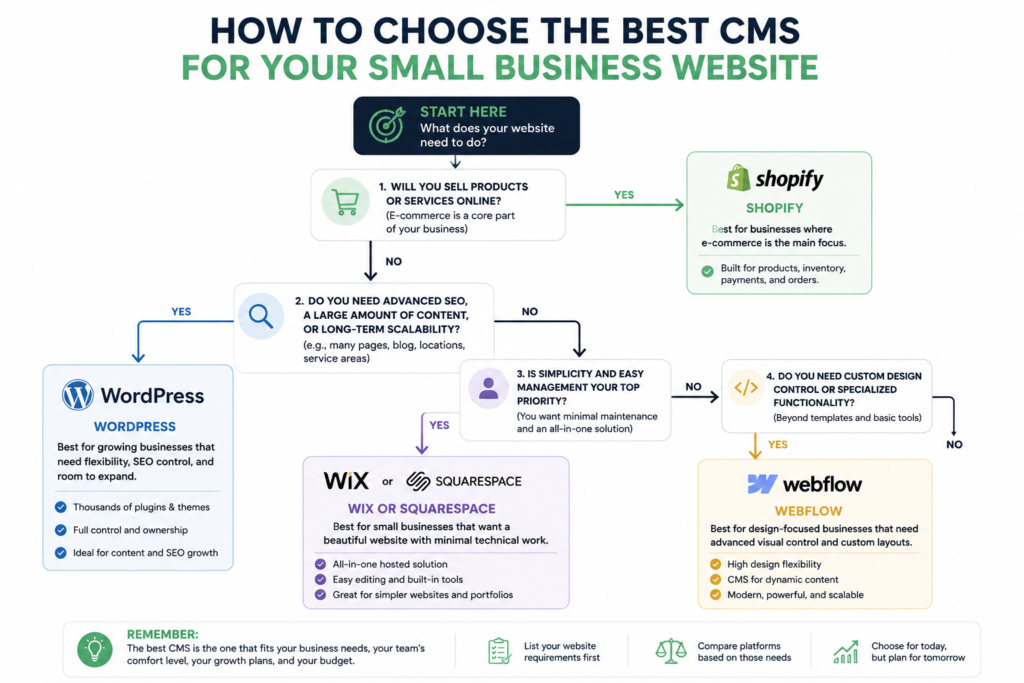
How to choose the best CMS for a small business website
Frequently Asked Questions
What is a CMS for a website?
A CMS is software that allows you to create, organize, edit, and publish website content without manually coding every page.
What is the best CMS for a small business website?
There is no universal best CMS. WordPress is a strong choice for many service and content-focused businesses, Wix and Squarespace can work well for simpler managed websites, and Shopify is particularly well suited to e-commerce.
Is WordPress or Wix better for a small business?
It depends on the business. WordPress offers extensive flexibility and control. Wix offers a highly managed environment with strong built-in tools and less infrastructure management for the owner.
Is WordPress good for small business SEO?
Yes, WordPress can be excellent for SEO when implemented properly, but using WordPress does not automatically improve rankings. Google evaluates the website and its content, not the CMS brand.
Do I need a CMS for a small business website?
Not technically. A simple website can be coded without one. For most businesses that want to update pages, publish content, add services, or manage the site without editing code, a CMS is usually much more practical.
Can I change my CMS later?
Yes, but migration difficulty depends heavily on the platforms involved and how the original website was built. Some content may transfer cleanly, while layouts, functionality, integrations, and styling may need to be rebuilt.
Conclusion
A CMS is simply the system used to manage your website’s content and functionality.
The harder question is which CMS your business should use.
For many service businesses, WordPress provides an excellent combination of flexibility, content management, SEO control, and future expansion.
For businesses that prioritize simplicity, Wix or Squarespace may be completely reasonable choices.
For businesses primarily selling products online, Shopify deserves serious consideration.
There is no universal best CMS for small businesses.
Choose what your website needs to do first. Choose the technology second.
Need Help Choosing?
If you are planning a new website and are not sure whether WordPress, Wix, Shopify, Squarespace, Webflow, or something else makes the most sense, Ottawa Web Genius can help you work backward from what your business actually needs.
The goal is not to put every business on the same platform. It is to choose a setup that works for the business today and still makes sense as it grows.