Website maintenance is the ongoing work required to keep a website functioning properly after launch. It generally includes keeping the site’s software, security, backups, performance, content, forms and integrations working over time. Most small-business websites need some level of maintenance, but that does not mean every business needs to pay an agency hundreds of dollars every month.
A simple brochure website with very little functionality may need only light, periodic attention. A WordPress website that generates leads, uses several plugins, accepts bookings or payments, connects to other software, or brings in meaningful Google traffic deserves more active care.
| THE SIMPLEST WAY TO THINK ABOUT IT A website isn’t something you finish. It’s software your business relies on. |
What Is Website Maintenance?
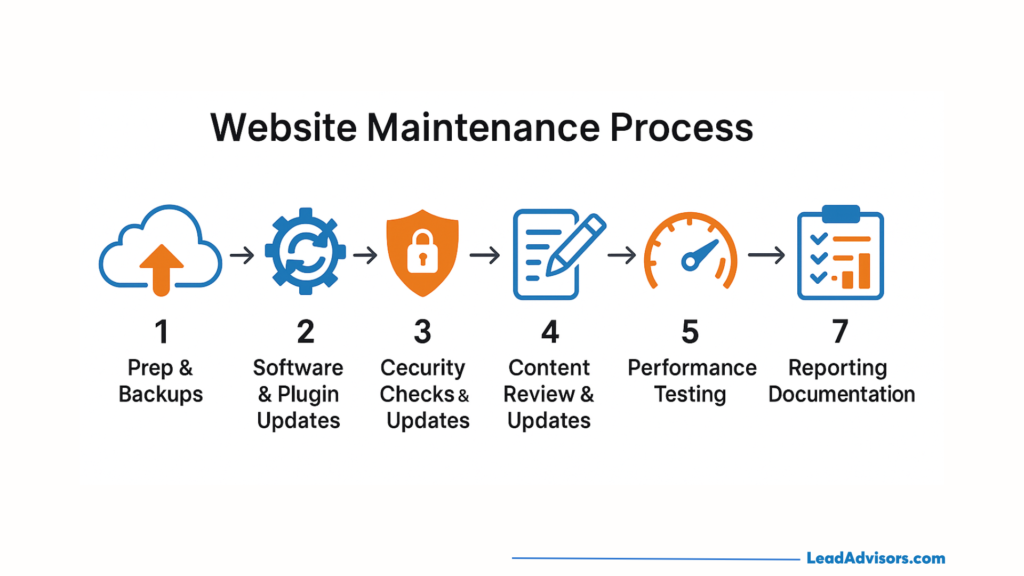
Website maintenance is an umbrella term for the recurring tasks that keep an existing site reliable, secure, accurate and functional. That can include software updates, plugin and theme updates, backups, security monitoring, uptime monitoring, performance checks, broken-link checks, form testing, analytics checks, content changes, SEO monitoring and, where relevant, database maintenance and compatibility testing.
A CMS (content management system) is software that lets you manage website content without manually coding every page. WordPress is a common CMS. A plugin is an add-on that gives WordPress extra functionality, while a theme controls much of the site’s design and layout. WordPress, its plugins and its theme can all receive updates separately. WordPress documents how core, plugin and theme updates are managed.
This is why the phrase “website maintenance” can be misleading when comparing providers. One plan might include updates and a backup. Another might include daily backups, security monitoring, form tests, performance checks, content edits and technical support. Compare what is actually included, not just the monthly price.
WHAT SHOULD YOU DO NEXT? If you already pay for maintenance, pull out the agreement and identify exactly what the provider is responsible for.
Why Do Websites Need Maintenance?
Think of the software on your phone. You do not replace the phone every time an app changes, but the operating system, apps and services around it continue evolving. A modern website is similar: it may look unchanged while the technology underneath it keeps moving.
Software changes
WordPress, plugins, themes, browsers, hosting environments and third-party services change over time. Updates can fix bugs, improve compatibility and address security issues. WordPress recommends reviewing updates carefully and checking the site afterward, rather than assuming every change is risk-free.
Security
A vulnerability is a weakness in software that could potentially be exploited. Keeping supported software patched helps reduce known risk; it does not mean an outdated plugin guarantees a hack. The Canadian Centre for Cyber Security recommends patching operating systems and applications as part of its baseline guidance for small and medium organizations. Malware simply means malicious software designed to damage, disrupt or gain unauthorized access to a system.
Backups
A backup is a saved copy of the files and information needed to rebuild your website. On WordPress, that normally includes site files and the database — the structured store containing content, settings and other site data. The important distinction is that having backups is not the same as knowing they can be restored. Good maintenance includes knowing where backups are stored, how recent they are and what the recovery process looks like.
Performance
Large images, extra plugins, third-party scripts, hosting limits and database growth can affect performance over time. Google’s Core Web Vitals documentation explains the page-experience measurements Google recommends site owners monitor. For a plain-English explanation, see Ottawa Web Genius’s Core Web Vitals guide for small business owners.
Functionality
Imagine an Ottawa contractor whose website still looks completely normal, but a contact-form update stops sending email notifications. For three weeks, prospective customers submit quote requests and see a success message, while the contractor receives nothing. The website did not visibly “break,” but an important business function did.
WHAT SHOULD YOU DO NEXT? Test every revenue-critical action on your site: forms, booking buttons, payment flows, click-to-call links and key integrations.
Website Maintenance vs. Website Updates: What’s the Difference?
Maintenance keeps the existing website functioning. Content updates change the information on it. Development adds or substantially changes functionality. Some care plans include all three; others do not.
| Type | Purpose | Examples |
| Maintenance | Keep the existing site working | WordPress updates, backups, form testing, compatibility fixes |
| Content updates | Change existing information | Staff profiles, menus, pricing, services, promotions |
| Development | Add or change functionality | Booking systems, custom tools, new service sections |
WHAT SHOULD YOU DO NEXT? Ask your provider what counts as maintenance, what counts as a content edit, and what triggers an additional invoice.
What Does Website Maintenance Usually Include?
| Maintenance task | What it means | Why it matters | How often |
| Software updates | Update the CMS/core | Compatibility, bug fixes, security | Weekly–monthly |
| Plugin/theme updates | Update add-ons and design software | Security and compatibility | Weekly–monthly |
| Backups | Save restorable copies | Recovery if something goes wrong | Daily–weekly |
| Security monitoring | Check for suspicious activity | Helps identify security issues | Continuous/regular |
| Uptime monitoring | Check whether the site is online | Detects outages | Continuous |
| Form testing | Submit test enquiries | Prevents unnoticed lost leads | Weekly–monthly |
| Broken-link checks | Find dead links | User experience and site health | Monthly |
| Performance monitoring | Review speed/Core Web Vitals | User experience and technical health | Monthly |
| Analytics checks | Confirm tracking still works | Protects reporting | Monthly |
| Content updates | Change text/images/hours | Keeps information accurate | As needed |
| SEO monitoring | Check indexing/technical search issues | Protects visibility | Monthly |
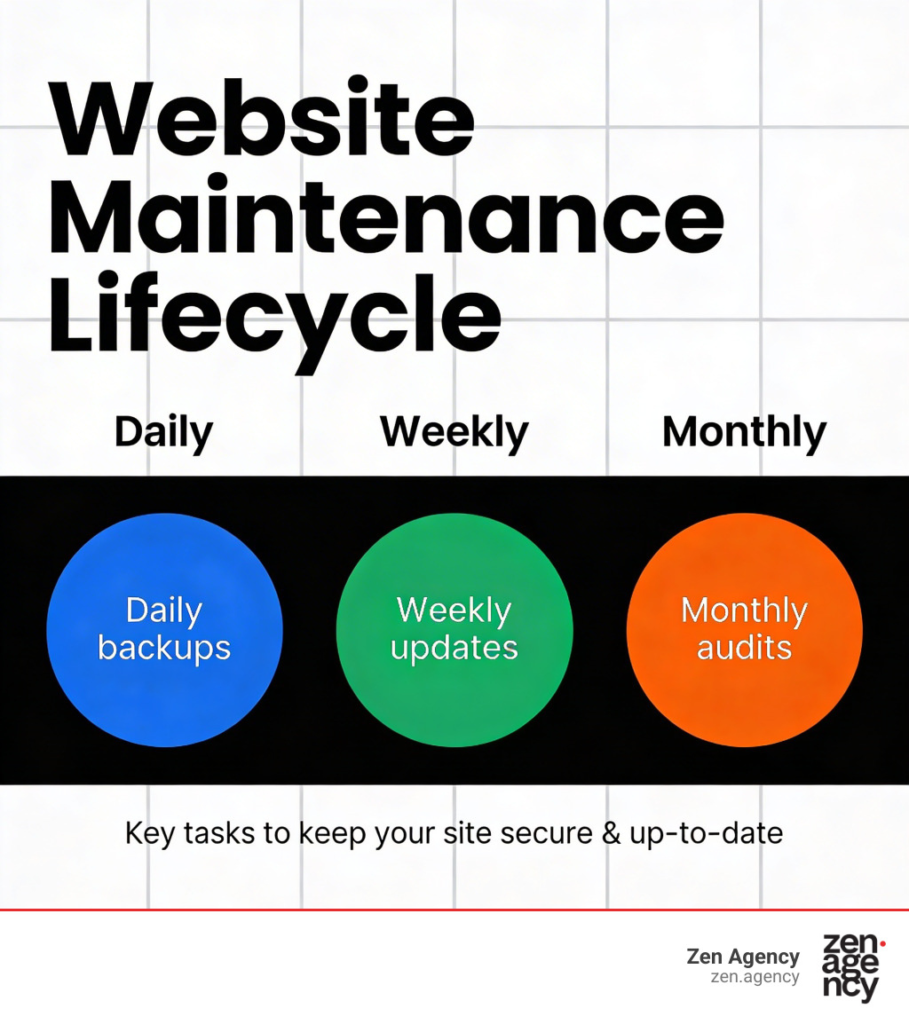
Backups, updates and checks on business-critical functionality are foundational for most active sites. Content edits, SEO monitoring, performance work and development time are more dependent on the website and the plan.
WHAT SHOULD YOU DO NEXT? Identify which website functions directly affect revenue. Those deserve the highest monitoring priority.
What Happens If You Don’t Maintain Your Website?
Usually, nothing dramatic happens overnight. Problems are more likely to develop gradually: outdated software, compatibility issues, broken forms, slow pages, stale information, security weaknesses, failed integrations, tracking problems or technical SEO issues.
Consider an Ottawa law firm that relies on Google traffic and online consultation requests. A mobile display issue makes a key practice-area page difficult to use, while a form conflict prevents some enquiries from arriving. The site is still online, but a technical issue has become a lead-generation problem. For a five-page side-hustle site with little traffic, the same level of proactive support may be unnecessary.
| WHAT SHOULD YOU DO NEXT? Ask: if my website stopped generating enquiries for seven days, would I notice financially? Your answer helps determine how proactive maintenance should be. |
Does Website Maintenance Affect SEO?
Yes, indirectly — but buying a maintenance plan does not automatically improve rankings. Website maintenance and ongoing SEO are different services.
Maintenance supports SEO by helping keep the site available, mobile-friendly and technically healthy, and by catching broken links, indexing problems or performance issues. Google’s technical requirements for Search make clear that Googlebot must be able to access a working page with indexable content. That is a technical foundation, not an SEO campaign.
Ongoing SEO can involve keyword strategy, content, on-page optimization, local SEO, authority building and performance analysis. See our practical guide to improving website SEO and website performance tracking guide for the distinction in practice.
| WHAT SHOULD YOU DO NEXT? If a plan says “SEO included,” ask exactly what work is included. A monthly health check is not the same as an ongoing SEO strategy. |
Can I Maintain My Website Myself?
Yes. DIY maintenance can be reasonable if the website is simple, you understand the CMS, you have reliable backups, you are comfortable troubleshooting and you have time to monitor it.
But clicking “Update All” is not a complete strategy. A staging environment is a private copy of the live website used to test changes before customers see them. A rollback means returning the site to a previous working version after a problem. WordPress’s own troubleshooting documentation recommends backing up both files and the database before upgrades. See the WordPress guidance.
| WHAT SHOULD YOU DO NEXT? If you maintain the site yourself, document where backups live, how to restore one, and what you test after an update. |
When Does Professional Website Maintenance Make Sense?
Ottawa contractor
If the website generates quote requests every week, form reliability directly affects revenue. Professional maintenance can make sense because unnoticed failures have a real cost.
Law firm or clinic
If the site attracts organic search traffic and enquiries, reliability, content accuracy, security and preservation of existing search visibility become more important.
Restaurant
Menus, hours, events, reservations and ordering integrations change regularly, so ongoing support can be valuable simply because the website is operationally active.
New side hustle
A simple five-page website with little traffic, no payments and few changes may be perfectly manageable by the owner or through pay-as-needed support. The conclusion should not always be “hire an agency.”
| WHAT SHOULD YOU DO NEXT? Evaluate maintenance based on website complexity and what failure would cost the business, not simply the number of pages. |
How Much Does Website Maintenance Cost?
There is no universal price because “maintenance” can range from periodic software updates to actively managing a revenue-producing website. A current Ottawa and Canadian market check shows entry care plans around the low hundreds per month, with broader support tiers commonly reaching $200–$400+ depending on included time, monitoring, e-commerce and development.
| Level | Typical monthly range | Usually fits |
| Basic maintenance | $50–$150 | Simple brochure/WordPress sites |
| Small-business maintenance | $150–$300 | Active lead-generation sites with support |
| Website management | $300–$500+ | Regular edits, reporting or development time |
| E-commerce / custom | Potentially higher | Payments, complex integrations or high-value sites |
For context, current advertised examples include Ottawa plans starting around $119/month at Designful, $199/month at PeakSpire, and $149/$249/$399 tiers at GlobeSign. These are market examples, not a universal rate card. Inclusions vary enormously.
You may also see annual plans, hourly support blocks and pay-as-needed maintenance. Comparing the monthly number without comparing responsibilities, response time and included support hours is misleading.
For Ottawa Web Genius’s current website packages and ongoing options, see our pricing page.
| WHAT SHOULD YOU DO NEXT? Compare providers by responsibilities, support time and response expectations first; compare price second. |
What Should You Look for in a Website Maintenance Plan?
What exactly is included?
How often are backups performed, and where are they stored?
Are updates tested, and what happens if one breaks the site?
Is malware cleanup included, or only scanning?
Are content updates included? If yes, how much time?
How are additional changes billed?
Who manages hosting, and who handles outages?
What is the response time for critical problems?
What happens if you cancel?
Do you still own your website, domain and content?
A legitimate care plan should make responsibilities clearer, not more confusing.
Hosting vs. Website Maintenance
Many business owners assume hosting and maintenance are the same thing. They are not.
| A SIMPLE ANALOGYHosting is where the website lives. Maintenance is the work that keeps the website itself functioning. |
Hosting provides the server infrastructure that makes the site available online. It may also include server-level security, backups or an SSL certificate — a digital certificate used to support encrypted HTTPS connections. But paying a hosting invoice does not automatically mean somebody is updating your WordPress plugins, testing forms or checking broken pages. Some providers bundle hosting and maintenance; others separate them.
| WHAT SHOULD YOU DO NEXT? Ask your host whether they maintain the website application itself or only the server it runs on. |
Website Maintenance Checklist for Small Businesses
| Frequency | Practical checks |
| Weekly | Test important forms, booking/payment actions and review critical uptime/security alerts. |
| Monthly | Review core/plugin/theme updates, confirm backups, check broken links, analytics and basic performance. |
| Quarterly | Review mobile experience, integrations, conversion tracking, Core Web Vitals and outdated content. |
| Annually | Review hosting, licences, admin users, privacy information, technology stack and whether the website still reflects the business. |
| WHAT SHOULD YOU DO NEXT? Put recurring maintenance checks on the calendar, even if you handle everything yourself. |
How to Decide Whether Your Business Needs Professional Maintenance
Use a simple decision framework. The more “yes” answers you have, the stronger the case for professional maintenance:
Does your website generate leads or sales?
Would a broken website cost you money?
Does it use WordPress and several plugins?
Does it accept payments or bookings?
Does it connect to third-party software?
Do you depend on organic Google traffic?
Do you regularly update content?
Would you know how to restore the website if something broke?
If you’re still evaluating what the website itself should be doing for the business, see Ottawa Web Genius’s web design and development service for the broader build and support context.
| WHAT SHOULD YOU DO NEXT? Count the yes answers, then identify the functions that would cost your business money if they stopped working. |
Frequently Asked Questions
How often should a small business website be maintained?
A simple brochure website may only need periodic checks, while an active WordPress site with forms, integrations, bookings or e-commerce can justify weekly updates and continuous automated monitoring. Frequency should follow complexity and business importance.
How much does website maintenance cost?
Basic plans often fall around $50–$150 per month, active small-business support around $150–$300, and broader website management around $300–$500+ per month. E-commerce and custom sites can be higher. Always compare inclusions before price.
Can I maintain my WordPress website myself?
Yes. If the site is simple and you are comfortable with WordPress, backups and troubleshooting, DIY maintenance can be reasonable. The key is having a reliable recovery process before making changes.
Is website hosting the same as website maintenance?
No. Hosting provides the infrastructure where the website runs. Maintenance involves caring for the website software, functionality, security, backups and other components. Some providers bundle both.
Does website maintenance include SEO?
Not necessarily. Maintenance can support SEO by keeping the site accessible and technically healthy, but ongoing SEO usually includes separate work such as keyword strategy, content optimization, local SEO and performance analysis.
What happens if I stop maintaining my website?
Possibly nothing immediately. Over time, software can become outdated, compatibility issues can appear, content can become inaccurate, integrations can fail and technical problems can go unnoticed. The impact depends on how complex and important the site is.
So, Do Small Businesses Really Need Website Maintenance?
Yes — virtually every business website needs some level of ongoing maintenance. But whether the owner needs to pay someone every month depends on the website’s complexity, how important it is to the business, and the owner’s ability and willingness to maintain it themselves.
If you have a straightforward website that rarely changes and you are comfortable handling updates, backups and basic troubleshooting, you may be able to manage it yourself. If the website generates leads, processes sales, handles bookings, ranks strongly on Google, uses multiple integrations or plays an important operational role, having someone actively responsible for it becomes easier to justify.
| THE DISTINCTION TO REMEMBERThe question isn’t really whether your website needs maintenance. It does. The question is who is going to be responsible for it. |
If you’re not sure what’s currently being maintained on your website — or whether you’re paying for things you don’t need — Ottawa Web Genius can review the setup, explain what’s actually important and help you choose the level of support that makes sense for your business. View our website pricing and support options or explore our web design and development services.