Two Different Jobs, One Website
Think of a website like a restaurant. The interior designer decides how the space should look and feel — the layout of the tables, the lighting, the colours, the way customers move through the room. The contractor takes those plans and physically builds the space — installing the walls, the plumbing, the electrical systems, the kitchen equipment.
Web design is the interior design. Web development is the construction.
Both require completely different skills. Both produce things the other can’t do alone. And for the restaurant to actually work — to open its doors and serve customers — you need both of them working from the same plan.
The difference between web design and web development is one of the most commonly confused concepts in the technology world. Business owners hear both terms, aren’t sure which one they need, and sometimes end up paying for one when they needed the other — or not understanding what they’re being quoted for.
This guide explains both clearly, in plain English, with real examples from Ottawa businesses similar to yours.
What Is Web Design?
Web design is the process of planning and creating how a website looks and how visitors experience using it.
A web designer makes decisions about:
- Visual design — colours, fonts, imagery, and the overall visual identity of the site. This is what most people picture when they hear “website design.”
- Layout — where different elements appear on each page: the navigation menu, the headlines, the images, the call-to-action buttons, the contact form.
- User Experience (UX) — UX (which stands for User Experience) refers to how easy and intuitive it is for a visitor to accomplish what they came to do. Can they find the information they need quickly? Does the page feel logical to navigate? Is the next step obvious? UX is about solving problems for the visitor, not about making things decorative.
- User Interface (UI) — UI (User Interface) refers to the specific visual elements a visitor interacts with — buttons, menus, forms, sliders. Good UI design makes those elements feel clear and easy to use.
- Branding alignment — making sure the website looks and feels consistent with the rest of the business’s visual identity — logo, brand colours, tone of voice.
Web design is not just about making things look attractive. A beautiful website that confuses visitors, buries the phone number, and never tells them what the business does is a design failure — even if it wins a design award. Good web design solves problems. It answers the visitor’s question fast, builds credibility quickly, and makes the next step obvious.
The deliverable of web design is typically a visual plan — sometimes called a mockup or wireframe — showing exactly how each page of the website should look before any code is written.
What should you do next? If you’re planning a new website, write down the answers to three questions before you speak to any designer: Who is your website trying to reach? What do you want them to do when they arrive? What questions do they need answered before they’ll take that action? Good design starts with the answers to those questions.
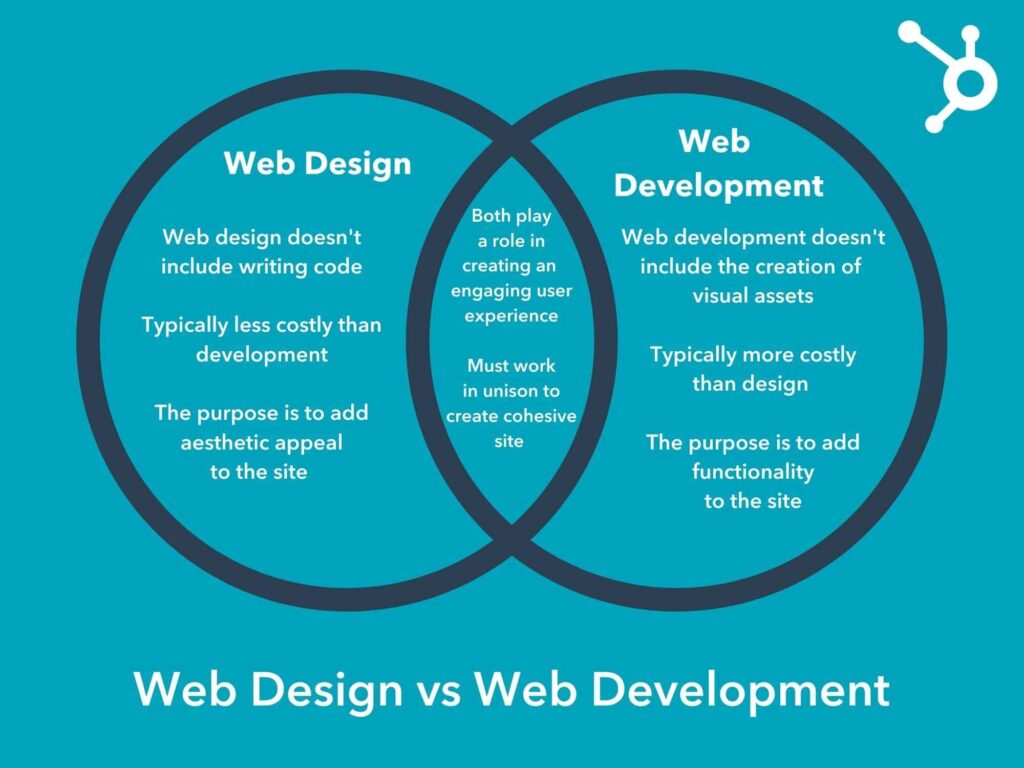
Web design and web development are distinct disciplines — design determines what a website looks like and how it feels to use, while development turns that design into a working, functional site.
What Is Web Development?
Web development is the process of building the website — taking the designer’s visual plan and turning it into something that actually works in a web browser.
A web developer writes the code that makes a website function. There are two primary types:
Front-end development refers to everything a visitor sees and interacts with directly — the visual layout as rendered by a browser, the buttons that respond when clicked, the menus that open and close, the forms that submit. Front-end developers work with languages called HTML (the structure of the page), CSS (the visual styling), and JavaScript (the interactive behaviour). These are simply programming languages — instructions that tell a web browser how to display and behave.
Back-end development refers to everything that happens behind the scenes — the server (a computer that stores and delivers the website), the database (an organised collection of information, like customer records or product inventory), and the code that connects user actions to that data. When you submit a contact form and the business receives an email notification, that’s back-end development at work.
CMS (Content Management System) — A CMS is a tool that lets business owners update their own website content without writing code. WordPress is the most widely used CMS in the world. Squarespace and Wix are also content management systems, though more limited. A developer configures the CMS so that the business owner can change text, add blog posts, and update photos through a simple interface — rather than needing a developer to make every small change.
Hosting refers to the server where your website files are stored. When someone types your URL into a browser, the hosting server delivers your website to their screen. Development includes configuring your website to work correctly on its hosting environment.
The deliverable of web development is a fully functioning website — accessible in a browser, working on all devices, and connected to any systems it needs to interact with (email, booking software, payment processors, etc.).
What should you do next? When speaking to a web developer, ask specifically which parts of the project they handle — front-end only, back-end only, or both. Ask what CMS the website will be built on and whether you’ll be able to update it yourself after launch. Ask whether hosting is included in the project scope or separate.
Web Design vs Web Development: Side by Side
| Factor | Web Design | Web Development |
|---|---|---|
| Primary question | How should this look and feel? | How do we make it work? |
| Main focus | Visual appearance, user experience | Code, functionality, performance |
| Core skills | Visual design, UX thinking, branding | Programming languages, databases, systems |
| Common tools | Figma, Adobe XD, Photoshop | HTML, CSS, JavaScript, PHP, WordPress |
| Typical deliverables | Mockups, style guides, page layouts | Working website, CMS, integrations |
| Business impact | First impressions, trust, conversions | Functionality, speed, reliability |
| When you primarily need it | New brand, poor user experience, confusing layout | New functionality, broken features, slow performance |
| Questions they answer | “Does this look trustworthy?” “Is it easy to use?” | “Does this work?” “Is it fast?” “Is it secure?” |
In practice, most web projects require both — the design determines what the website should be, and the development makes it real.
Where Design and Development Work Together
The best websites are not produced by design and development working in isolation. They are produced by both disciplines working from the same understanding of the business’s goals.
Here is how a well-run web project typically flows:
Business goal and audience defined
          ↓
Content strategy and page structure planned
          ↓
Web Design (visual layouts, UX, branding)
          ↓
Web Development (code, CMS, integrations)
          ↓
Testing across devices and browsers
          ↓
Launch and Google Search Console setup
          ↓
Ongoing content and performance improvements
Where the collaboration matters most:
SEO (Search Engine Optimisation) — A term for practices that help your website appear in Google search results. SEO decisions happen at both the design level (how pages are structured, what content appears above the fold) and the development level (page speed, schema markup — code that tells Google specific things about your business, sitemap setup). Neither design nor development alone produces a well-optimised website. Our guide on what a business website should include covers the structural requirements that design and development need to meet together.
Performance — A website that looks beautiful but loads in seven seconds on a mobile phone is a development problem that undermines the design investment. Optimised images, fast hosting, and efficient code are development responsibilities that directly affect how the design is experienced.
Accessibility — Accessibility refers to making a website usable for people with disabilities — those using screen readers, those navigating without a mouse, those with visual impairments. Accessibility decisions span both design (colour contrast, text size) and development (code structure, keyboard navigation). It is increasingly both a legal and ethical consideration for business websites.
What should you do next? When evaluating any web design proposal, ask explicitly how SEO, performance, and mobile responsiveness are addressed — and whether these are handled by the designer, the developer, or both. Our post on what is responsive web design explains why mobile performance is one of the most important outcomes of the design-development collaboration.
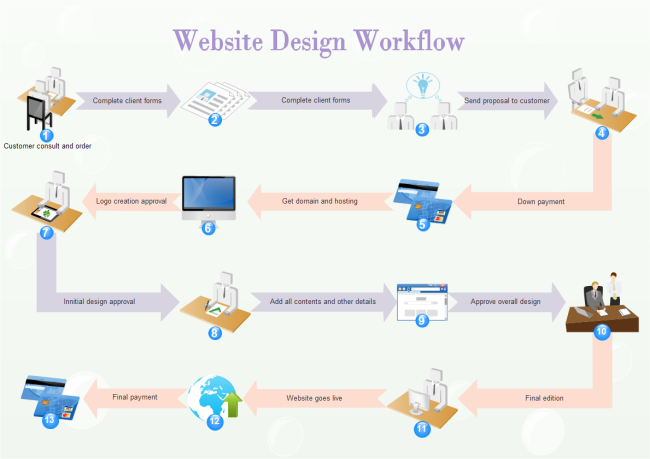
A well-run website project follows a clear sequence — from business goals through design, development, testing, and launch — with design and development working from the same strategic foundation.
Ottawa Business Examples
A contractor in Kanata launching a new website: Needs both design and development. The design determines how the homepage communicates trust (project photos, licensing display, clear service offer), how the services pages are structured, and where the quote request form lives. The development builds all of this in WordPress, ensures it loads quickly on mobile, and integrates the contact form with an email notification system. Neither discipline alone produces what this contractor needs.
A family law firm in Ottawa redesigning an outdated website: The existing site functions technically but looks dated and doesn’t convert visitors into consultations. This is primarily a design problem — the visual presentation, messaging structure, and UX need to be rebuilt. The development work may be relatively modest if the existing WordPress framework can be retained. In this case, the design investment is larger than the development investment.
A restaurant in Westboro adding online reservations: The existing website looks fine and the design doesn’t need to change significantly. The restaurant needs a development project — integrating a reservation system (like OpenTable or Resy) with the existing site, testing it thoroughly, and ensuring it works correctly on mobile. The development work is the primary need; the design work is minimal.
A physiotherapy clinic in Nepean improving appointment bookings: Needs both. The design needs to be reconsidered — the current layout makes it difficult for patients to find and book appointments on a phone. And the development needs to integrate a booking platform and ensure the site loads fast enough that patients don’t abandon the process before completing a booking.
Common Misconceptions
“A web designer builds websites.” Some do, but many don’t. A web designer’s primary skill is visual and experiential thinking — not writing code. Many excellent web designers have limited or no development skills, and that’s completely normal. When you hire a web design agency, ask specifically who handles the code.
“A web developer chooses the colours and layout.” Occasionally, but this is not their training. A developer who designs their own websites typically produces something functional but not visually compelling or strategically considered. Good development in service of weak design produces a working website that doesn’t convert visitors.
“A good-looking website automatically converts visitors into clients.” Design affects trust and first impressions, but conversion also depends on messaging clarity, call-to-action placement, content relevance, and mobile performance — all of which span both design and development. Our guide on how to get more clients from your website addresses the conversion layer specifically.
“You only need one of them.” Almost never true for a complete website project. The few exceptions are: purely cosmetic refresh projects (where design changes without code changes) and purely technical projects (fixing broken functionality without changing any visual elements). Most real projects require both.
Which One Does Your Business Need?
New business launching its first website: Both — you need design to establish the visual identity and UX structure, and development to build it into a functioning site.
Existing business needing a visual refresh: Primarily design, with some development to implement the changes. The ratio depends on how significant the visual changes are.
Business adding new functionality (booking system, e-commerce, membership area): Primarily development. Design may be needed for new pages, but existing design can often remain.
Business with a poorly converting website: Primarily design and strategy — the visual presentation, messaging structure, and call-to-action placement need to be reconsidered. Development implements the changes.
Business focused on SEO improvement: Both — technical SEO improvements are a development task, while content structure and page design are design decisions.
E-commerce business: Both — product pages and checkout flows require careful design for conversion, and the underlying systems (inventory, payment, shipping) require careful development.
What should you do next? If you’re not sure which you need, describe what isn’t working about your current website in plain English. “Our website looks outdated” points toward design. “Our contact form doesn’t work on mobile” points toward development. “We’re getting visitors but no calls” could be either — or both. Our post on Ottawa web design vs. DIY helps you frame this decision in the context of whether to hire professionally at all.
The Full Website Creation Process
Whether you’re working with a single person who handles both design and development, or two specialists working together, most professional website projects follow a similar sequence:
1. Discovery and strategy — Understanding the business, the audience, the competition, and what success looks like. This happens before any design work begins.
2. Content strategy — Deciding what pages are needed, what information goes on each page, and how the pages connect to each other. This informs the design.
3. Web design — Creating visual mockups of how each page will look. Getting client approval before development begins avoids expensive rebuilding later.
4. Web development — Building the approved design into a working website. Setting up the CMS, integrating any third-party systems, and ensuring everything works correctly.
5. Testing — Testing across multiple devices (desktop, tablet, phone), multiple browsers (Chrome, Safari, Firefox), and multiple screen sizes. Testing all forms, links, and interactive elements.
6. Launch — Moving the site from a development environment to its live server. Setting up domain connections, SSL certificates (the security layer that makes your URL start with “https://”), and submitting the sitemap to Google Search Console.
7. Ongoing improvements — Monitoring performance, updating content, addressing technical issues, and making iterative improvements based on how visitors actually behave on the site.
For more detail on what the finished product should include, our guide on what a business website should include covers every page and element a professional site needs.
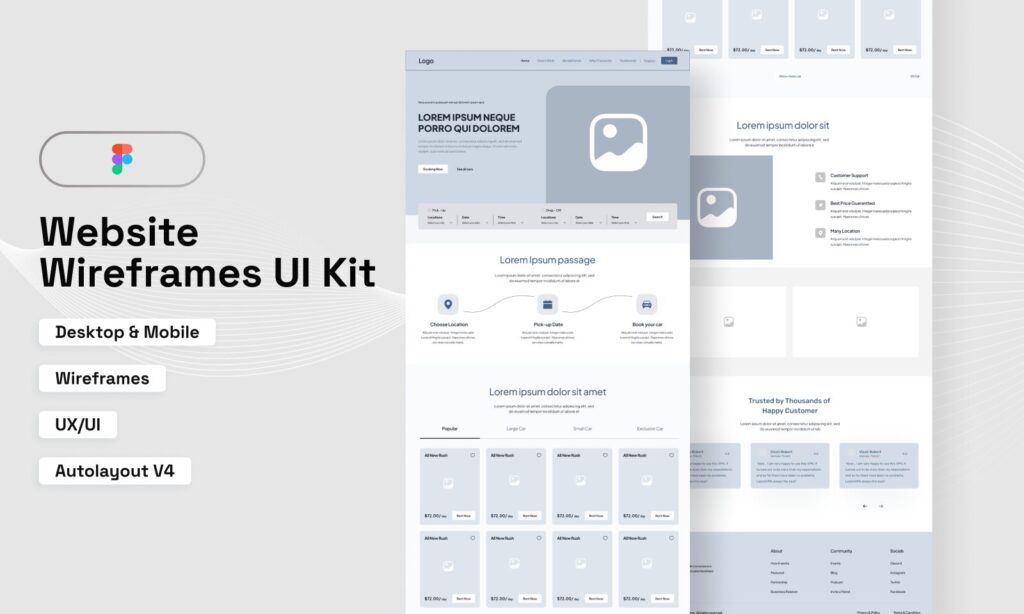
Web design begins with wireframes and visual layouts — a plan for how each page will look and function — before development turns those plans into a working website.
Frequently Asked Questions
Do I need to hire both a web designer and a web developer?
Not necessarily. Many web design agencies (including Ottawa Web Genius) handle both disciplines in-house or through a coordinated team. If you’re hiring a single freelancer, ask specifically whether they handle both design and development — and to see portfolio examples of complete projects they’ve built end-to-end. A freelancer who is primarily a developer and “does design too” may produce a functional site with weak visual execution. A freelancer who is primarily a designer and “can build it too” may produce a beautiful site with technical weaknesses. For most Ottawa small businesses, an agency or a clearly coordinated design-development team produces the best outcome.
Can a website builder like Wix handle both design and development?
Yes — that is essentially what a website builder does. It combines a simplified design interface with pre-built development so you don’t need separate skills for each. The trade-off is flexibility: you’re working within the platform’s constraints on both the design and development side. For businesses in competitive markets that need specific SEO capabilities, custom functionality, or unique design differentiation, those constraints become limiting. For a straightforward comparison of website builders versus professional design, our post on Ottawa web design vs. DIY covers the trade-offs in detail.
What is HTML and do I need to understand it to have a website?
HTML (HyperText Markup Language) is the code that defines the structure of a web page — headings, paragraphs, images, links. It’s one of the three foundational languages of the web, alongside CSS (which controls visual styling) and JavaScript (which adds interactive behaviour). As a business owner, you do not need to understand HTML to have a website — that’s what developers are for. You do benefit from understanding that HTML exists and that the code behind your website matters for both SEO and performance. According to MDN Web Docs, HTML is “the most basic building block of the Web” — and while you don’t need to write it, the quality of your site’s HTML directly affects how Google reads and ranks your pages.
How do I know if my website has a design problem or a development problem?
Design problems typically look like: the site feels visually outdated, it’s confusing to navigate, the messaging isn’t clear, or visitors aren’t taking the action you want them to take. Development problems typically look like: something doesn’t work (forms fail, pages load slowly, the site breaks on certain phones), content can’t be updated without calling a developer, or the site has technical errors in Google Search Console. Many real-world problems involve both — a poorly converting website often has weak design and technical performance issues simultaneously.
Why do some websites look great but don’t generate leads?
Because design and conversion strategy are not the same thing. A website can be visually impressive but still fail to generate calls if the homepage doesn’t clearly communicate what the business does, if the phone number is buried in the footer, if there’s no visible call-to-action on service pages, or if the contact form is too long. These are strategic and design failures — not development failures. According to Google’s UX research on page experience, user experience signals (which include design decisions) directly affect how visitors engage with a site and how Google evaluates it. Our guide on how to get more clients from your website addresses the conversion gap specifically.
How long does it take to design and develop a small business website?
For a professionally built small business website in Ottawa — say, a ten-to-fifteen-page service site with proper SEO foundations — the typical timeline is four to eight weeks from kickoff to launch. Design phases usually take two to three weeks (depending on how quickly approvals are provided). Development takes another two to four weeks. Testing and launch preparation add a few days. The most common sources of delay are late content delivery from the client and approval rounds that extend beyond the agreed timeline. Coming to the project with your content — service descriptions, photos, company information — ready to go significantly accelerates both design and development.
Design Plans It, Development Builds It, and Both Are Non-Negotiable
Web design determines how a website looks, how it feels to use, and whether a visitor trusts the business enough to take action. Web development turns that plan into a functioning, accessible, fast website that works correctly on any device.
Neither is optional. A beautifully designed website that doesn’t work is a useless one. A technically flawless website with confusing navigation and weak messaging generates no leads. The websites that perform consistently — that rank well, convert visitors into clients, and grow with the business — are the ones where design and development were treated as equally important from the beginning.
At Ottawa Web Genius, we handle both — strategy, design, and development — as a coordinated process rather than two separate projects bolted together. If you’re planning a new website and aren’t sure where design ends and development begins, we’re happy to walk you through what your business actually needs before you invest.
Explore our web design services to see how we approach both sides of the process — or reach out directly if you’d like a plain-English conversation about what your specific project requires.