
The Google Business Profile Description That Decides Who Gets the Call
How to write a google business profile description? Imagine this – A homeowner in Barrhaven searches for a renovation contractor. Someone in Kanata needs an accountant before tax season. A restaurant owner in Orléans is looking for a bookkeeper. They open Google Maps, see several businesses with similar ratings and reviews, and start reading the profile descriptions.
One says: “We are committed to providing high-quality solutions and exceptional customer service to our valued clients.”
That sentence describes nothing. It could apply to a hair salon, a law firm, a pest control company, or a sandwich shop.
The next profile says: “We are an Ottawa renovation contractor specialising in basement renovations, kitchen remodels, and bathroom updates for homeowners across Ottawa, Kanata, and Barrhaven. Family-owned and operating since 2008.”
Which business do you understand faster?
A well-written Google Business Profile description helps prospective customers quickly understand who you are, what you do, who you serve, where you operate, and why they might choose you over the alternatives. That is its primary job.
This guide explains how to write one that does that job well, what Google’s current rules allow, and what to avoid.
What Is a Google Business Profile Description?
The Google Business Profile description is a text field in your Business Profile where you can share information about your business. According to Google’s guidance on business descriptions, this field is the place to provide useful information about your services and products, the mission of your business, its history, and anything else that helps customers understand what makes your business distinctive.
It is important to understand what the description field is and what it is not:
It is not your business name. The name field is separate.
It is not your categories. Categories are selected separately and are one of the primary signals Google uses to understand what type of business you are.
It is not your services list. There is a dedicated Services section in your profile.
It is not Google Posts. Google Posts are separate, time-limited updates for promotions, events, and announcements.
The description sits in the “About” section of your profile. In Google Maps, customers who click on your profile can read it. It gives them context that reviews and categories alone cannot provide.
What Should a Google Business Profile Description Include?
A useful description typically communicates five things:
1. What you are. Identify the type of business clearly in the opening sentence. “Ottawa Web Genius is an Ottawa web design and local SEO company” is immediately useful. “Welcome to Ottawa Web Genius, where innovation meets excellence” communicates nothing.
2. What you do. Name your main services, but not every possible offering. A contractor does not need to list 22 services in 750 characters. Choose the two or three that represent most of your work or that attract the clients you most want.
3. Who you help. Some businesses serve small business owners. Some serve homeowners. Some serve healthcare professionals. Some serve families. A description that speaks to the right reader feels more relevant than a generic one.
4. Where you operate. For local Ottawa businesses, mentioning Ottawa and the areas you serve adds geographic context that is useful to the reader. A service-area business might say “serving Ottawa, Kanata, and Barrhaven.” A single-location business might say “located in downtown Ottawa.” There is no need to list every neighbourhood. One to three naturally placed location references are enough.
5. Why someone might choose you. This is where genuine differentiators belong. Years in business, specific specialisation, bilingual service, a particular methodology, or industry focus are all meaningful. Empty phrases like “committed to excellence” or “#1 in Ottawa” are not.
 A strong Google Business Profile description answers four questions: what you do, who you help, where you serve, and why someone should choose you over the alternatives.
How to Write a Google Business Profile Description Step by Step
Step 1: Identify your primary customer. Who is most likely to read this description before deciding whether to contact you? A family looking for a dentist behaves differently from a business owner looking for an accountant. Write for the actual person who will read it.
Step 2: Identify your primary service. What is the core thing you want to be associated with? For a furnace repair company, that is furnace repair. For a family law firm, that is family law. Lead with the thing that matters most.
Step 3: Write a clear opening sentence. Use this structure as a starting point: [Business name] is a [type of business] [providing/serving/specialising in] [primary service] for [customer type] in [location]. Then make it sound like a human wrote it.
Step 4: Add supporting services. Pick two or three. Not ten. The Services section of your profile is the right place for a comprehensive list.
Step 5: Add one genuine differentiator. Answer the question: why this business rather than another? “Family-owned and operating in Ottawa since 2011” is concrete. “We strive to exceed expectations” is noise.
Step 6: Add geographic context naturally. If you serve Ottawa broadly, say so. If you primarily serve specific areas, mention those. Do not create a list of every neighbourhood you have ever visited.
Step 7: Remove filler. Before publishing, cut every phrase that could apply to any business anywhere. “Committed to excellence,” “your one-stop shop,” “passionate about what we do,” “we pride ourselves on customer service” all belong in the bin unless they are followed by something specific that justifies them.
Step 8: Read it as a customer. After reading it, can you explain what this business does to a friend? If the answer is no, rewrite it.
Google Business Profile Description Rules You Need to Know
Google’s content guidelines for business descriptions set out specific restrictions. Before publishing yours, confirm against the current Google Business Profile guidelines.
At the time of writing, Google’s guidelines state that descriptions should focus on information relevant and useful to customers. Descriptions should not:
Include links. The description field is not the place for website URLs or social media links. Your profile has separate fields for those.
Focus on promotions, prices, or sales. “20% off all services this month” or “New customers receive a free quote valued at $150” is content for Google Posts, not the business description.
Include irrelevant, distracting, or low-quality content. The description should serve the reader.
Contain keyword stuffing. A description that reads “Ottawa plumber plumbing Ottawa emergency plumber plumbing company Ottawa plumber near me” violates these guidelines and provides no useful information.
Make unsupported claims. Describing your business as “Ottawa’s #1 contractor” or “the best law firm in Canada” requires substantiation. Empty superlatives that cannot be supported should be avoided.
These guidelines are subject to change. Verify against current Google documentation before publishing.
How Long Should a Google Business Profile Description Be?
Google currently allows up to 750 characters in the business description field. In the profile display, the description is typically truncated and customers click to expand the full text.
The 750-character limit is not a target. It is a ceiling.
One of the first things I look at when reviewing a Google Business Profile is whether the description immediately communicates what the business does. A 250-character description that does that clearly is more useful than a 750-character description packed with filler.
Write the length that your business genuinely needs to answer the five questions above. For a single-service business in one city, that might be 200 to 300 characters. For a professional-services firm with multiple practice areas, 500 to 600 characters might be appropriate. Let the content determine the length, not the character limit.
Should You Put Keywords in Your Google Business Profile Description?
Yes, where they naturally describe what you do. No, if you are trying to manipulate rankings by stuffing them in unnaturally.
One mistake I see regularly is businesses trying to turn the description into a keyword list instead of explaining what they actually do. A description that reads “Ottawa HVAC Ottawa furnace repair Ottawa heating contractor Ottawa cooling services” does not help a customer understand the business, and Google’s content guidelines prohibit this approach.
Relevant terms appear naturally in a well-written description because they describe the business accurately. A furnace repair company will naturally mention furnace repair. An Ottawa law firm will naturally mention Ottawa. That natural relevance is appropriate and useful.
According to Google’s documentation on how local results are ranked, local rankings are based on relevance, distance, and prominence. Google also says that businesses with complete and detailed profiles may be easier for Google to understand and match with relevant searches. That is a reason to be clear and specific, not a reason to keyword-stuff.
Does Your Google Business Profile Description Help You Rank Higher?
The honest answer is: the description alone is not a primary ranking lever.
Google’s local ranking framework is based on three factors: relevance (how closely the profile matches what the person searched), distance (how far the business is from the searcher or specified location), and prominence (how well-established the business appears based on available signals).
The description contributes to completeness and context. A complete, detailed profile helps Google better understand what your business does, which can support relevance matching. But keyword density in the description is not a substitute for the factors that actually drive local rankings: correct categories, consistent NAP information, reviews, website authority, and overall profile completeness.
If you are looking to improve your local map pack visibility in Ottawa, the description is one small piece of a larger foundation. Our guide on how to rank higher on Google Maps in Ottawa covers the full set of factors that matter for local map rankings.
The Real Job of Your Description: Helping Customers Decide
Local SEO gets your profile in front of people. The profile description then needs to help those people decide whether to contact you.
Compare these two descriptions for a renovation contractor:
Weak version: “ABC Renovations provides high-quality renovation solutions to clients throughout the Ottawa area. We pride ourselves on our workmanship and are committed to delivering exceptional results. Customer satisfaction is our top priority.”
Stronger version: “ABC Renovations is an Ottawa renovation contractor specialising in basement renovations, kitchens, and bathrooms for homeowners across Ottawa, Kanata, and Nepean. Family-owned and operating since 2009. Free on-site estimates.”
The second version is not necessarily going to rank higher because of the description alone. It will, however, help a homeowner in Kanata immediately understand that this business works in their area, does the type of renovation they need, has been around long enough to be established, and offers a concrete next step.
That understanding is what turns a profile view into a phone call.
Google Business Profile Description Examples for Ottawa Businesses
These are illustrative templates. Adapt them for your actual business rather than copying them.
Ottawa renovation contractor
Weak: “We offer renovation services across the Ottawa area and are dedicated to quality and customer service.”
Better: “Smith Contracting is an Ottawa renovation company serving homeowners in Barrhaven, Nepean, and Kanata. We specialise in basement renovations, kitchen updates, and custom additions. Licensed, insured, and family-operated since 2007. Free estimates available.”
Why it works: It names the service, the specific areas served, the business type, the key credentials, and the concrete next step.
Ottawa family law firm
Weak: “Our firm provides comprehensive legal services to clients in the Ottawa region.”
Better: “Jones Family Law is an Ottawa family law firm helping individuals and families navigate divorce, custody, and separation agreements. We offer consultations for new clients and provide both in-person and virtual appointments.”
Why it works: It identifies the practice area, the client situation, and removes friction around getting started.
Ottawa restaurant
Weak: “We serve delicious food in a warm and welcoming atmosphere. Come visit us today.”
Better: “La Maison Bistro is a French-Canadian restaurant in Westboro serving dinner Wednesday through Sunday. Known for our seasonal prix-fixe menus and curated wine selection. Reservations recommended.”
Why it works: It gives a customer everything they need to decide: cuisine type, location, hours pattern, and what to expect.
Ottawa HVAC company
Weak: “Ottawa HVAC provides heating and cooling services to residential and commercial clients.”
Better: “Ottawa Climate Services is a residential HVAC company serving homes across Ottawa and surrounding communities. We install and service furnaces, air conditioners, and heat pumps. Emergency repairs available. Serving Ottawa homeowners since 2012.”
Why it works: It distinguishes residential from commercial, names the specific equipment types, mentions emergency availability, and establishes experience.
Ottawa accountant
Weak: “We provide accounting services for businesses and individuals in Ottawa.”
Better: “Rideau Accounting is a CPA firm in Nepean serving small businesses, self-employed professionals, and individuals across Ottawa. We specialise in personal tax, corporate tax, and bookkeeping. Accepting new clients.”
Why it works: “Accepting new clients” is one of the most conversion-relevant phrases an accounting firm can include. It directly answers a question many prospective clients have before picking up the phone.
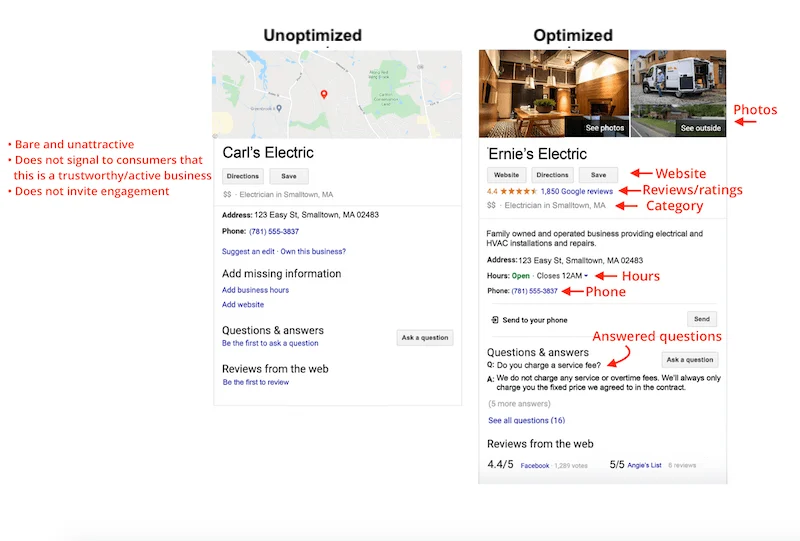
The difference between a profile description that loses customers and one that earns calls is almost always specificity. Generic language describes nothing. Specific language builds confidence.
A Reusable Google Business Profile Description Template
Use this structure as a starting point. Adapt it for your actual business.
For a service-area business: “[Business name] is a [type of business] serving [customer type] across [service area]. We specialise in [primary service], [secondary service], and [secondary service]. [Genuine differentiator such as years in business, certification, specialisation, or language]. [Optional: availability or next step such as ‘accepting new clients’ or ‘free estimates available’].”
For a professional services firm: “[Business name] is an Ottawa [profession] firm helping [client type] with [primary service area]. [Optional: second practice area]. [Differentiator]. [Practical note for prospective clients such as virtual appointments, languages offered, or client acceptance status].”
For a restaurant or storefront: “[Name] is a [cuisine/type] restaurant located in [neighbourhood]. [What it is known for]. Open [days]. [Any practical detail that helps customers decide, such as reservations, takeout availability, or parking].”
These are frameworks, not scripts. A description copied mechanically from a template without any genuine business-specific detail will read like a template. Use it as a structure, then fill it with real information about your actual business.
Should Ottawa Businesses Mention Specific Neighbourhoods?
For many Ottawa service-area businesses, mentioning one to three specific areas adds genuinely useful geographic context. A contractor who primarily serves Barrhaven and Nepean serves a different geographic market than one covering all of Ottawa and surrounding municipalities.
A reasonable approach: mention the areas where you do the most work or that most accurately describe your service footprint.
“Serving Ottawa homeowners across Kanata, Barrhaven, and Nepean” is useful.
“Serving Ottawa, Kanata, Barrhaven, Nepean, Orléans, Gloucester, Stittsville, Westboro, Centretown, Alta Vista, Manotick, Kemptville, Carleton Place…” is a geographic keyword dump that exhausts the character limit without helping any reader.
If your service area genuinely covers all of Ottawa, saying “serving homeowners and businesses across Ottawa and surrounding communities” is accurate and does not require listing every postal code. For strategies around neighbourhood-level local SEO that go beyond the description field, our guide on local SEO for Ottawa neighbourhoodscovers the fuller picture.
What NOT to Put in Your Google Business Profile Description
Promotional pricing or sales. “First-time customers receive 10% off” or “furnace tune-up for $79 this month” belongs in a Google Post, not the description. Google’s current content guidelines prohibit using the description for special promotions.
Website or phone number links. Your profile has dedicated fields for these. The description should not repeat them. Google currently does not permit links in the description field.
Keyword lists. “Ottawa plumber, plumber Ottawa, plumbing contractor Ottawa, emergency plumber Ottawa” is not a sentence and not a useful description. It does not help a customer and it violates content quality guidelines.
Every neighbourhood you serve. Choose the areas most relevant to the reader. Leave the comprehensive service area mapping to the Service Area section of your profile.
Unsupported superlatives. “Ottawa’s best,” “the #1 choice,” “award-winning” require substantiation. If you have won a legitimate award that is publicly verifiable, you can mention it specifically. Generic excellence claims add nothing.
Fabricated credentials. Never invent certifications, memberships, awards, or years in business.
Emojis or excessive formatting. Google’s guidelines refer to “low-quality content” and “distracting” material. A business description is not the place for emoji-heavy marketing copy.
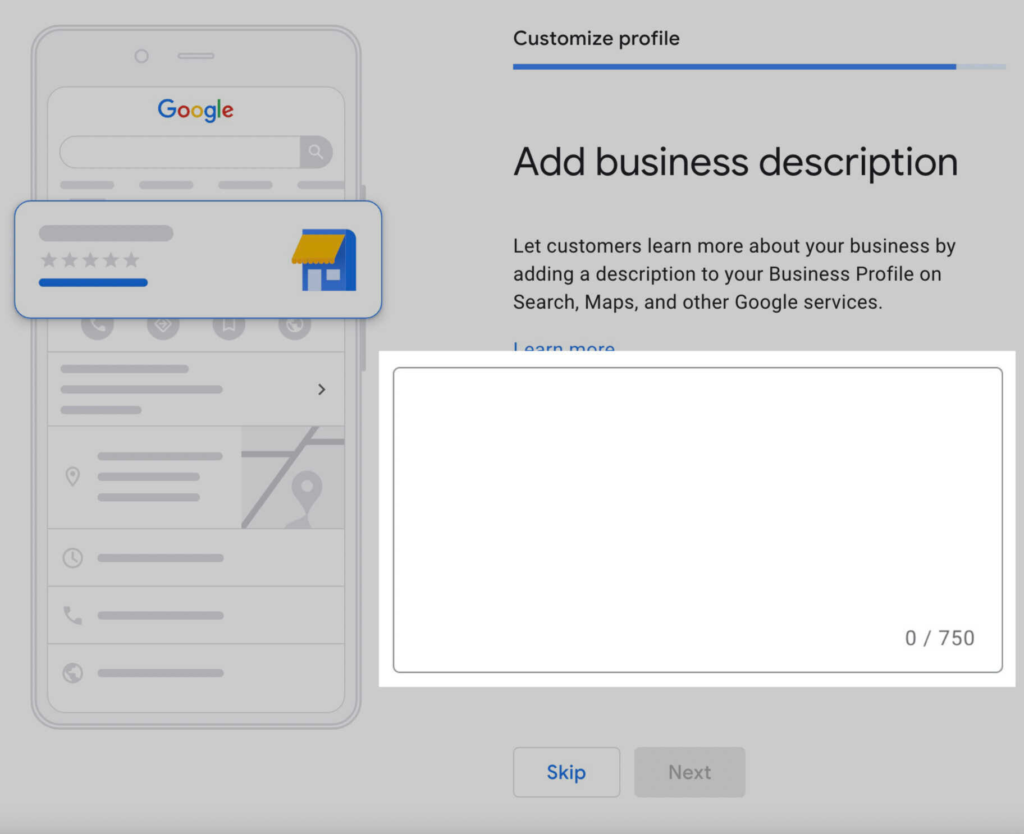
The description is one part of a complete Google Business Profile. Categories, services, reviews, photos, and accurate business information all work together to support local visibility.
How Often Should You Update Your Description?
Update it when there is a genuine reason to do so. Good reasons include:
- Your main services have changed
- Your business positioning has shifted
- Your service area has expanded or contracted
- You have opened a new location or moved
- Your team, credentials, or specialisation have changed meaningfully
- Key information in the current description is no longer accurate
There is no SEO benefit to changing your description weekly or monthly for its own sake. A stable, accurate description is more useful than one that changes constantly without substantive reason.
Note that profile edits on Google Business Profile may take time to display after submission. According to Google’s profile edit guidance, changes may take time to appear, and some edits may be reviewed before going live.
A practical approach: review your entire profile quarterly to ensure all information is current. Update the description only when the content itself warrants a change.
Your Description Is Only One Part of Google Business Profile Optimisation
Rewriting your description will not fix a weak local presence on its own. A strong Google Business Profile also needs:
- The correct primary and secondary categories (one of the most important ranking inputs)
- A complete services list with descriptions
- Accurate and current business hours
- A configured service area that reflects where you actually operate
- Regular photo uploads
- A consistent review collection process
- A linked website that supports and reinforces the profile information
- Correct and verified business information
According to Google’s local ranking documentation, complete and accurate profiles can help Google better match businesses with relevant searches. Every field matters, not just the description.
For the comprehensive view of what a well-optimised GBP looks like in 2026, our Google Business Profile optimisation guide for Ottawa businesses covers every element including the most recent platform changes. And if your profile has been suspended or restricted, our guide on what to do when your Google Business Profile is suspended covers the recovery process.
Google Business Profile Description Checklist
Use this before publishing your description.
Clarity:
- [ ] The first sentence clearly identifies what the business does
- [ ] Someone outside the industry could understand it without explanation
Services:
- [ ] Main services are represented
- [ ] Every possible service is not listed (the Services section handles that)
Location:
- [ ] Ottawa or the relevant service area is mentioned naturally where appropriate
- [ ] No neighbourhood stuffing
Differentiation:
- [ ] At least one genuine reason to choose this business is included
- [ ] Every claim can be substantiated
Google policies:
- [ ] No links
- [ ] No promotional language (sales, prices, discounts)
- [ ] No distracting or gimmicky formatting
- [ ] No fabricated credentials or awards
Conversion:
- [ ] The reader understands who the business helps
- [ ] The description creates a clear picture of what the business actually does
Final review:
- [ ] No keyword stuffing
- [ ] No filler phrases
- [ ] No spelling errors
- [ ] Information is current
- [ ] Within the 750-character limit
Frequently Asked Questions
What should I write in my Google Business Profile description?
Write a description that clearly identifies your business type, your main services, the customers you serve, where you operate, and at least one genuine reason someone might choose you. Avoid vague marketing language that could apply to any business. According to Google’s guidelines, the description should provide useful information about your services, mission, history, and what makes your business unique.
How long should a Google Business Profile description be?
Google currently allows up to 750 characters. The right length is however long it takes to clearly answer the five key questions: what you are, what you do, who you help, where you operate, and why someone might choose you. A focused 250-character description that communicates all five can outperform a padded 750-character description from a customer experience standpoint. Do not write to fill the limit.
Should I put keywords in my Google Business Profile description?
Yes, naturally. Relevant terms should appear in your description because they accurately describe what your business does. “We repair furnaces” naturally includes the word “furnace.” “We are an Ottawa plumber” naturally includes “Ottawa” and “plumber.” What you should avoid is unnatural repetition of keywords in a pattern clearly designed to manipulate rather than inform. Google’s content guidelines prohibit this, and it degrades the customer experience.
Does the Google Business Profile description affect rankings?
It is not a primary ranking factor. According to Google’s local ranking documentation, local results are primarily based on relevance, distance, and prominence. Google notes that businesses with complete and detailed profiles may be easier for Google to understand and match with relevant searches. A clear, complete description contributes to that completeness. It is one piece of a larger profile and local SEO picture, not an independent ranking lever.
Can I include my website or phone number in my Google business description?
No. Google’s current guidelines do not permit links in the business description. Your website URL and phone number have dedicated fields in your profile, which is the appropriate place for them. Using the description to repeat information that belongs in dedicated profile fields reduces the space available for genuinely useful business information.
How often should I update my Google Business Profile description?
Update it when the content warrants a change: when your services have changed, your positioning has shifted, your service area has changed, or the description contains outdated information. Changing it frequently without genuine substantive reason provides no benefit. Plan to review your entire profile periodically, such as quarterly, and update the description specifically only when something material has changed. Note that profile edits may take time to appear after submission.
Clarity Is the Goal, Not Length or Keywords
A strong Google Business Profile description does one thing well: it helps a prospective customer understand your business faster than your competitors’ descriptions do. That means being specific about what you do, who you help, where you operate, and what makes your business worth contacting.
It is not a ranking shortcut. It is not a keyword container. It is a short piece of writing that either answers a reader’s questions or doesn’t.
If you are not sure whether your Google Business Profile is actually helping customers find and choose your business, Ottawa Web Genius helps Ottawa businesses review and improve their Google Business Profile, local SEO foundations, and overall presence in local search.
Explore our local SEO services or view our pricing to understand what a proper GBP and local SEO review looks like. Or reach out directly if you want a straight assessment of where your profile stands and what it should say.